
The Latest AI-Assisted Research Tools: What is SciSpace? Top 5 Features and Pricing Plans Explained<span class="wtr-time-wrap after-title"><span class="wtr-time-number">28</span> min read</span>
In this article, I’ll introduce SciSpace, an all-in-one AI tool designed for researchers.

Finding the right paper can feel impossible, reading papers can take forever, and switching between ChatGPT, DeepL, Consensus, and other tools wastes a lot of time.
SciSpace can help address many of these problems.
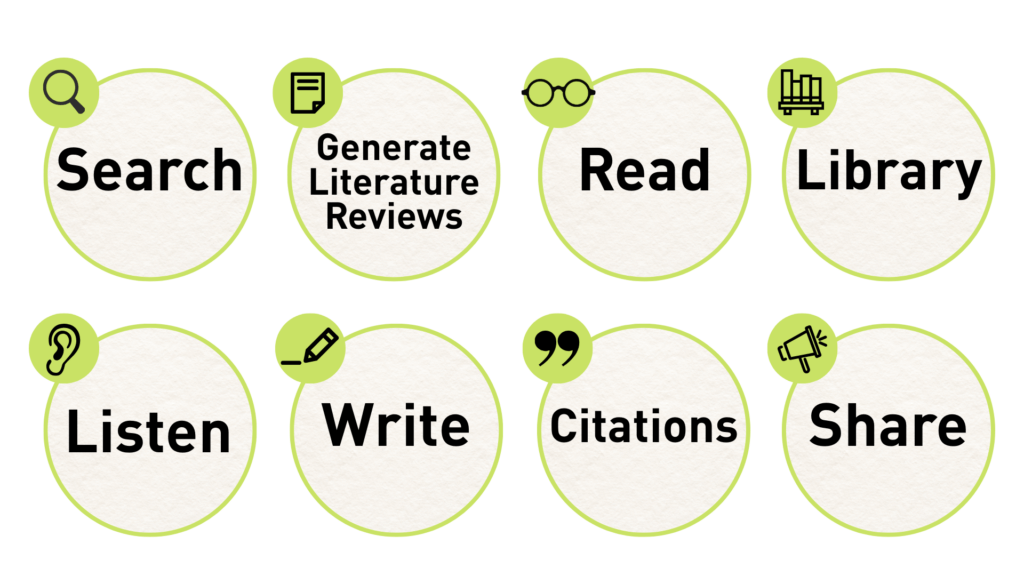
Benefits of using SciSpace
- Find the most relevant papers faster than ever
- Read papers twice as fast
- Consolidate and improve your research workflow
- Centralize your research tools in one platform
SciSpace keeps expanding what AI can do for researchers.
In February 2025, it added Deep Review: a high-end literature search function. In July 2025, it launched agent capabilities.
In this article, I’ll break down the key benefits of SciSpace in detail.
- SciSpace: 5 Key Features
- SciSpace Pricing Plans
- Comparison of the SciSpace Free Plan and Paid Plans
- How to Get Started with SciSpace
There’s one thing I need to touch on before we dive deeper into SciSpace: the output quality and usability of the Free Plan is limited, so you may prefer using a paid plan when conducting serious research.
Since SciSpace is such a powerful tool, I recommend subscribing to a paid plan (the Premium Plan starts at US$7.20 per month).
If you switch to a paid plan, make sure you use a coupon to get up to 40% off the membership fee.
| Plan | Subscription Type | Coupon Code |
|---|---|---|
| Premium Plan / Advanced Plan | Annual |
ATSAID40
40% off |
| Monthly |
ATSAID20
20% off |
SciSpace: An Overview
Key Features of SciSpace
- A unified platform for literature search, analysis, writing, and bibliography management
- High-precision literature searches (especially with Deep Review)
- Reading assistance for clarifying confusing text and interpreting visuals
- Side-by-side comparisons of saved literature in your Library
- Autonomous research agents for automated research workflows
- The AI output quality on the Free Plan is limited
- Premium Plan: from US$7.20 per month
- Advanced Plan: from US$42 per month
(Lowest price available using this site’s 40% OFF coupon)
SciSpace is recommended for researchers with the following needs:
- You want to use AI for research, but don’t want a complicated setup or complex configurations
- You’re looking for a powerful all-in-one research tool that covers everything in one platform
- You want a highly accurate, AI-powered literature search tool that expands your research questions
- You want to generate comprehensive, text-focused reviews using Deep Review
- You care about having good quality reading support and writing assistance tools
- You want to incorporate autonomous research agents into your workflow
- You are willing to pay for a high-performance tool if it delivers real value
Five Key Features of SciSpace
Let’s dive in by introducing five key features of SciSpace, presented in order of my most recommended features.
Summary of SciSpace’s Features:
Recommended SciSpace Feature 1: Literature Search Support
SciSpace offers three ways to search for papers:
- Literature Review: standard literature search
- Deep Review: high-precision literature search
- Find Topics: concept-based search
- SciSpace groups search results by concepts and extracts a summary for each cluster
Literature Search Support Feature 1: Streamlining Everyday Searches with Literature Review
Let’s start our discussion with SciSpace’s standard search mode, Literature Review.
Literature searches can easily turn into a trip down the rabbit hole:
You scroll for hours, but you can’t find the perfect paper.
At some point, you even forget what you were looking for in the first place.

It’s exhausting…
SciSpace helps you find the most relevant papers as quickly as possible.
Benefit 1: Search the literature using a research question
On the SciSpace homepage, enter the question you want to search for.
For example: “How effective is radiation therapy for early-stage (Stage I or II) lung cancer patients compared with surgery or chemotherapy?”

You can simply write your question as a sentence and include the keywords you need, making the process very straightforward.
Benefit 2: At-a-glance insights into each paper’s discussion and results
On the search results page, SciSpace automatically organizes the key points of the paper—such as insights and conclusions drawn from the article—into columns.

You can quickly grasp what experiments the authors ran and what results they reported.
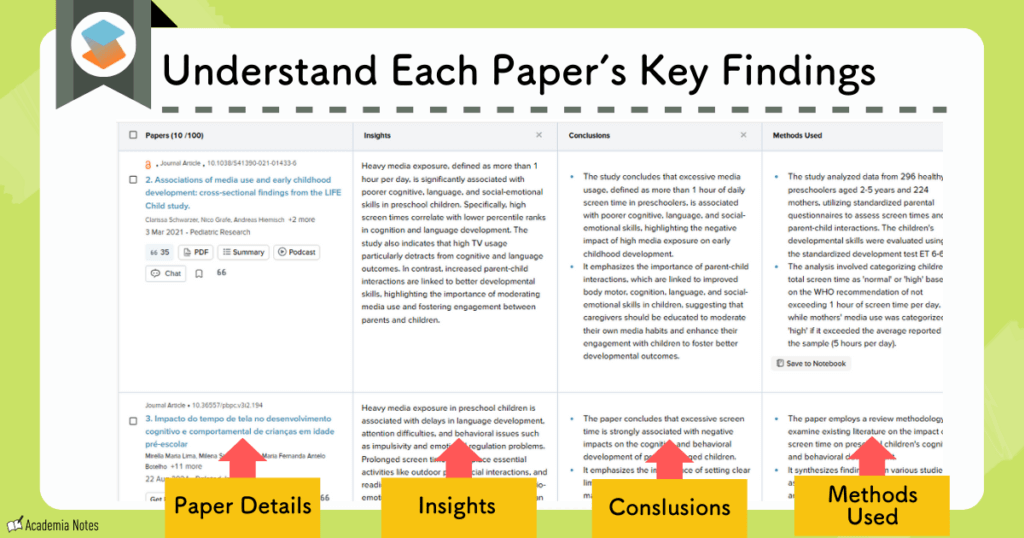
You can even edit the columns according to your preferences.
The following columns are available for customization:
- Conclusion
- Abstract summary
- Results
- Introduction summary
- Methods
- Study limitations
- You can also create custom columns
Note that the number of customizable columns differs between the Free Plan and the Premium Plan, however.
| Free Plan | Premium Plan |
|---|---|
| up to 5 columns | all 50 columns |

This column feature completely redefined how I compare papers.
With the key points of the article laid out in columns like this, the risk of wasting time reading abstracts that aren’t relevant to your research is dramatically reduced.
Literature Search Support Feature 2: Advanced Retrieval with Deep Review

In February 2025, SciSpace added Deep Review to its features, making its search capabilities even more powerful.
Deep Review improves your search in two key ways:
- Keyword optimization
- Automatic rewriting of search keywords and multiple parallel searches
These enhancements empower Deep Review to produce highly precise hits, ensuring far greater accuracy for your literature searches.
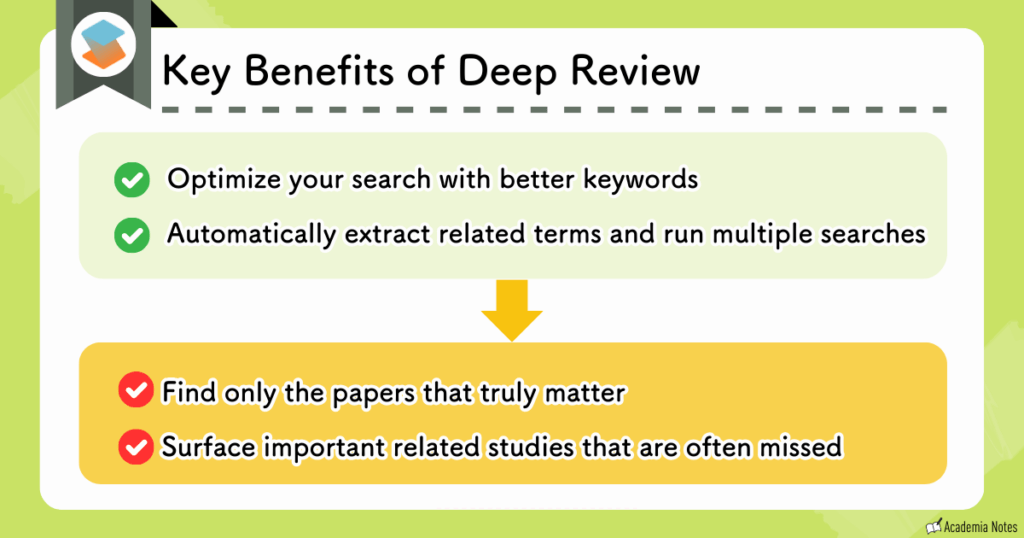
- How does SciSpace Deep Review help identify better keywords?
-
Before you run the search, Deep Review helps you refine and optimize your search keywords via a chat interface.
- What about automatic extraction and multiple searches?
-
Deep Review automatically extracts related keywords from your query and runs multiple searches simultaneously to enhance result quality.
To use Deep Review, first enter your research question.
Then, initiate a chat session with the AI to clarify your search intent.
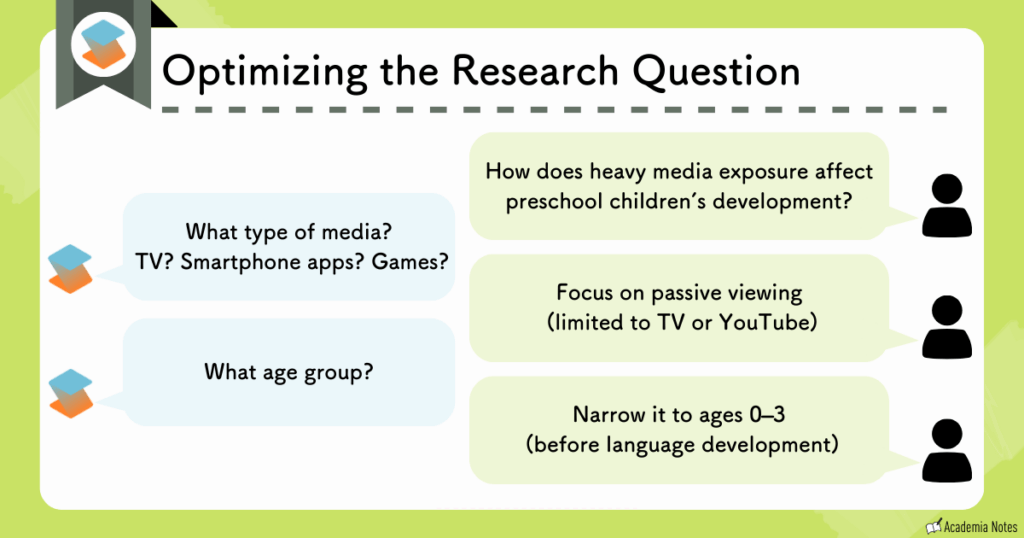
Sometimes the AI’s questions bring to light overlooked criteria or variables you hadn’t considered, leading to a deeper level of insight.
Next, the AI automatically extracts related keywords in order to broaden the search scope.
Once your search intent is clear, the AI generates related keywords.
By running multiple searches for each keyword, the overall quality of the results is greatly improved.
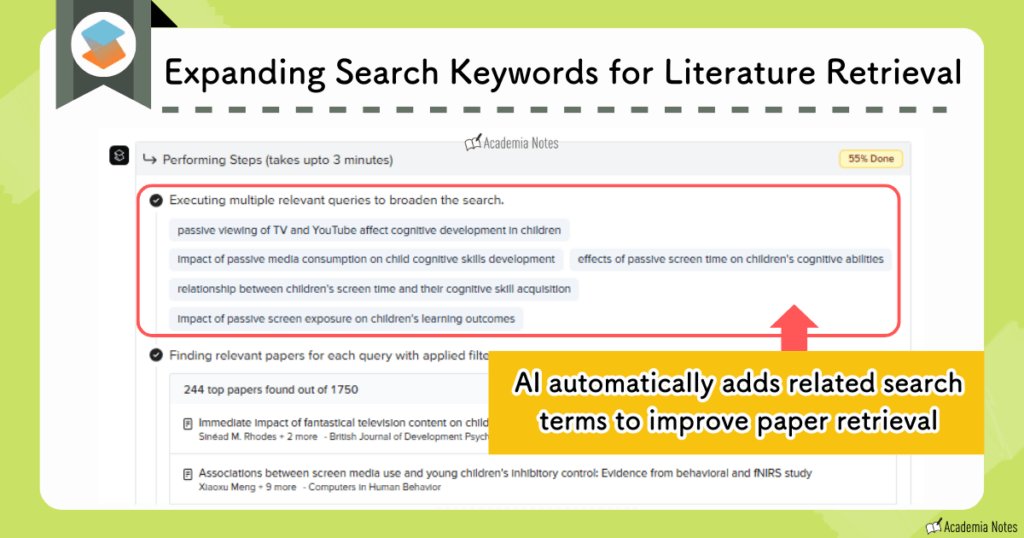
This helps prevent you from missing relevant papers due to differences in wording during your search.
The summaries generated with Deep Review are highly accurate and comprehensive. They also:
- Offer a broad search scope
- Are exceptionally comprehensive
- Cite highly relevant papers
- Provide a structured summary that covers the paper’s contents, from the introduction to the conclusion
Here’s an example of a summary generated with Deep Review:
You can also jump directly to cited references using the links on the summary page.
To use SciSpace’s Deep Review feature, you’ll need to subscribe to the highest-tier paid plan, the Advanced Plan.
Read More: Learn more about Deep Review
Literature Search Support Feature 3: Concept-Based Search with Find Topics
Find Topics is a tool you can use when you want to search for information about a general concept rather than individual papers.
This can be a bit hard to grasp at first, so I’ll walk you through an example.
In this case, I searched for information on the topic of “treatment of lower back pain.”

The output looked like this 👇.
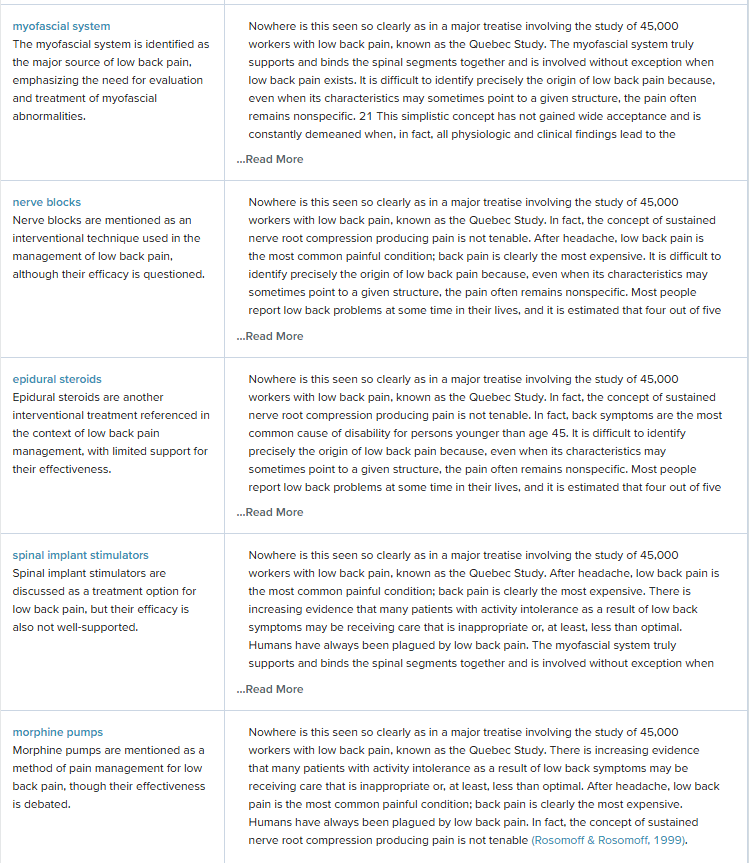
For the treatment of lower back pain, it listed a wide range of evidence-based approaches—including not only pharmacological therapy and surgery but also chiropractic care and physical therapy.
It also provided a concise summary for each approach.
Find Topics is particularly useful in the following situations:
- When writing a narrative review or a systematic review
- When exploring a new research field
That concludes the overview of SciSpace’s literature support features.
These literature search features are impressive, yet they represent only a fraction of what SciSpace can do.
I know this is getting a bit long, but the exploration of SciSpace continues on below!
SciSpace Feature 2: Reading and Comprehension Support
SciSpace is also unparalleled as a tool for reading and understanding research papers.
Its strengths in this domain can be summarized in four key points:
- Quickly find the information you need
- Ask about unfamiliar terms via chat
- Translate or summarize difficult sections into other languages
- Get explanations of figures, tables, and equations
Some common issues that arise when reading papers and often end up taking more time than expected:
1. Hunting for specific mentions
2. Toggling between tabs for translations
3. Googling jargon or terminology every two minutes
SciSpace eliminates a lot of this wasted time.
The working interface looks like this:
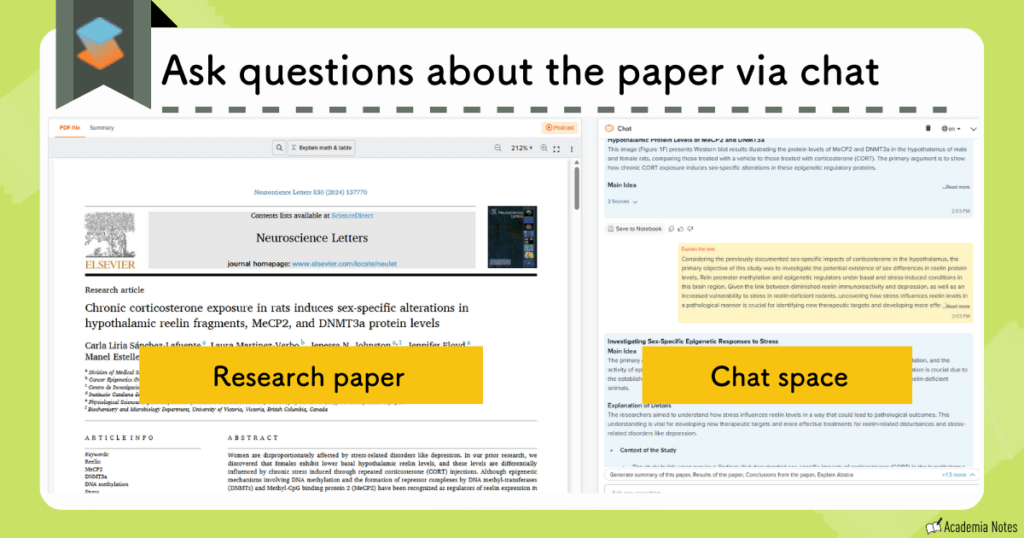
Now, let’s go through the reading support features one by one.
Reading Support Feature 1: Extract Only the Information You Need
For when you’re wondering…
“What stage of disease were the patient groups in?”
“What reagent was used in experiment X?”
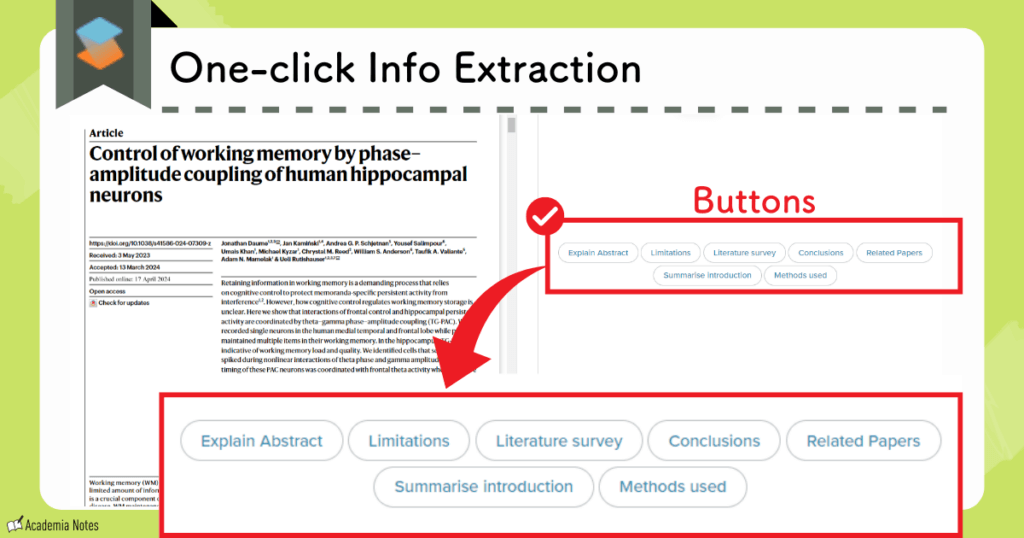
When you need only very specific information, simply type your question into the chat panel and it’ll deliver outputin as little as 10 seconds.
Or you can simply click one of the buttons provided in the chat panel for access to shorthand versions of frequently requested queries.
These include common requests, such as summaries of the research, summaries of the conclusions, and methods used in the study.
Such a thoughtful design!
Reading Support Feature 2: Querying Unfamiliar Terminology via Chat
For when you’re thinking…
“What does term X mean?”
With SciSpace, if you encounter unfamiliar term you don’t even need to leave the paper to look it up—just type your question into the chat panel.

It instantly returns reliable answers with citations.
Fewer interruptions during your literature review means:
- You can read more in less time and improve your comprehension, too
Reading Support Feature 3: Translation and Summarization of Complex Passages
For when you’re thinking…
“I have no idea what this paragraph is saying!”
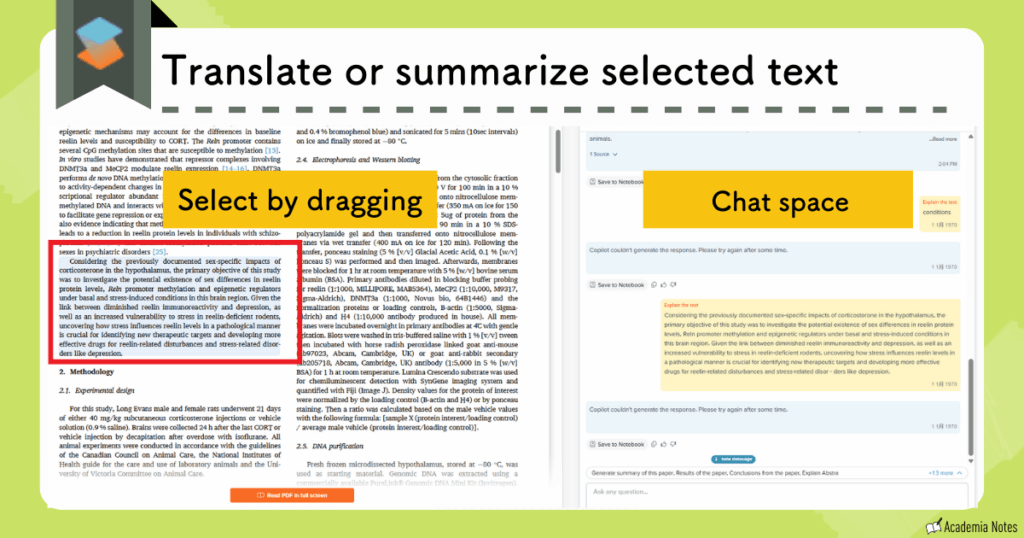
For text in another language or for dense text filled with technical terms, simply request a translation or a summary.
All you need to do is highlight the text you want translated or summarized and it’ll appear in the chat panel:
Reading Support Feature 4: Explanations of Figures, Tables, and Equations
For when you’re thinking…
“I don’t know what this table is trying to show.”
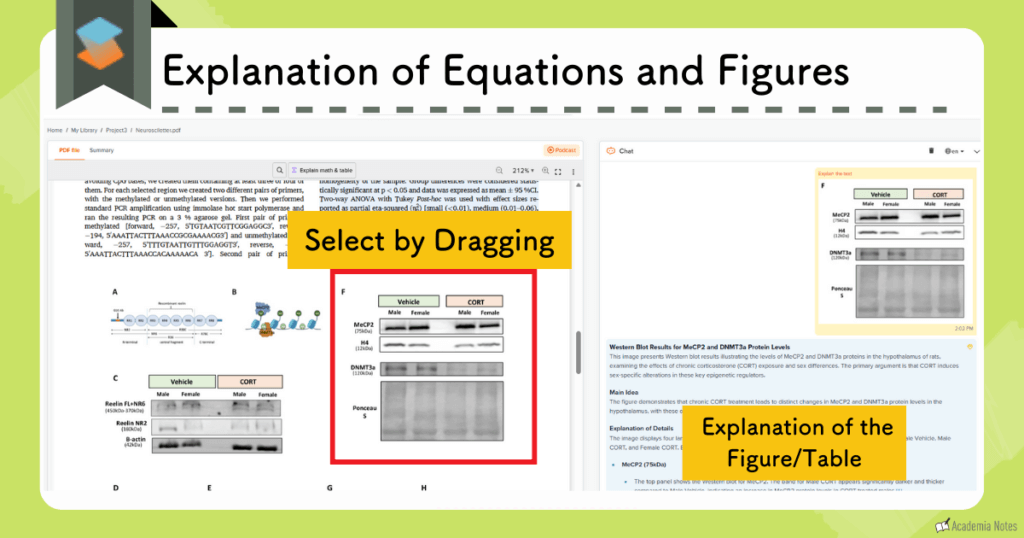
One of the most impressive features of SciSpace is its ability to explain figures, tables, and equations.
Just select the object you’re confused about and SciSpace will then provide an explanation of it in the chat panel—regardless of the format of the object.
The paid version of SciSpace offers a substantial boost in precision and reliability.
That completes our overview of SciSpace’s reading support features.
By using these tools effectively, you can potentially double your reading speed.
Unfortunately, the Free Plan has strict usage limits and limited access to lower-tier models of the AI. Therefore—to fully unlock the benefits of SciSpace—For serious research, the Premium or Advanced Plan is usually the better choice.
You can use the links provided below to access coupons for up to 40% off a paid plan:
【Premium Plan / Advanced Plan】
- Annual plan (40% off): ATSAID40
- Monthly plan (20% off): ATSAID20
Official Website: SciSpace (https://typeset.io/)
SciSpace Feature 3: Library
The SciSpace Library is also extremely easy to use.
Within the Library, the content of each paper is broken down into key elements and organized into a table.
- Understand the content of a paper at a glance
- Easily compare similar and related papers
Library Feature 1: Quickly Understand Article Content
The Library interface looks like this:
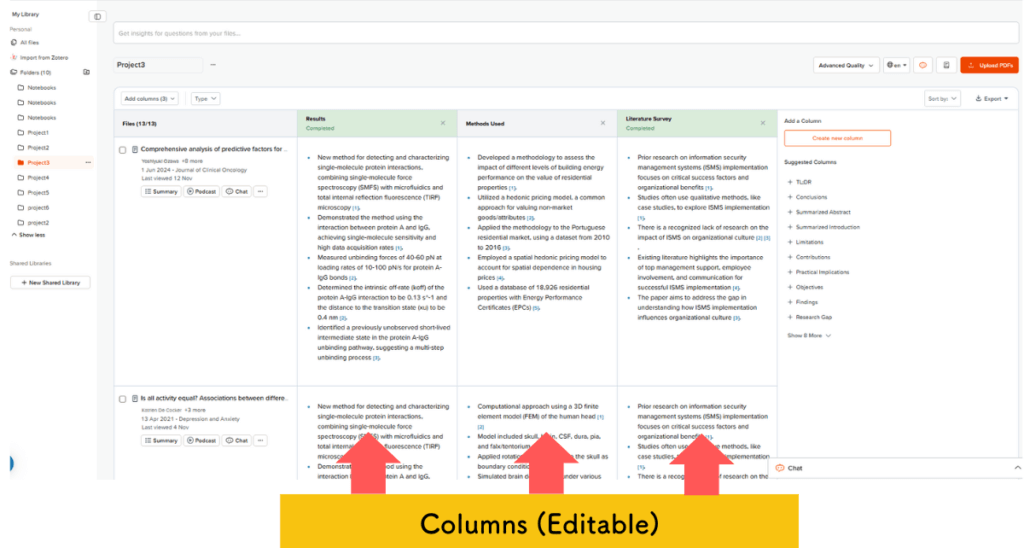
Not only is bibliographic information listed, but also results, methods, and other sections of the article are listed as individual, customizable columns.
The information displayed in the Library is customizable, and you can change what’s displayed at any time from a selection menu. Customizable library elements include:
- Conclusion
- Abstract summary
- Results
- Introduction summary
- Experimental methods
- Limitations of the study
You can also create your own custom elements based on your specific needs.
Have you ever stared at a long list of paper titles and thought, “What was this one about again?” (I know I have!)
When your papers are organized in a table like this, you can quickly grasp the content of each paper.
Library Feature 2: Compare Related Articles Side-by-Side
The Library also allows you to organize papers into folders.
An effective way to use this system is to group papers you want to compare against one another in the same folder.
For example, you might create a folder titled “Papers Referenced for Experimental Methods.”
This makes it much easier to compare related papers.
SciSpace Feature 4: Writing Support
- AI Writer
- Paraphraser
- Citation Generator
Writing Support Feature 1: AI Writer
The AI Writer is a feature designed to support the creation of research documents.
You write your text directly within SciSpace, as shown in the image below.
How Writing Works in SciSpace
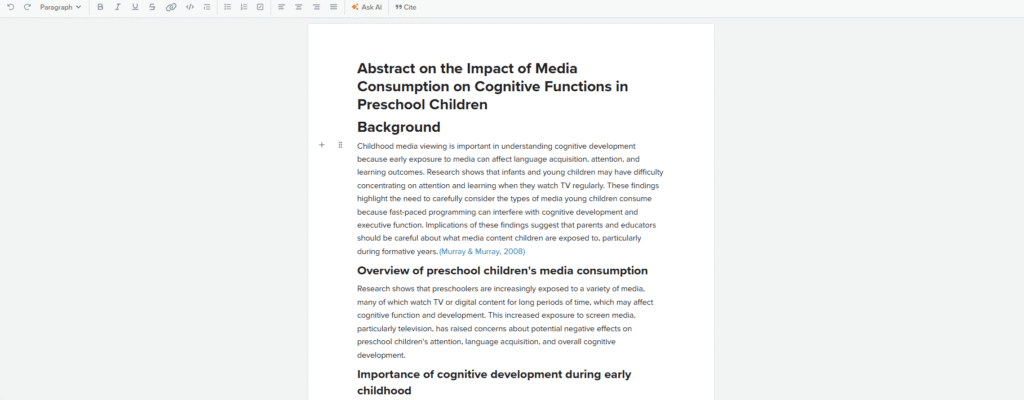
Here’s a brief overview of the writing workflow in SciSpace.
You aren’t required to use a template, but five templates are available to SciSpace users:
- Research Proposal
- Literature Review
- Abstract Writing
- Thesis Statement
- Essay Writing
Let’s select ‘Literature Review.’
When using the Literature Review template, start by entering a rough overview of the topic you want to write about.
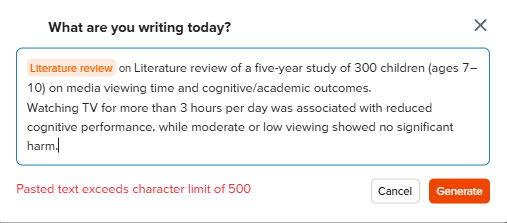
SciSpace then generates a structured draft based on your input:
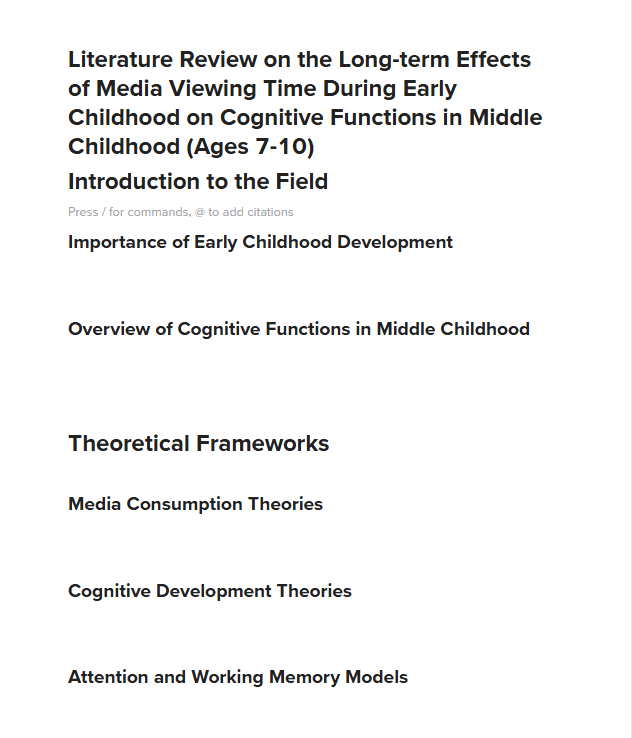
From here, you can continue working on your manuscript.
SciSpace automatically suggests the next sentence based on where your cursor is placed.
This is especially helpful when you get writer’s block!
Of course, if the suggestions don’t quite hit the mark, you can simply ignore them and continue writing on your own.
The Ask AI feature allows you to instantly transform your writing style and tone by selecting text and choosing from several rewrite modes.
Examples of Practical Use:
- Translating Japanese text into English.
- Rewriting your own text into text with a more academic tone.
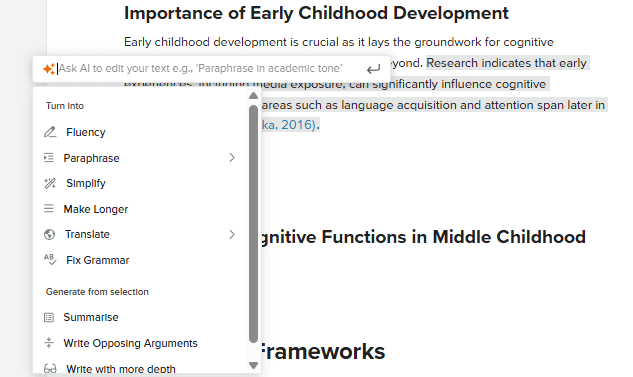
Available rewrite options include the following:
- Fluency
- Paraphrase
- Simplify
- Make Longer
- Translate
- Fix Grammar
You can rewrite text with a single click!
The Academic setting within Paraphrase mode automatically refines your language to be more suitable for research papers.
Because the tool also corrects grammar, users could potentially complete a paper using SciSpace support alone.
You can even insert citations with a single click, all without ever leaving the SciSpace platform.
You can insert citations in the following ways:
- Select from your Library
- Create citations manually
- Use citation candidates suggested by SciSpace
As shown in the image below, the citation candidates are suggested based on the context of your paper:
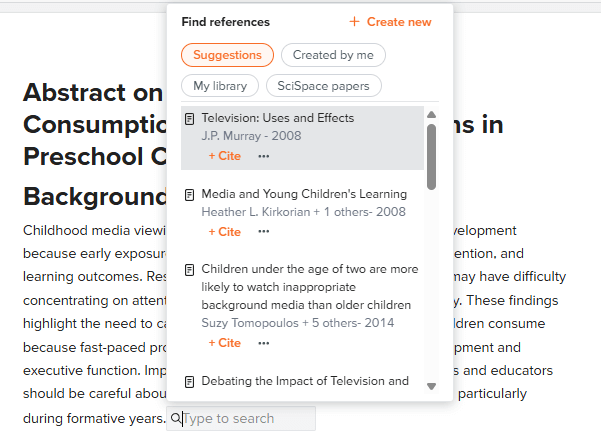
Ideally, you should choose citations from your curated library for the best results. The AI-suggested citations are best used as a starting point or for quick reference.
Actual screenshot of the interface
In-text example 👇
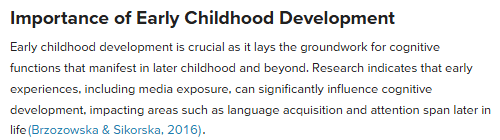
Reference list at the end of the document 👇
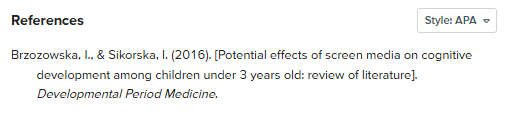
You can change the citation style with a single click using the drop-down menu in the upper right.
This concludes our overview of AI Writer.
While there is a slight learning curve, the boost in productivity makes it well worth the initial effort.
While there are many standalone AI writing tools, AI Writer is just one piece of a the start-to-finish research workflow provided by SciSpace.
Acting as an all-in-one workstation that replaces multiple subscriptions, SciSpace offers incredible value for money.
If you want a writing-focused AI tool that also includes pre-submission checks and plagiarism detection, Paperpal is another option I recommend.
Read More: https://www.academianote.site/en/paperpal/
The Paraphraser and Citation Generator are also available as standalone tools within SciSpace’s platform.
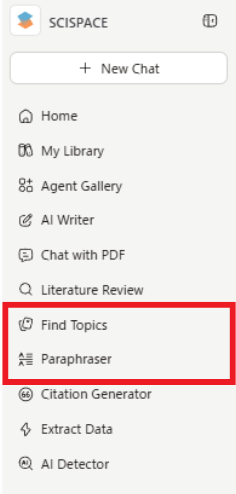
The following is a brief introduction to these features.
Writing Support Feature 2: Paraphrasing Tool
The Paraphraser rewrites English text to match your intended use by allowing you to select different modes.
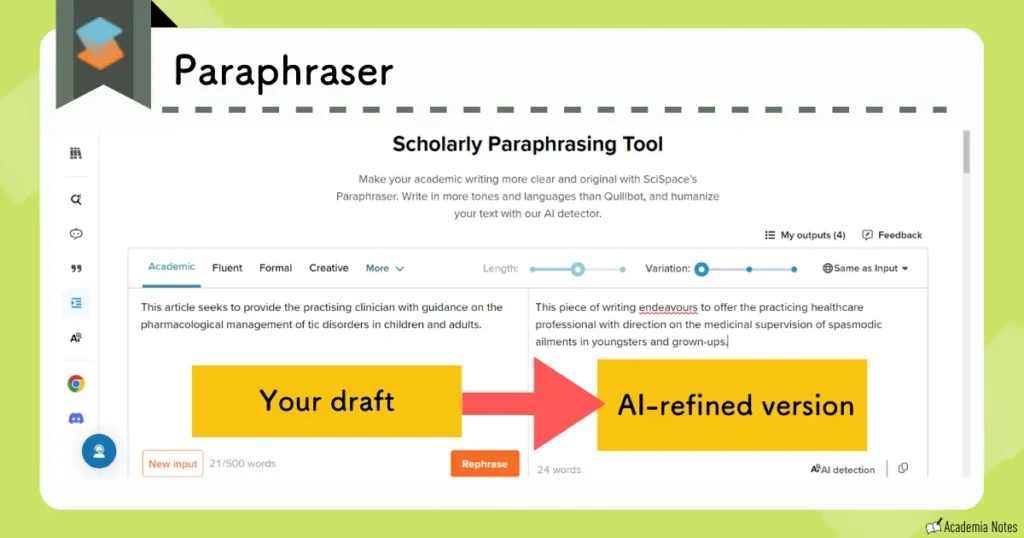
For non-native speakers of English, for example, capturing the subtle nuances of academic English can be incredibly challenging. This is where SciSpace’s Paraphraser really shines.
Available paraphrasing modes include the following:
- Academic
- Fluent
- Formal
- Creative
Many other modes are also available.

If you’re ever unsure about the flow of your writing, give the Paraphraser a try!
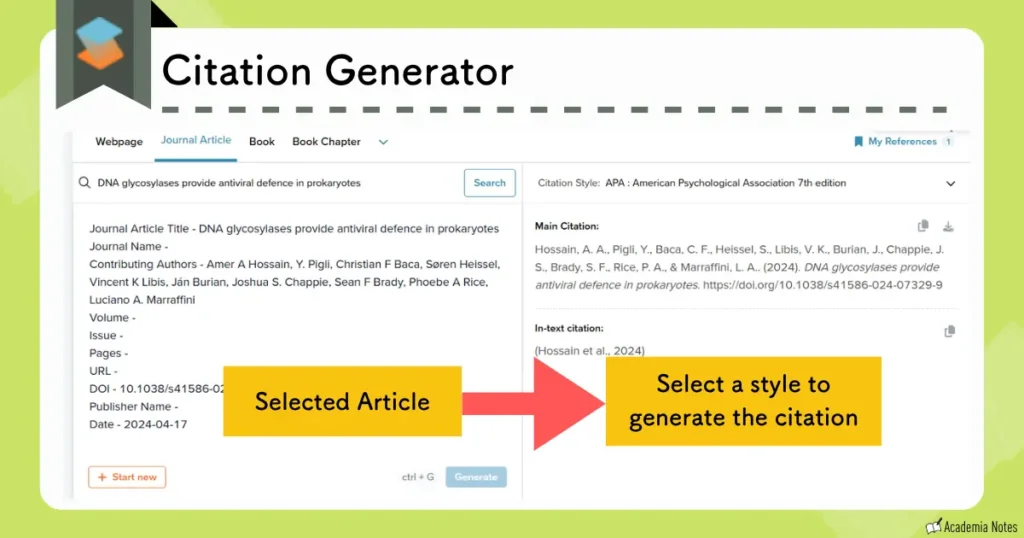
Writing Support Feature 3: Citation Generation
SciSpace also includes a citation generation feature.
Once you find your reference and choose a citation style, SciSpace handles the rest—generating accurate citations formatted exactly how you need them.
SciSpace Feature 5: Generating Presentations from Research PDFs
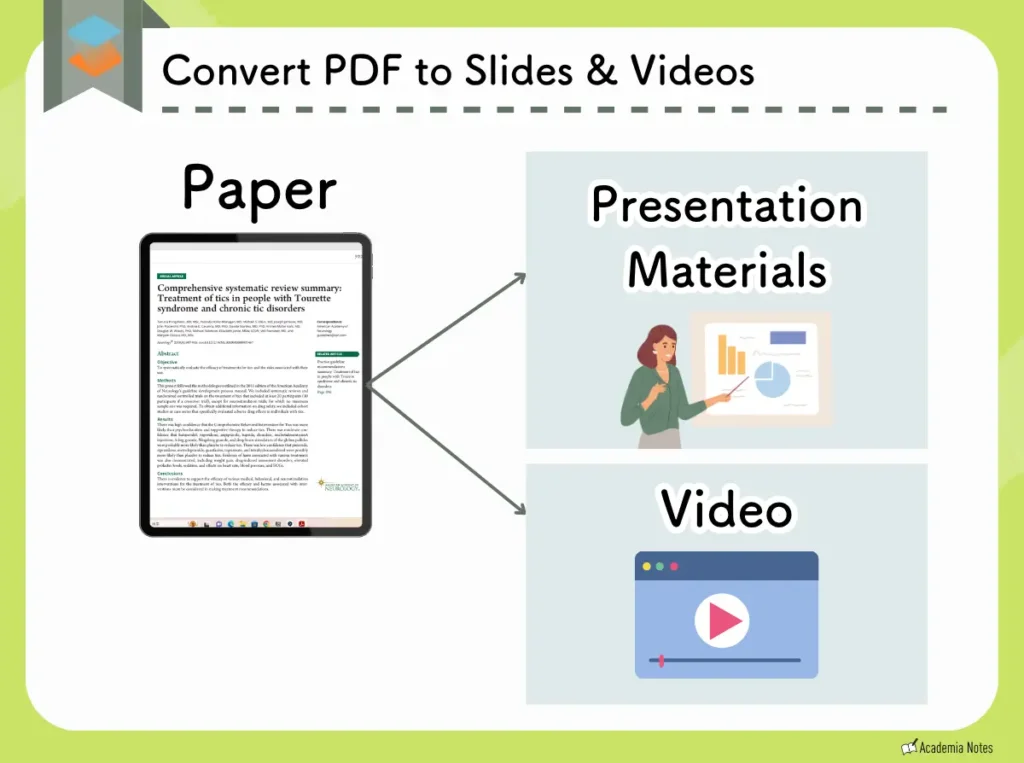
Last but not least, let’s take a look at the feature that turns a research PDF into a ready-to-use presentation.
- Slides
- Short videos with narration
Presentation Output 1: Short Video with Narration
Short video content is ideal for social media promotion. With automated narration and high-quality text-to-speech, a complete video can be produced in as little as five minutes.
An example of a video generated using this feature is available to view below (click to play).
Presentation Output 2: Slide Generation
Slides can be automatically generated from PDFs, and this feature even prepares a full script for your presentation.
An example of presentation slides generated using this feature is available below (click to play).
The panel on the right contains the presentation script.
Unfortunately, these slides cannot be exported to PowerPoint or other external software at this time.
The slide generation feature is incredibly handy for giving a quick overview of a paper during lab meetings or informal study sessions.
Even if you plan to make your own slides, it’s a helpful way to get inspiration for layout and key bullet points.
Official Website: SciSpace (https://typeset.io/).
We’ve now covered five essential features of SciSpace.
Perhaps the biggest advantage is that SciSpace centralizes your entire research workflow into a single platform.
It’s the ultimate, all-in-one toolkit for researchers.
Summary of SciSpace Features:
- Literature research support (Deep Review)
- Reading support
- Library
- Writing support
- Generation of presentations from PDFs
SciSpace Pricing Plans
SciSpace offers 3 different plans to individual users:
- Premium
- With a promo code, the monthly price is $7.20
- Advanced
- With a promo code, the monthly price is $42
- Max
- With a promo code, the monthly price is $104
Simple Pricing Plan Comparison
| Premium | Advanced | Max | |
|---|---|---|---|
| Price | From $7.20/mo | From $42/mo | From $104/mo |
| AI models | ○Pro model | ○Pro + Expert models | |
| Literature search | ○Unlimited | ||
| Paper reading | ○Unlimited | ||
| AI Writer | ○Included | ||
| Deep Research & SLR | ○ | ||
| Monthly usage | 1,200 credits | Unlimited | |
| Parallel chats | Up to 4 | Up to 8 | Up to 16 |
Prices shown apply only when using our coupon code.
For the Enterprise plan, please apply via our contact page.
Last updated: October 2026
The key takeaways here are:
- You can use most features with the Free Plan, but the output quality is lower and usage is limited
- If you want to use Deep Review, you need the Advanced Plan
- Credits are available with all plans
In my opinion, daily use of SciSpace requires more than what the Free Plan offers, and it’s a powerful tool that justifies the cost.
If your priority is Deep Review, the Advanced Plan is your best option, despite being a bit pricier.
Also, there are coupons available for 20% to 40% off on all plans, so make sure to use them!
| Plan | Subscription Type | Coupon Code |
|---|---|---|
| Premium Plan / Advanced Plan | Annual |
ATSAID40
(40% off) |
| Monthly |
ATSAID20
(20% off) |
Paid Plan Pricing
You can choose annual or monthly billing — the annual plan is clearly the better deal.
| Plan | Monthly (before → after discount) | Promo code |
|---|---|---|
| Premium | $12/mo→$7.20/mo | ATSAID40 (40% OFF) |
| Advanced | $70/mo→$42/mo | |
| Max | $160/mo→$104/mo | AONOTE35 (35% OFF) |
| Premium | $20/mo→$16/mo | ATSAID20 (20% OFF) |
| Advanced | $90/mo→$72/mo | |
| Max | $200/mo→$130/mo | AONOTE35 (35% OFF) |
Show notes (2)
- Prices are in USD.
- Japanese credit cards and Google Pay are accepted.
For full pricing, see the official site.
Last updated: October 2026
Differences Between the Free Plan and the Paid Plans
If you plan to use SciSpace on a regular basis, I recommend the Premium Plan.
- Limitations on AI chat usage
- AI performance
- Number of columns of information in search results
I recommend starting with the Free Plan to get a feel for the interface. It’s a good way to see if SciSpace fits your research style before committing to a Paid Plan.
Chat Usage Limits
| Free Plan | Premium Plan |
|---|---|
| Limited | No usage limit |
Usage limits are not clearly stated on the official website , but the usage cap for the Free Plan is reached very quickly. Once you’ve reached your limit, you’ll have to wait a while before the tools become available again.

It’s best to think of the Free Plan as a ‘trial version’ rather than a long-term solution.
AI Performance Levels
| Free Plan | Premium Plan |
|---|---|
| High Quality mode not available | High Quality mode available |
High Quality mode is essential if you want to read and understand challenging papers, but it’s not available for use in the literature search or AI chat options in the Free Plan.
With High Quality mode, you’ll see clear differences in quality in:
- Summaries generated through literature search
- Tables generated through literature search
- Text generated by the AI Writer or the Paraphraser

To be honest, the output quality of the Free Plan isn’t quite up to par for professional use.
Number of Table Columns in Literature Search and Library
While the Free Plan tier restricts you to five columns of information you can view in your search results, the Premium Plan allows for up to fifty.
This massive expansion lets you to simultaneously compare dozens of articles side-by-side.
| Free Plan | Premium Plan |
|---|---|
| Up to 5 columns | All 50 columns |
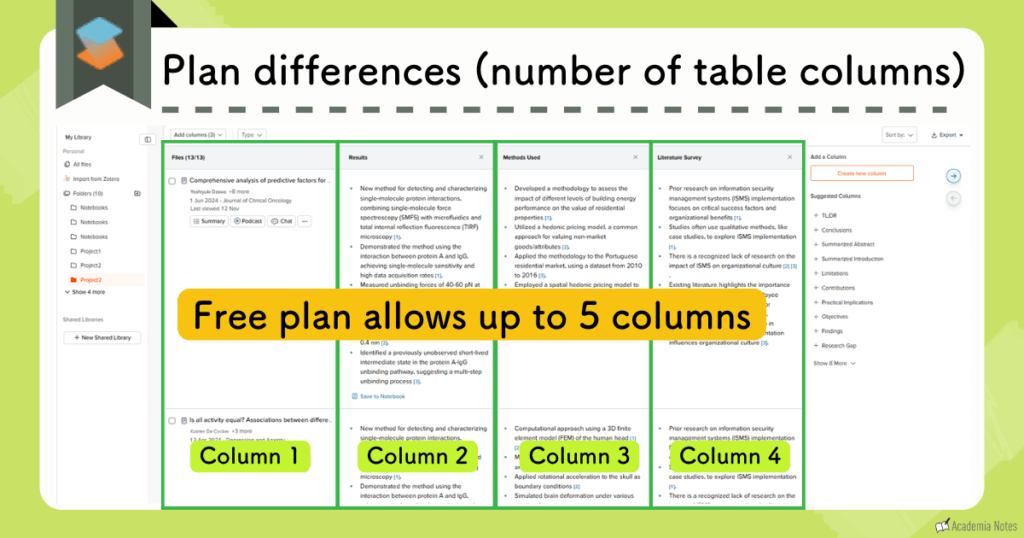
Some additional columns you can add include:
- Conclusion
- Abstract summary
- Results
- Introduction summary
- Methods
- Study limitations and related considerations
(Custom fields can also be created and applied as needed)
Conclusion: If you plan to use SciSpace regularly, I highly recommend the Premium Plan.
Additional Benefits of SciSpace
Here are a few more SciSpace features that I think you’ll find useful:
- Multilingual support
- Compatibility with the Google Chrome extension
- Integration with Zotero
Multilingual Support
You can set your native language as the default language in the Copilot settings. This way, the Copilot always greets and assists you in that language when:
- Viewing literature search results
- Extracting information from PDFs
- Using the AI chat feature
- Viewing the Library
The AI generates natural-sounding language, which really helps to speed up the workflow.
Enhanced Productivity with the Google Chrome Extension
SciSpace is also available as a Google Chrome extension.
You can access the SciSpace chat on the right-hand side of a given webpage, even when you are viewing pages outside of the platform.
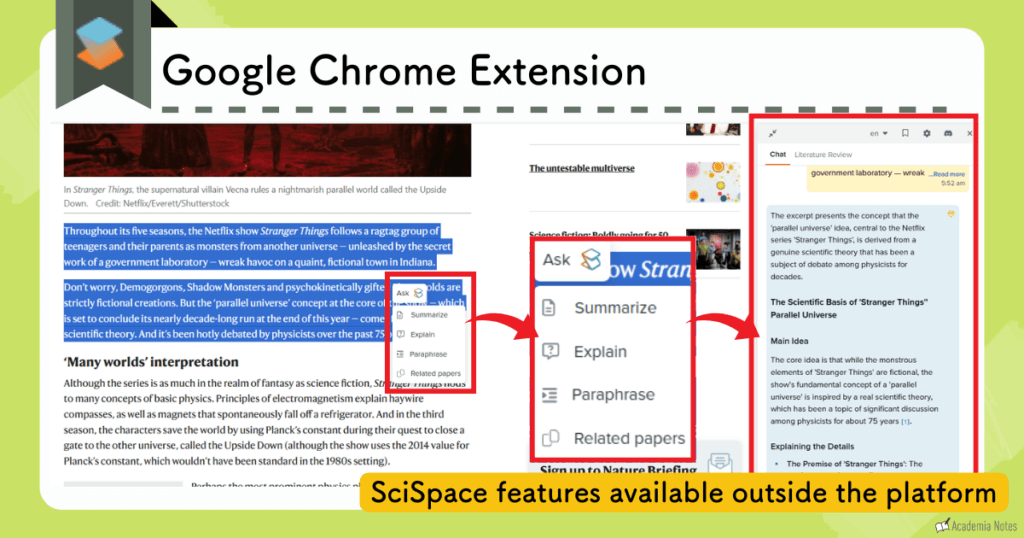
It’s very convenient!
Workflow Optimization Through Integration with Zotero
Another great feature is that SciSpace integrates seamlessly with Zotero. This allows you to:
- Upload papers you want to read directly from Zotero
- Download papers you want to save from SciSpace directly to Zotero
Not having to move PDFs around is a big help!
Limitations of SciSpace
The Need to Subscribe to a Paid Plan
SciSpace is an excellent tool for scholarly research. However, a huge drawback is that the Free Plan has strict usage limits and lower quality performance, making it effectively usable unless you subscribe to a paid plan.
Since you essentially need a paid plan for SciSpace to be worth using, this is definitely a downside.
That said, if you use a 40% off coupon you can subscribe for around US$7.20 per month (coupon details are listed below).
| Plan | Subscription Type | Coupon Code |
|---|---|---|
| Premium Plan / Advanced Plan | Annual |
ATSAID40
(40% off) |
| Monthly |
ATSAID20
(20% off) |
Official Website: SciSpace (https://typeset.io/)
Getting Started with SciSpace
There are two ways to get started with SciSpace.
- Sign in with Google
- Create an account
- Sign up by entering:
- Your name
- Your email address
- A password
- Sign up by entering:
How to Upgrade SciSpace
Official Website: SciSpace (https://typeset.io/)
The annual plan is usually cheaper overall than the monthly pricing.
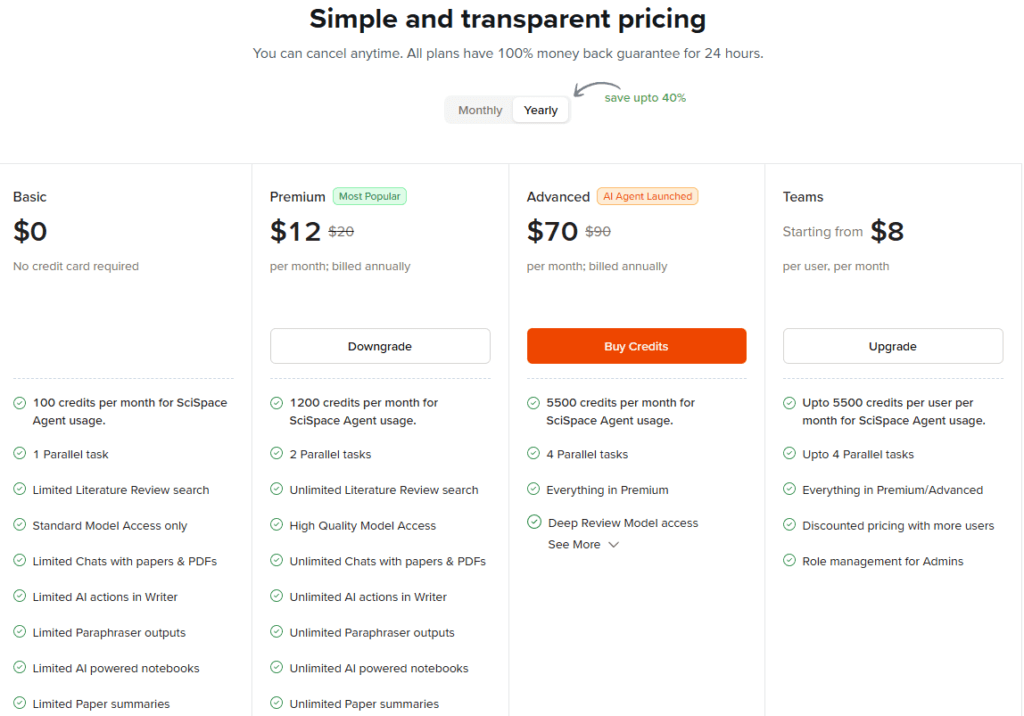
| Plan | Subscription Type | Coupon Code |
|---|---|---|
| Premium Plan / Advanced Plan | Annual |
ATSAID40
(40% off) |
| Monthly |
ATSAID20
(20% off) |
Enter the discount code into the area highlighted in red, then verify that the total amount has changed before checking out.
If you choose the annual Premium Plan, you’ll get a US$57.60 discount, bringing the total down to just $86.40 per year.
At only $7.20 a month, this is the most cost-effective way to access all the Premium Plan features.
You can use Google Pay or a credit card to pay for your purchase.
Frequently Asked Questions About SciSpace
Final Summary of SciSpace
SciSpace is a very useful tool for researchers in their everyday work.
By effectively integrating AI into your workflow, you can reach new heights of productivity in your research.
If you’d like to learn more about SciSpace Deep Review in detail, feel free to check out the article below.
User Guide: Learn more about Deep Review
Key Features of SciSpace
- A unified platform for literature search, analysis, writing, and bibliography management
- High-precision literature searches (especially with Deep Review)
- Reading assistance for clarifying confusing text and interpreting visuals
- Side-by-side comparisons of saved literature in your Library
- Autonomous research agents for automated research workflows
- The AI output quality on the Free Plan is limited
- Premium Plan: from US$7.20 per month
- Advanced Plan: from US$42 per month
(Lowest price available using this site’s 40% OFF coupon)
Start by trying the Free Plan!
Official Website: SciSpace (https://typeset.io/)