
Streamline Your Research with Paperguide: Features and Pricing Explained by a Researcher in the Field<span class="wtr-time-wrap after-title"><span class="wtr-time-number">24</span> min read</span>
Paperguide is an all-in-one AI tool specifically designed for academic research, and in this article I’ll introduce what it can offer to researchers like us.

The new Deep Research feature was recently added, making Paperguide’s literature search capabilities even more robust.

Its literature-search performance is on par with the highest-tier plan offered by SciSpace.
Despite its extensive capabilities, it’s priced surprisingly affordably—arguably one of the best cost-performance options available.
If you’ve ever found yourself thinking…
“I can’t find the papers I need.”
“Writing takes too much time.”
“I’m constantly going back and forth between ChatGPT, DeepL, and Paperpile… This workflow is so inefficient!”
…then you might find Paperguide useful. Paperguide brings all your essential research features into a single platform, allowing you to streamline the entire research process.
Let’s explore how Paperguide can help you tackle these challenges.
- Locate the most relevant papers quickly
- Generate high-quality reviews
- Handle writing, citation management, and plagiarism checking with Paperguide alone
- It’s an all-in-one platform that supports everything from literature searches to reading support

The entire workflow becomes dramatically more efficient with Paperguide.
One of Paperguide’s biggest advantages is that every feature is available at full performance even on the Free Plan.
The free version does have usage limits, though, so you may want to upgrade depending on how often you use it.
With the coupon available from AcademiaNote, paid plans start at $7.20 per month.
How to Use the 20% off Coupon
Official Website: Paperguide (https://paperguide.ai/)
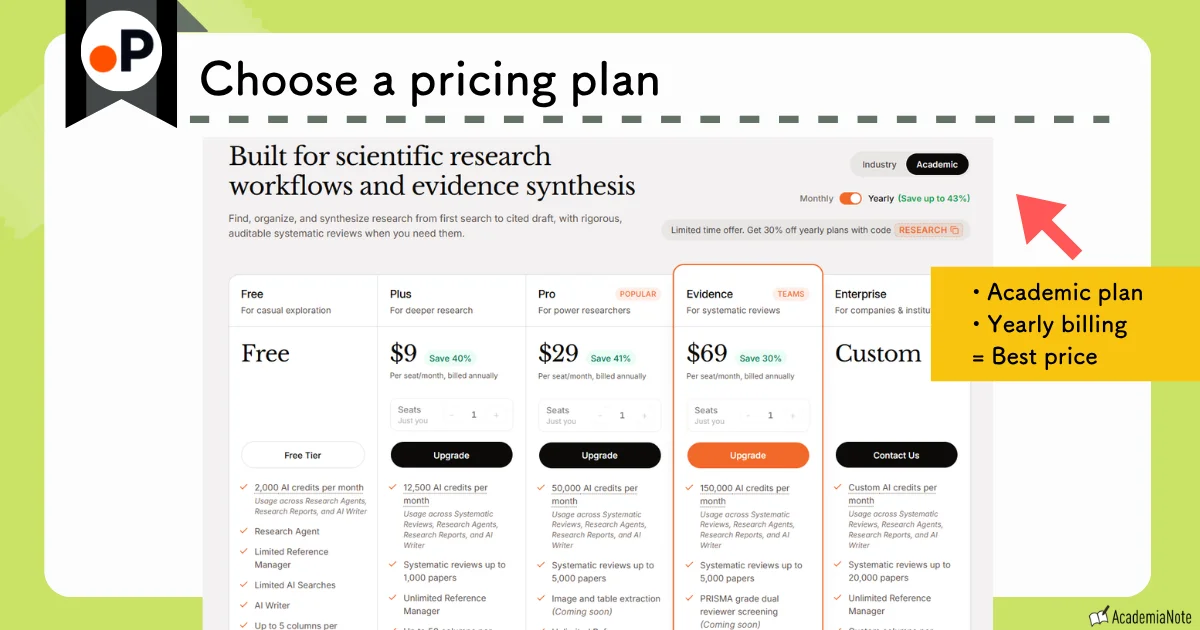
Annual plans offer a lower overall price in the long run.
Enter the coupon code (listed below) on the payment screen.
Payment can be made by credit card.
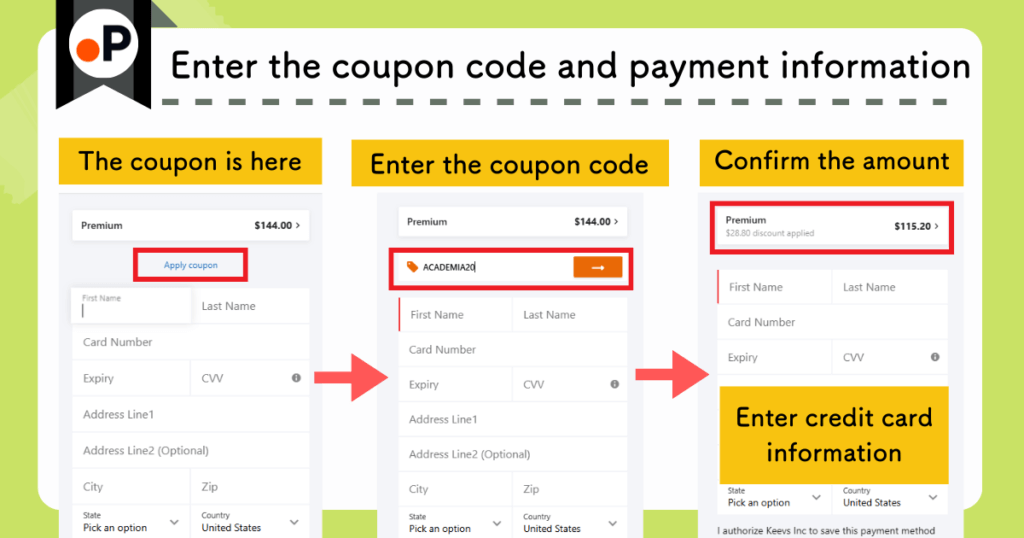
Once your payment is processed, you can immediately start using all of Paperguide’s paid features.
In this article, I provide a detailed, illustrated overview of Paperguide‘s features and how to use them.
Click a topic to jump to a specific section:
Official Website: Paperguide (https://paperguide.ai/)
What Is Paperguide?
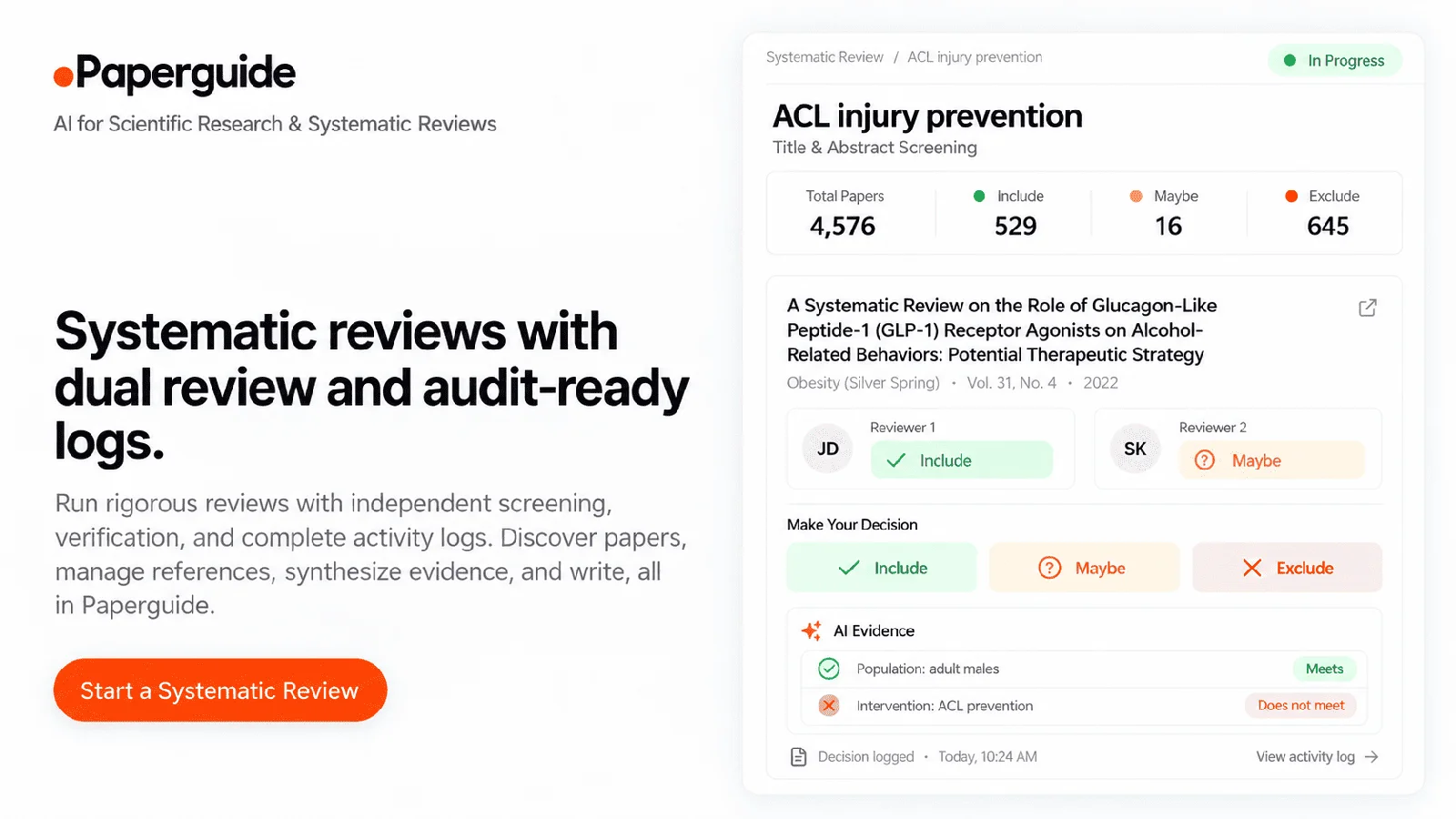
Paperguide is an all-in-one AI tool built specifically for researchers.
Key Features of Paperguide
- From literature search to reading support, drafting, and citation generation—everything happens in one place.
- Highly accurate literature searches via Paperguide’s Deep Research feature
- AI-generated literature reviews with customizable screening criteria
- Writing support with an AI-powered academic writing feature
- Reading assistance that can help you understand unclear sections, figures, and tables in papers
The Free Plan imposes usage limits, however, so frequent users may want to upgrade to a paid plan.
- Plus Plan: from US$7.20 per month
- Pro Plan: from US$23.20 per month
20% off coupon available from AcademiaNote:
ACADEMIA20
Four Key Features of Paperguide

Now I’ll introduce the four key features of Paperguide.
Paperguide Feature 1: Literature Search Tools
Finding papers can often feel overwhelming, prompting thoughts such as:
“I can’t find relevant papers, even though it feels like I’ve been scrolling for hours.”
“I’m starting to forget what I was looking for in the first place…”
With Paperguide, you can find the most relevant papers faster and with far less effort.
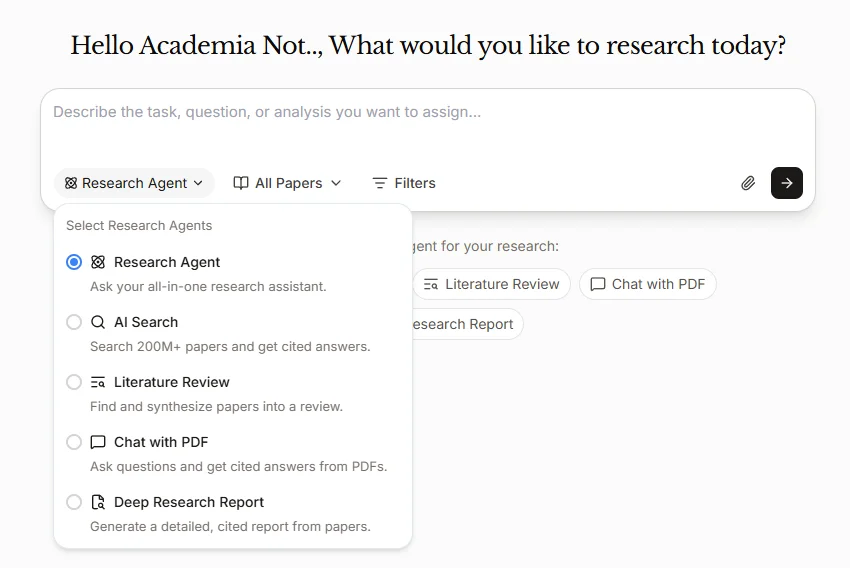
Paperguide offers three different ways to search the literature:
- AI Search for quickly grasping the overall landscape of the field
- Literature Review for finding papers through literature review generation
- Deep Research for highly accurate literature searches and automated report generation
Search Support 1: Get an Instant Overview of Any Topic with AI Search
AI Search is useful when you want a quick, high-level overview of a topic: just type in your research question and the AI will automatically explore it.
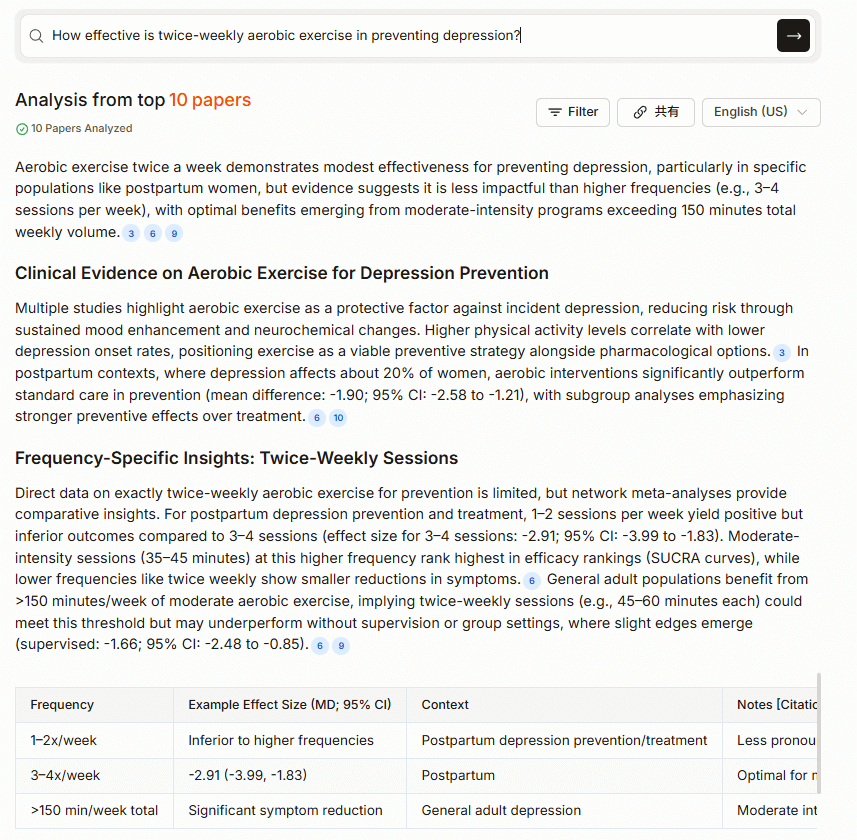
Start by entering your research question on the Paperguide home page.
Example: How effective is twice-weekly aerobic exercise in preventing depression?
Paperguide instantly generates a concise report that summarizes the relevant key points found in the literature.
The generated report is based on an analysis of the top ten most relevant papers:
Below that is a list of papers cited in this report:
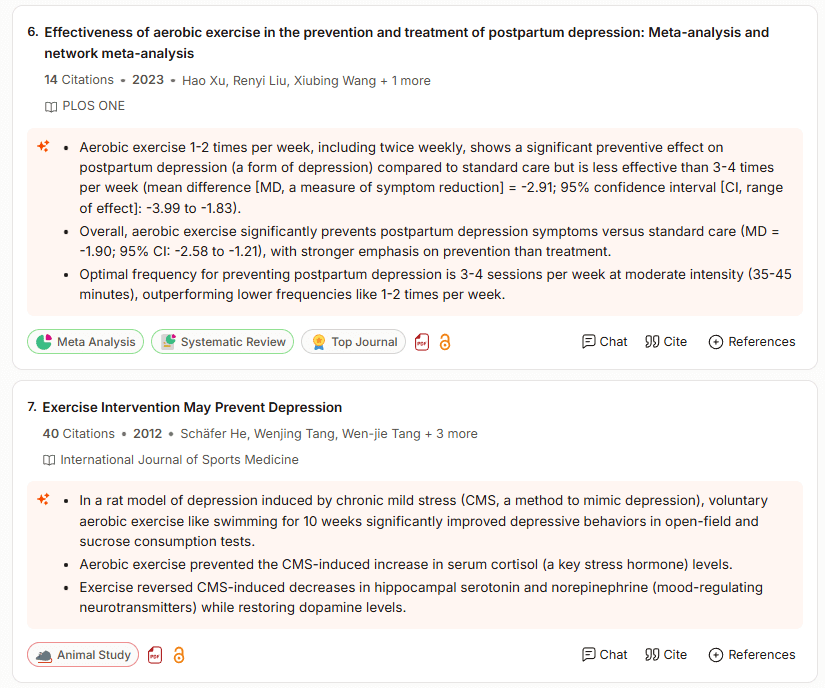
The summary and labels for each paper are very easy to read.
AI Search is an extremely useful tool for resolving your research questions quickly and efficiently.
Search Support 2: Discover Relevant Papers with Literature Review
Literature Review is ideal when your goal is to locate key papers related to your research question.
To summarize the difference between Paperguide‘s AI Search and Literature Review search functions:
| AI Search | Literature Review |
|---|---|
| When you want to grasp the overall landscape of the field in regard to your research question | When you want to find papers related to your research question |
The difference comes down to whether you want to understand the existing evidence or you want to locate the papers themselves.
Just like AI Search, Literature Review outputs a summary derived from the top ten most relevant papers.
Here’s where Literature Review differs from AI Search 👇
In the results view, the study’s methods, conclusions, and key points are automatically organized into a table.

You can see what kind of experiment was conducted and what results were obtained at a glance.
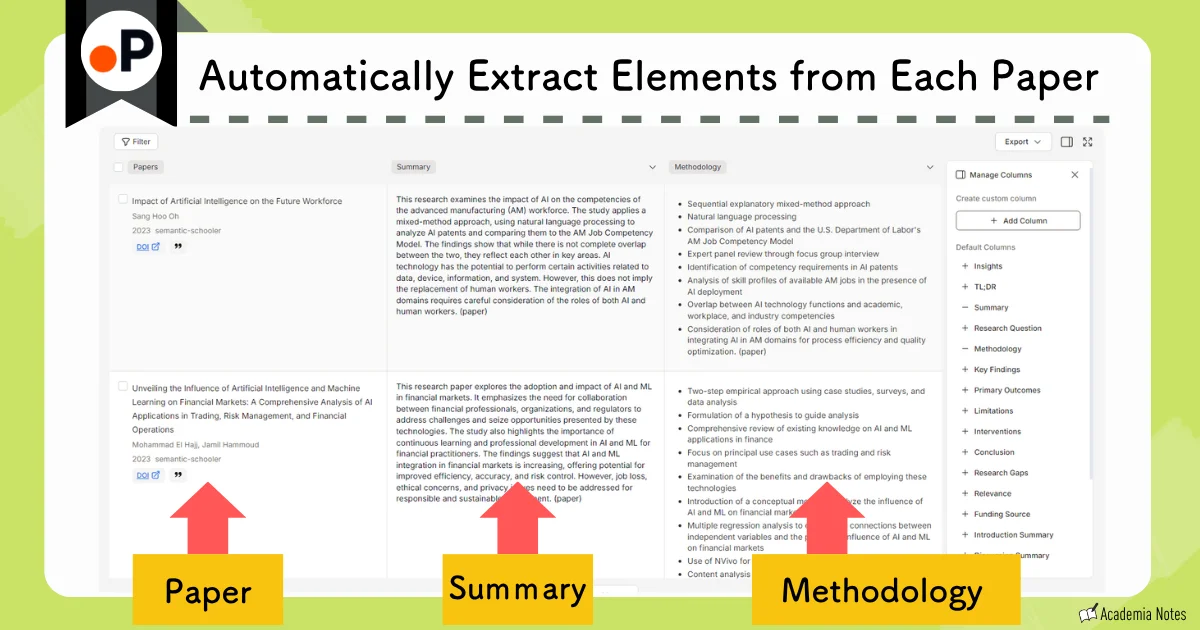
You can freely edit the columns in the table, too.
For example, you can include:
- Conclusion
- Abstract Summary
- Results
- Introduction Summary
- Methodology
- Research Limitations, etc.
(You can also create your own custom columns)
This table function is truly groundbreaking.
Literature Review automatically extracts essential information—such as participant details and experimental methods—both of which are crucial when screening papers for research.
This dramatically cuts down on the familiar frustration of:
“I found the paper and read the abstract, but it wasn’t what I needed at all!”
Paperguide can help save you from that kind of time-wasting detour.
Search Support 3: Execute High-Precision Searches and Generate Reports with Deep Research
In June 2025, the Deep Research feature was added, giving the literature search engine a substantial boost in accuracy and analytical depth.
Deep Research offers:
- Optimized search keywords
- A Controlled Mode that further improves the accuracy of literature selection
Let’s walk through how it works step by step.
First, let’s enter a research question:
“How effective is twice-weekly aerobic exercise in preventing depression?”
The first major difference from the previous search tools is that Deep Research begins with a chat-based refinement process, where you and the AI clarify your search intent together:
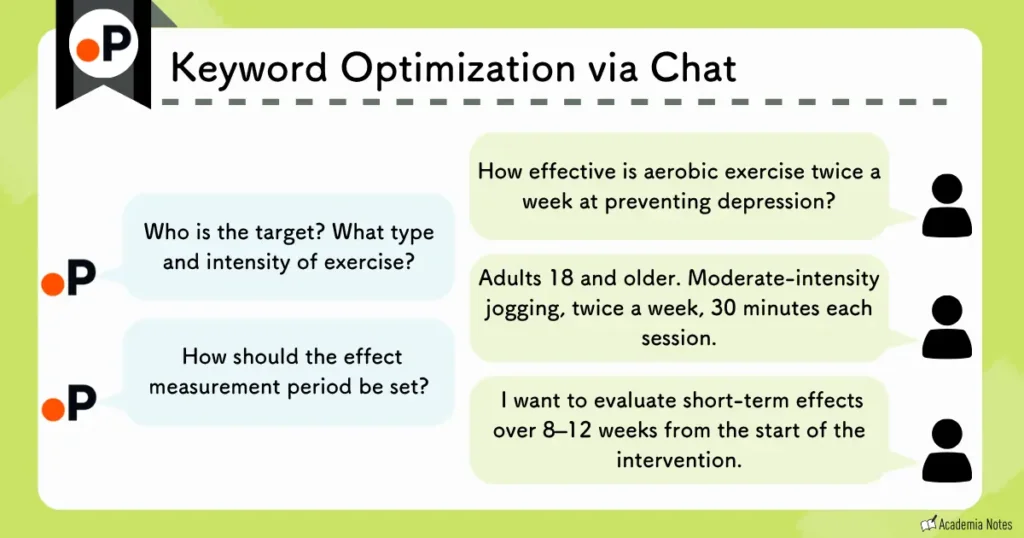
Sometimes the AI’s questions reveal nuances you hadn’t considered—the kind of details that make you think, “I hadn’t thought of that…”
After this interactive back-and-forth, the finalized research question looks like this (the red text represents improvements suggested during the chat) 👇
“Among adults aged 18 and over, how effective is performing moderate-intensity jogging twice a week (30 minutes per session) in preventing depression based on self-reported depression scores (e.g., PHQ-9)? Base the review on evidence obtained from randomized controlled trials and observational studies.“
Let’s compare this finalized version with the original research question:
| Before | After |
|---|---|
| “How effective is twice-weekly aerobic exercise in preventing depression?” | “Among adults aged 18 and over, how effective is performing moderate-intensity jogging twice a week (30 minutes per session) in preventing depression based on self-reported depression scores (e.g., PHQ-9)? Base the review on evidence obtained from randomized controlled trials and observational studies.“ |
The research question has become much more specific and structured.
Once your research question is finalized, you can choose how you want to run Deep Research:
- Controlled Deep Research
- Automate Deep Research
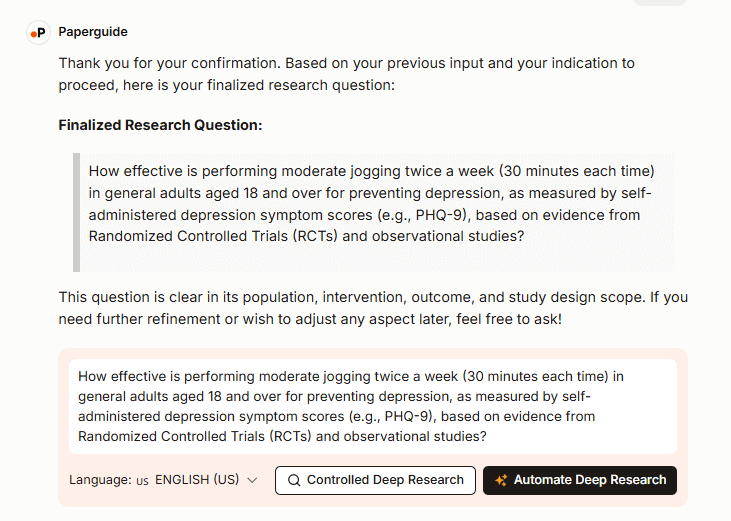
Controlled Deep Research gives you the ability to step in at every stage of the literature screening process.
This level of user control is a major strength that many other tools don’t offer.
Conversely, if you choose Automate Deep Research, the system handles everything automatically. Just press the button and a full literature review is generated from start to finish.
Let’s walk through what you can customize at each step when using Controlled Mode in Deep Research.
Paperguide automatically generates approximately ten sub-questions that help refine and expand your research focus:
Sample Sub-Questions Generated for the Current Example:
“Does exercising twice a week differ in effectiveness compared to three times a week?”
“Does age influence the degree of benefit?”
“How does jogging compare to other aerobic exercises (cycling, swimming)?”
“Are there differences between group jogging and solo jogging?”
“Over what duration does the intervention begin to show measurable effects?” etc.
What You Can Do at This Stage
- Add or edit sub-questions
- Remove unnecessary sub-questions

In this case, it identified forty-eight papers as strong candidates.
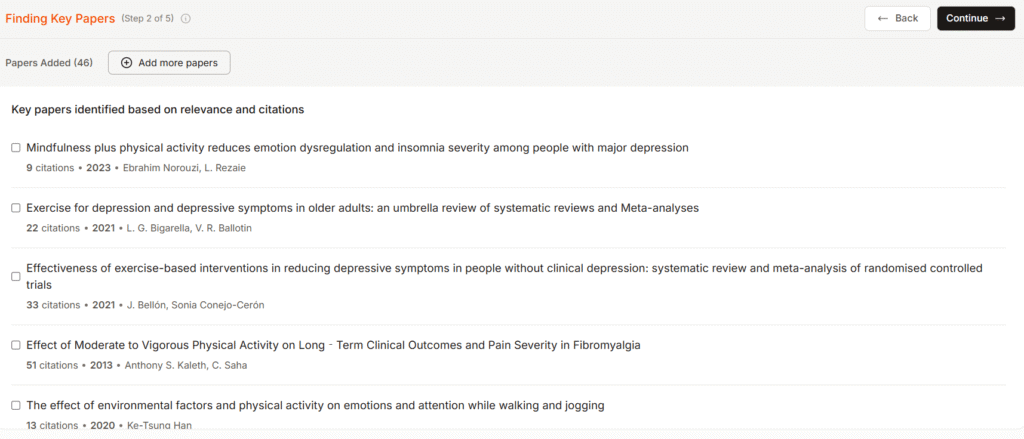
What You Can Do at This Stage
- Upload any other papers you want to include
- Remove papers that aren’t relevant
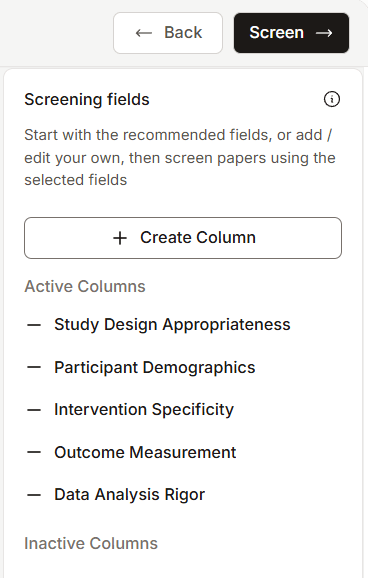
Screening Criteria Used in This Example:
“Is the study design reliable?”
“Are participant characteristics appropriate?”
“Does the intervention align with the research question?”
“Are the outcome measures appropriate?”
“Is the statistical analysis reliable?”
What You Can Do at This Stage
- Add or edit screening criteria
- Delete any criteria you don’t need
Paperguide automatically extracts the information specified in your screening criteria from each paper.
A screening score is then automatically calculated based on the items you selected or entered in the previous step.
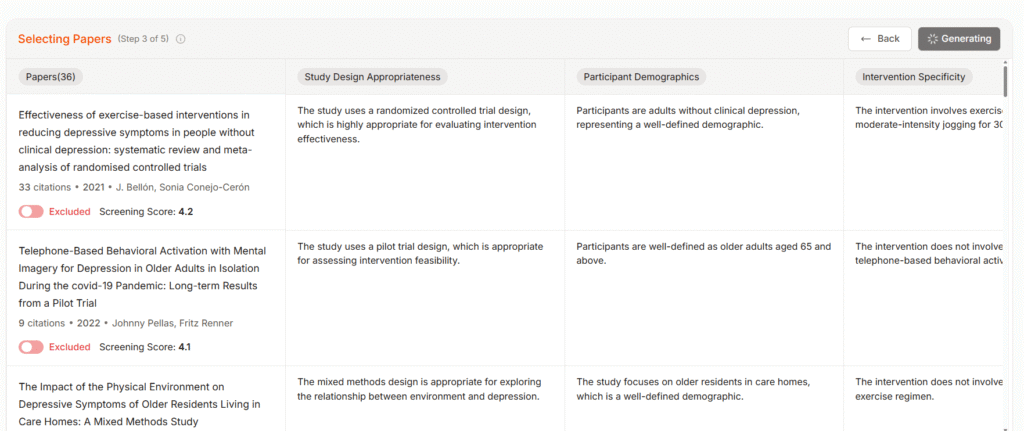
What You Can Do at This Stage
- You can make the final decision to include or exclude each paper, using the automatically generated scores as a reference.
A toggle switch allows you to choose “include” and “exclude” for each paper.
You can review the abstract of each paper in the final step.
The workflow is thoughtfully designed and well structured.
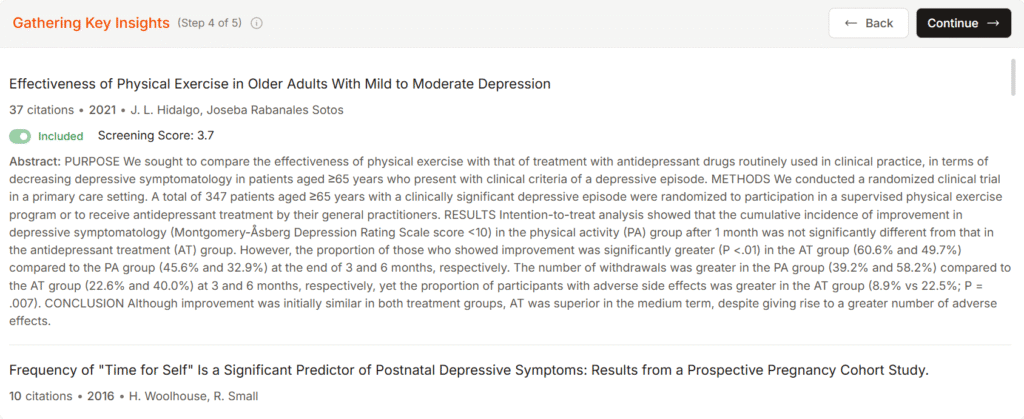
What You Can Do at This Stage
- Read the abstract and make the final decision to either include or exclude the paper.
After completing these steps, the final report looks like this👇
The report is substantial and highly comprehensive.
Not only can you read the completed literature review, but you can also reuse it in various ways.
For example, you can:
- Import it into the AI Writer for further editing
- Download it as a Word file
- Share it via a link
This is convenient for drafting manuscripts or sharing with collaborators.
I will explain in detail later, but Deep Research can be used up to two times per month on the Free Plan.
| Free Plan | Plus Plan | Pro Plan |
|---|---|---|
| 2 uses per month | 10 uses per month | 50 uses per month |
Be sure to give it a try!
Paperguide Feature 2: Writing Assistance
In addition to literature search, Paperguide also places strong emphasis on writing support.
What makes Paperguide useful for academic writing?
Here are five key points.
- You can create a draft
- You can rewrite existing text
- You can receive writing assistance
- You can insert citations with a single click
- You can check for plagiarism
Writing Support 1: Create a Draft
By providing detailed instructions about what you want to write, Paperguide automatically generates a draft.
Draft creation screen
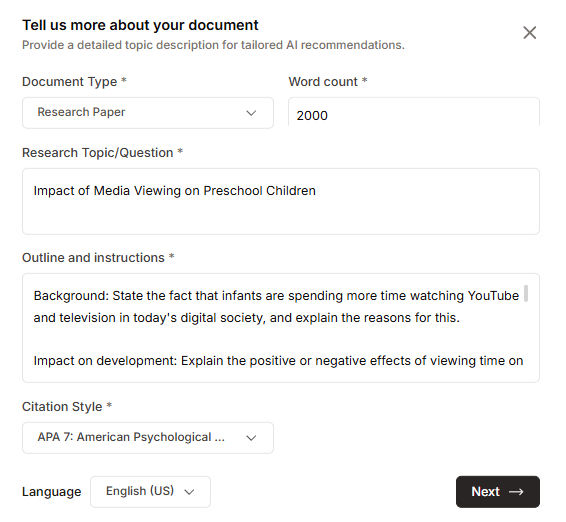
The information you enter here includes 👇
- Article type
(Research paper, case study, literature review, etc.) - Word count
- Topic or title
- Requirements (detailed instructions)
- Citation style
- Language

The quality of the requirements section directly affects the quality of the draft.
Here’s an example of what you might enter in the Requirements field:
Background: State the fact that infants are spending more time watching YouTube and television in today’s digital society, and explain the reasons for this.
Impact on development: Explain the positive or negative effects of viewing time on infants’ cognitive, language, social, and physical development, with specific examples.
Scientific basis: Based on the latest research and literature regarding the relationship between viewing time and development, include relevant data and statistics.
Recommended viewing time: State the expert-recommended viewing times for YouTube and television to promote healthy development, and provide the rationale.
Alternative activities: State recommended activities (e.g., playing and reading) that have a positive impact on infant development as alternatives to digital media.
Conclusion: Summarize the impact of YouTube and television viewing time on development, and provide appropriate advice for parents and educators.
Note: I’m still testing how much the precision of the instructions affects the output quality.
An outline review is also displayed during this process:
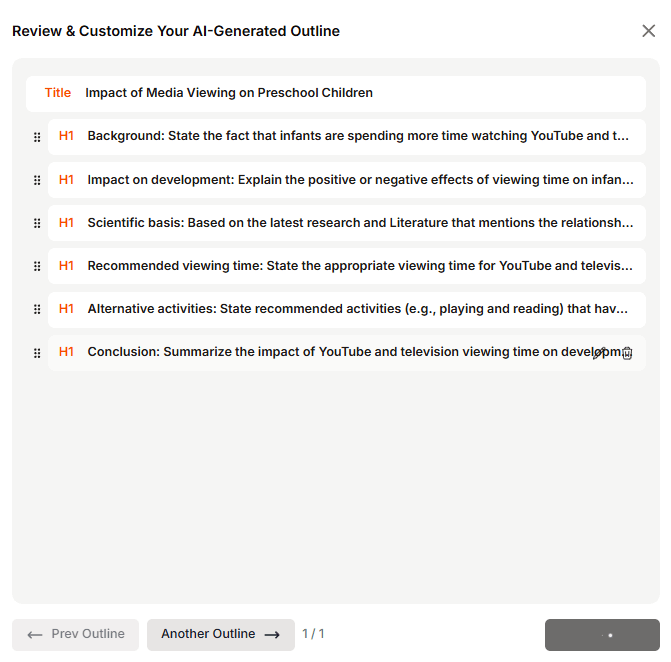
Here is the actual output generated using the instructions above:
The output is so extensive that I’ll introduce it as a video instead.
It’s impressive to see an article of this length generated in a single pass.
Once you have a solid draft, you can simply refine and adjust the details as needed.
It saves a lot of time.
Writing Support 2: Rewrite Existing Text
Now, I’ll explain how the rewriting feature works.
For any text you’re drafting inside Paperguide, you can highlight the section you want to revise and apply a rewrite with a single click.
The available options include:
- Improve grammar
- Adjust expressions to sound more natural and human-like
- Adjust the tone
- Make the text more concise
- Translate the text
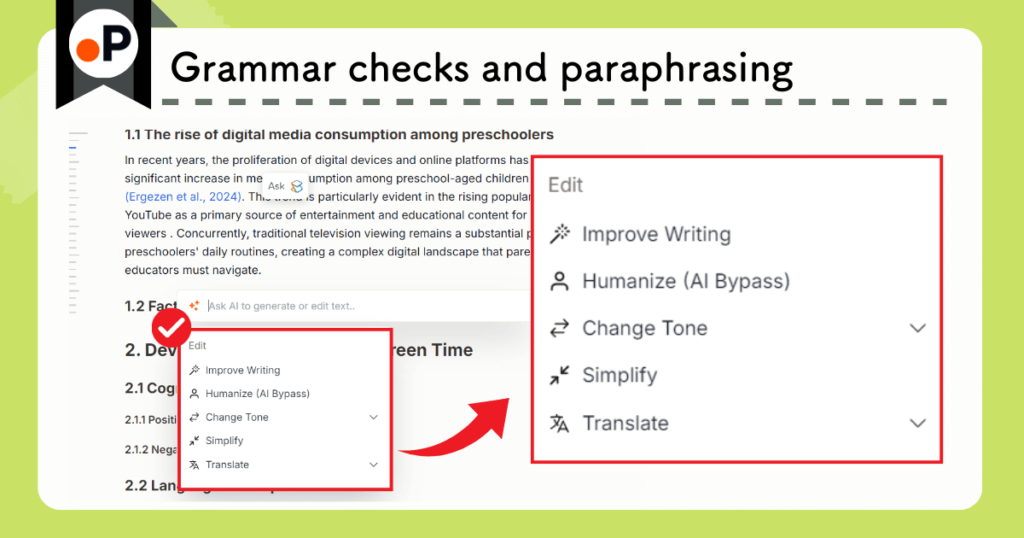
You can adjust the text as many times as you need until you find the phrasing you like.
“Change Tone” includes an Academic Tone option, so choose that if you’re working on research-related writing.
Writing Support 3: Receive Writing Assistance
When you’re stuck and can’t move forward, Paperguide can suggest the next sentence or paragraph based on where your cursor is placed:
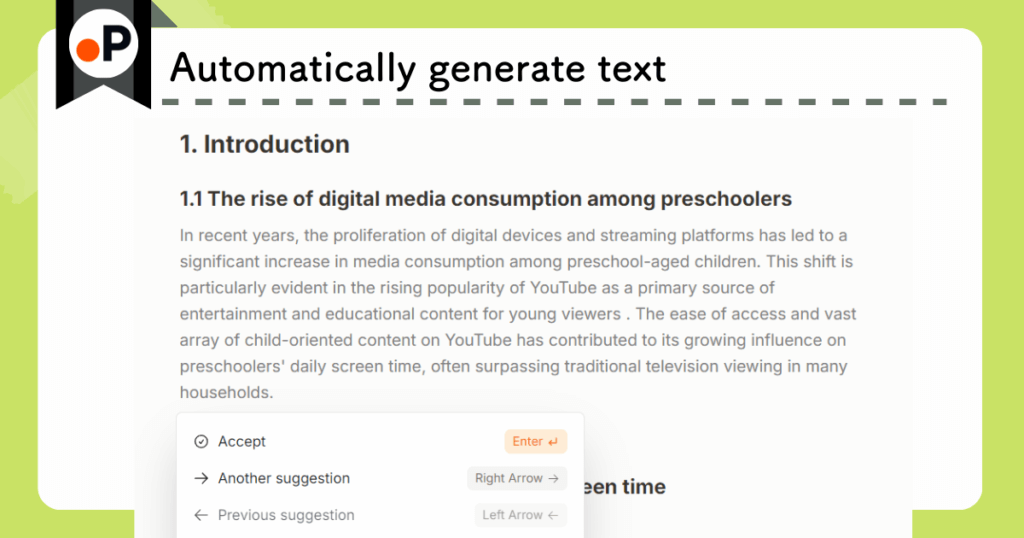
If you don’t like the suggested text, you can ask for alternative options.
And, of course, you can always continue writing manually as well.
Writing Support 4: Insert Citations with a Single Click
Paperguide also lets you handle citations directly within the platform.
Open the reference manager on the right side of the screen.
With a single click on the +Cite button, a citation is inserted at the selected location:

A full reference list is also generated automatically at the end of the document:

You can, of course, choose your preferred citation style in the settings.
Writing Support 5: Check for Plagiarism
Plagiarism checking is essential when submitting a paper.
Paperguide includes this feature by default.
It automatically compares your text with similar publications and detects any potential plagiarism risks.

Plagiarism can happen without your knowledge, so make sure to run the check every time!
For example, plagiarism can include cases like the following:
- Unintentional Plagiarism
- Reusing sentences from cited papers without adequate paraphrasing, and failing to include a proper citation
- Simply forgetting to include a source that text was based on
- Self-Plagiarism
- Reusing content you previously published without clearly indicating the source
Plagiarism checks are extremely important in order to avoid being suspected of misconduct by the journal you’re submitting to.
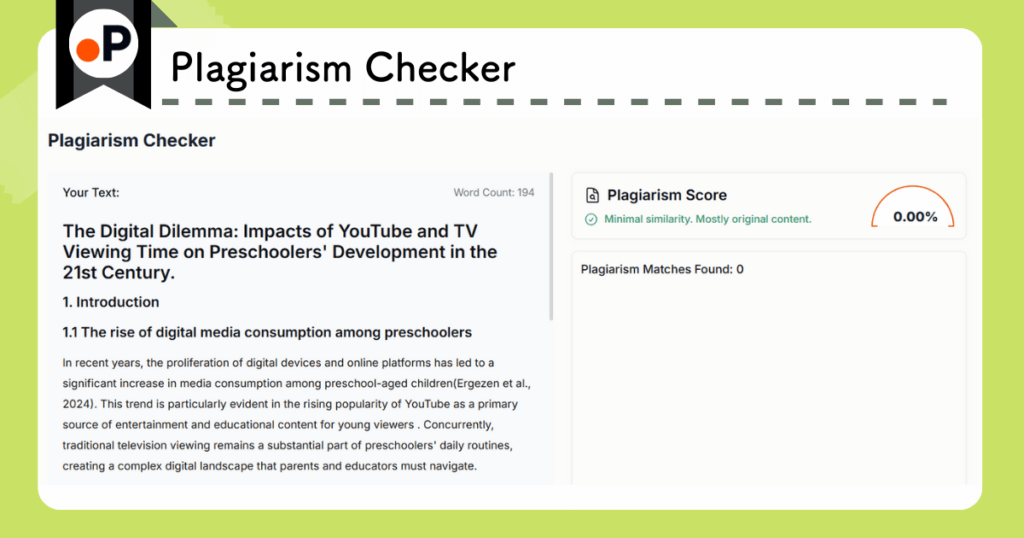
Paperguide‘s Plagiarism Checker generates outputs like the following 👇
- Extracted sections where plagiarism is suspected
- A percentage and list of the suspicious passages
A plagiarism checker is a feature that could stand alone as a paid service.
The fact that Paperguide includes it as a standard feature is impressive.
This concludes the overview of Paperguide’s writing support features.
The writing tools are impressive enough, but Paperguide also offers other additional features as an all-in-one platform for academic research.
Paperguide Feature 3: Reading Support
What are the benefits of using Paperguide when it comes to reading papers?
Here are five key features:
- You can extract only the information you need from a paper
- You can ask about unfamiliar terms via chat
- You can get explanations of figures and tables
- You can add highlights to text
- You can create and save notes
Here are a few common situations that slow down researchers when we’re reading papers:
“Somewhere in this paper it mentioned X, but I can’t find it…”
“What does this term mean? Guess I’ll have to Google it…”
Paperguide helps reduce the amount of time you spend looking up terms or searching for specific information in the text.
Below is what the actual workspace looks like:
Here’s what the workspace looks like
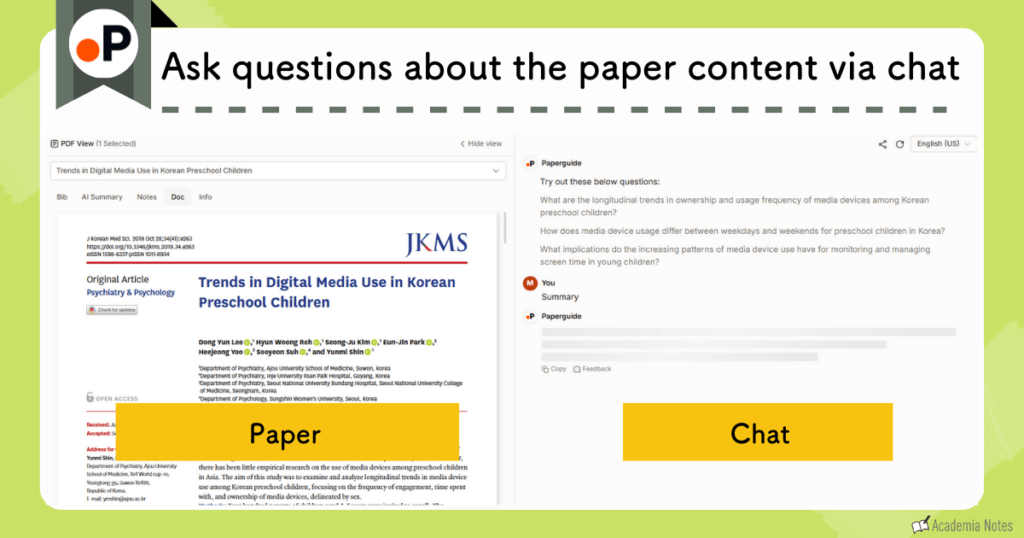
Next, let’s go through each reading support feature one by one.
Reading Support 1: Extract Only the Information You Need From a Paper
“What stage of disease were the patients in?”
“What reagents were used in the experiment?”
When you only need a specific piece of information from a paper, just type your question into the chat space.
Paperguide outputs the answer in about ten seconds.
If it’s a commonly used query type, you can simply click one of the preset buttons in the chat space:
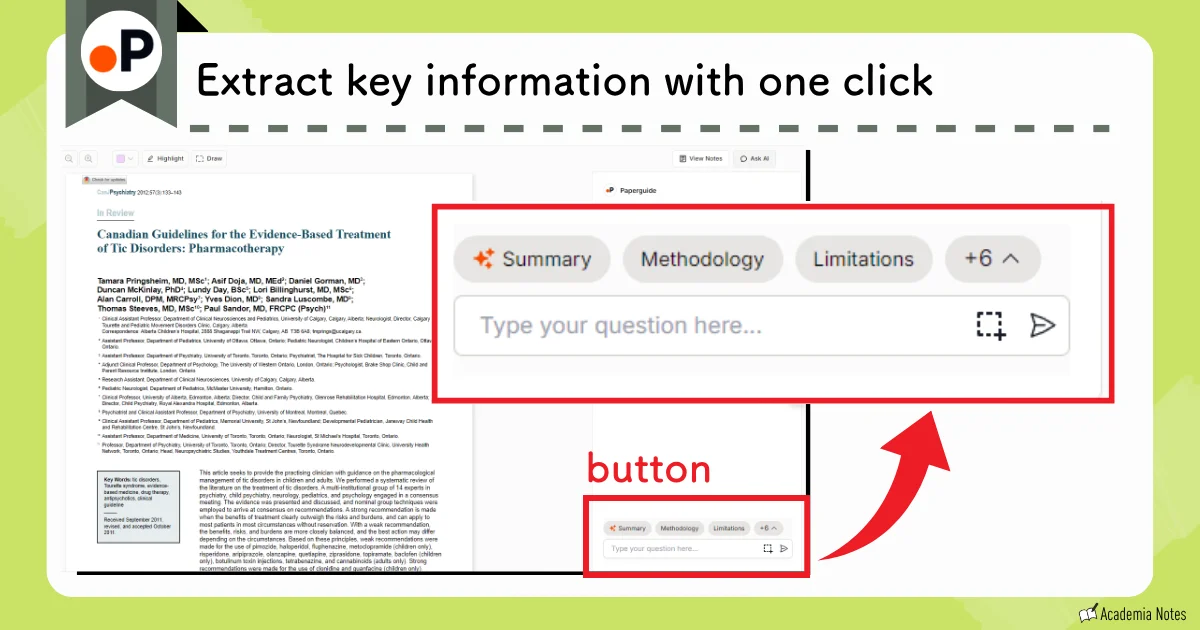
Reading Support 2: Ask About Unfamiliar Terms via Chat
“What does ‘term X’ mean? I’ve gotta go look it up…”
One of the main reasons paper reading takes so long is because we often encounter unfamiliar terminology.
Ask about unclear terms directly in the chat space, and Paperguide instantly returns a reliable explanation.
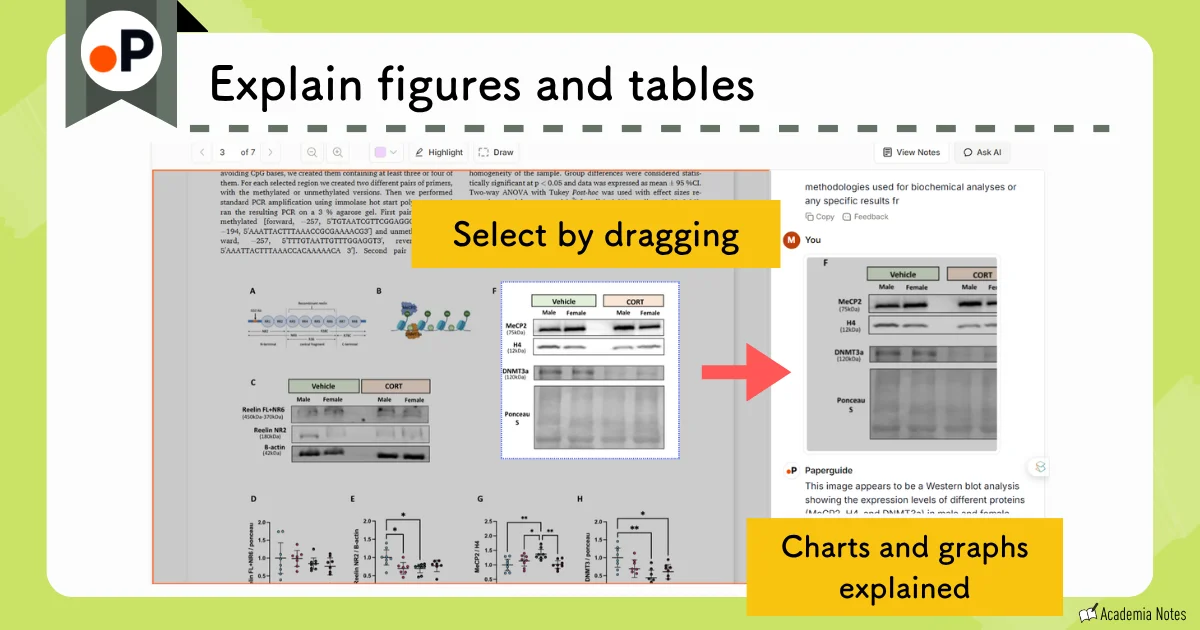
Reading Support 3: Explanations of Figures and Tables
How many times have you found yourself wondering:
“I have no idea what this figure is showing.”
A surprisingly powerful feature of Paperguide is the ability to request explanations of figures and tables.
Simply highlight the figure, table, or equation, and Paperguide will provide a clear, easy-to-understand explanation:
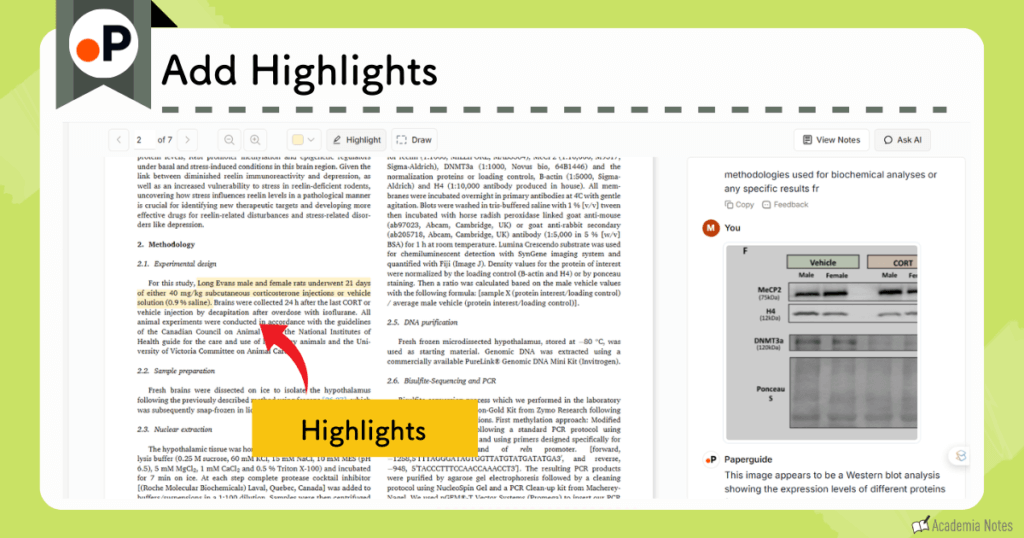
Reading Support 4: Add Highlights to Text
You can highlight important sections within the paper.
These highlights are then saved for later:
Reading Support 5: Create and Save Notes
By clicking the View Notes button in the upper right corner, you can leave notes for yourself.
Any highlighted sections are automatically collected and displayed in the notes section as well.

This note feature is extremely convenient when you come back to review the paper later.
Paperguide Feature 4: Extract Data and View Results in a Table
Paperguide allows you to extract information directly from an uploaded PDF and organize it into a structured table.
- You can understand the contents of a paper at a glance
- You can easily compare related papers
Table View Advantage 1: Grasp the Contents of a Paper at a Glance
You can generate a table directly from the papers saved in your reference manager:
You can see the contents of each paper at a glance.
The table fields can be edited, just like in the literature-search screen.
Table View Advantage 2: Compare Related Papers Side-by-Side
If you select multiple similar papers and generate a table, you can then compare them simultaneously.
You might notice things like, “The experimental conditions in Paper A are a bit different from the experimental conditions in Paper B ,” or perhaps even identify why only one study reports a conflicting result.
This can lead to many useful insights.
Paperguide Pricing Plans
Paperguide offers three paid plans:
- Free
- Plus
- With a promo code, the monthly price is $7.20
- Pro
- With a promo code, the monthly price is $23.20
- Evidence
- With a promo code, the monthly price is $55.20
Pricing Plan Comparison
There is no difference in output quality between Paperguide’s free version and paid subscriptions.
The main distinction is usage limits. The Free Plan imposes strict caps, so if you expect to use Paperguide frequently, upgrading to a paid plan will give you a smoother experience.
Key differences include:
- Number of Deep Research uses
- Workbook (*see note below) capacity and features
- Maximum word count for the AI Writer
- Access to plagiarism checking

The Free Plan hits its usage limits rather quickly.
Between the paid plans, choose Plus or Pro based on how much volume you need.
For most users, the Plus Plan is a solid starting point.
| Free | Plus | Pro | Evidence | |
|---|---|---|---|---|
| Price | — | From $7.20/mo | From $23.20/mo | From $55.20/mo |
| AI credits | 2,000/mo | 12,500/mo | 50,000/mo | 150,000/mo |
| Systematic reviews | × | ○Up to 1,000 papers | ○Up to 5,000 papers | |
| AI paper search | △Usage limits | ○Unlimited | ||
| Reference manager | △Limited | ○Unlimited | ||
| Data extraction | △Up to 5 columns, 10 papers | ○Up to 50 columns, 100 papers | ||
| Collaboration and team admin | × | ○ | ||
| Image and table extraction | × | ○Coming soon | ||
| PRISMA dual reviewer screening | × | ○Coming soon | ||
Last updated: August 2026
*“Workbook” refers to the table generated during literature searches or data extraction.
Paid Plan Pricing
You can choose annual or monthly billing. Academic pricing is shown alongside the standard rates.
| Plan | Price | Monthly (before → after discount) | Promo code |
|---|---|---|---|
| Plus | Industry | $17/mo→$13.60/mo | ACADEMIA20 (20% OFF) |
| Academic | $9/mo→$7.20/mo | ||
| Pro | Industry | $39/mo→$31.20/mo | |
| Academic | $29/mo→$23.20/mo | ||
| Evidence | Industry | $119/mo→$95.20/mo | |
| Academic | $69/mo→$55.20/mo | ||
| Plus | Industry | $29/mo→$23.20/mo | ACADEMIA20 (20% OFF) |
| Academic | $15/mo→$12/mo | ||
| Pro | Industry | $69/mo→$55.20/mo | |
| Academic | $49/mo→$39.20/mo | ||
| Evidence | Industry | $199/mo→$159.20/mo | |
| Academic | $99/mo→$79.20/mo |
Show notes (5)
- Prices are in USD, per seat.
- "Regular price" is the published price; the discounted price includes the promo code.
- Annual plans are shown as a per-month figure (billed yearly).
- The Enterprise discount (10+ seats, 30–40%) is arranged through an introduction from this site.
- "Academic" prices are the ones shown when you select "Academic" on the official pricing page.
For full pricing, see the official site.
Last updated: August 2026
Other Convenient Functions and Integrations
Integration with Zotero
Paperguide integrates smoothly with Zotero.
You can:
- Upload papers directly from Zotero to Paperguide
- Send papers from Paperguide’s search results to Zotero
Not having to manually shuffle PDFs around is a real time-saver.
Reference Manager
Uploaded papers are automatically saved in the reference manager. Paperguide organizes them for you as soon as they’re uploaded, so everything stays in order.
When you want to revisit a paper, you don’t need to upload it again—it’s already stored and ready to access.
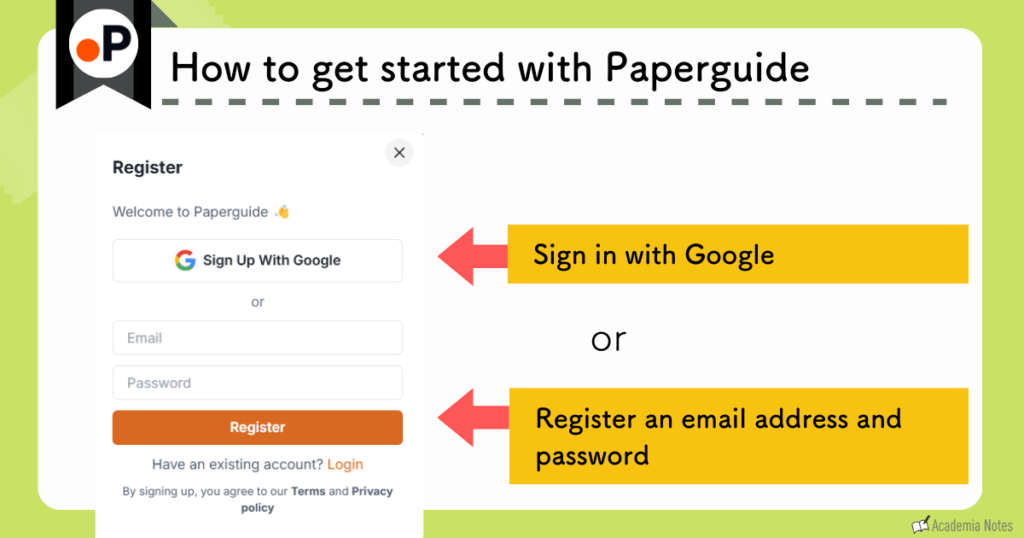
How to Get Started with Paperguide
There are two ways to start using Paperguide:
- Sign in with Google
- Create an account
Enter your email address and password
How to Upgrade Your Plan
Official Website: Paperguide (https://paperguide.ai/)
Annual plans offer a lower overall price in the long run.
Enter the coupon code (listed below) on the payment screen.
Payment can be made by credit card.
Once your payment is processed, you can immediately start using all of Paperguide’s paid features.
Conclusion
This concludes the overview of Paperguide.
Official Website: Paperguide (https://paperguide.ai/)