
This article introduces Paperpal, an AI-powered tool designed to support academic writing, especially research papers.

- You may be worried about whether the sentences and grammar in the English you write are correct.
- You may feel confident about the scientific content of your paper. What worries you is only the English.
- Perhaps you feel that using a professional English editing service is simply too expensive.
All of these concerns can be addressed by Paperpal, an AI-powered English editing tool.
Benefits of using Paperpal
- You can quickly improve your English writing with real-time editing suggestions.
- It offers comprehensive support from drafting your paper through to final submission.
Professional English editing services for journal submission can be a major expense.

But if you are already familiar with the submission process, Paperpal alone will usually be sufficient.
It helps keep your costs under control, and above all, it is fast.
The price of Paperpal starts from $9.27 per month when you use the coupon below.
Since this price also includes the literature search tool R Discovery, connecting the two allows you to use them as an all-in-one research tool.
In this article, I will provide a detailed overview of the benefits and concrete features of Paperpal.
Official site: Paperpal (https://paperpal.com/)

So, let us get started.
Paperpal What Is It?
Paperpal is an AI-powered English editing tool provided by Editage, the largest English editing service provider in Japan.
Key points about Paperpal
- Final checks before submitting your manuscript.
- Batch checks before submission, including English language editing.
- Plagiarism checks.
- Writing your manuscript.
- Improving text you have written yourself.
- English editing.
- Rewriting.
- Generating text with AI.
- Drafting using templates.
- Writing assistance.
- Translation.
- Inserting citations.
- Improving text you have written yourself.
- Reading papers.
Paperpal offers such a wide range of features that you can practically complete the entire submission process using Paperpal alone.
Why you should use Paperpal
- Writing optimized for academic manuscripts.
- Consistency in the edits.
- A clear, accessible edit history.
- Checks tailored to the specific requirements of academic papers.
- A paid plan is recommended if you intend to use Paperpal continuously.
- With the coupon, plans start from $9.26 per month.
- Coupon “ ACADEMIA20 ”.
- R Discovery is also included in the price.
Editage is a company that operates one of the leading English editing services.
Paperpal is an AI system trained on the English editing data accumulated by Editage’s professional editors.
In addition to Paperpal, Editage offers a wide range of other tools and services for researchers, providing comprehensive support for their research activities.
Another attraction is its seamless integration with the literature discovery tool R Discovery.
Final Paper Check With Paperpal
Paperpal’s most important feature ischecking a manuscript after you have finished a full draft.
There are two main types of checks.
- Pre-submission batch check.
- Plagiarism check.
Check Feature 1: Pre-submission Bulk Scan
This function provides a comprehensive evaluation of key points before you submit your paper.
Once your manuscript is more or less complete, upload the file to Paperpal.
Your paper will then be checked from the following perspectives.
- Checks tailored to academic manuscripts.
- English language editing of the main text.
For the checks specific to academic manuscripts, you can see a summary of the results directly in your browser.
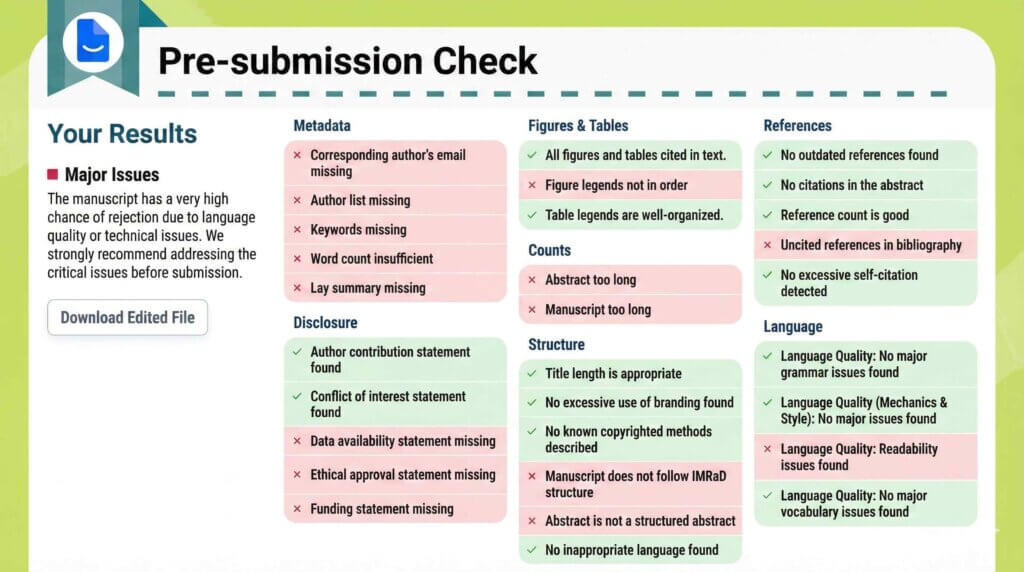
In total, your manuscript is evaluated against 30 criteria grouped into 7 major categories.
Below is a selection of the items that are checked.
- Metadata
- Author email address.
- Author list, etc.
- Declarations
- Author contribution statement.
- Conflict of interest statement, etc.
- Figures and tables
- Citations for figures and tables, etc.
- Counts
- Length of the manuscript.
- Length of the title.
- Structure
- Whether the paper follows the IMRAD structure, etc.
- References
- Number of references, etc.
- Language
- Language quality, grammar, and related aspects.
By downloading the generated report, you can review the detailed results of the checks.
Sample report
- This section gives an overview of the checks that are specific to academic manuscripts.
For each of the 30 checklist items that you could already view in the browser, the report now includes detailed comments.
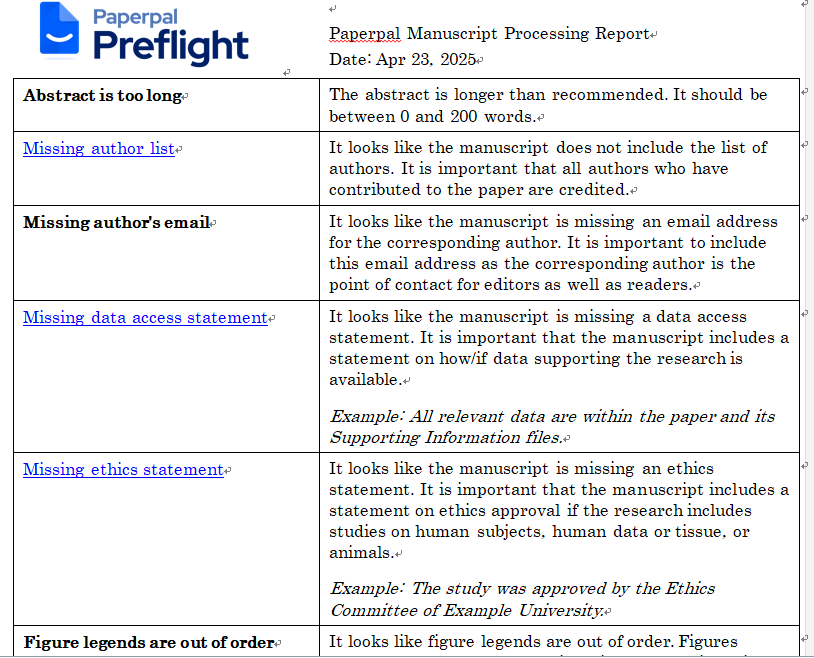
- Revisions with tracked changes.
- Suggested edits with comments.
n the English editing, Paperpal thoroughly checks grammar such as articles and noun number, as well as consistency of word choice, across the entire manuscript.

What I find especially helpful is that the tool keeps a full track-change history and attaches comments to the revisions.
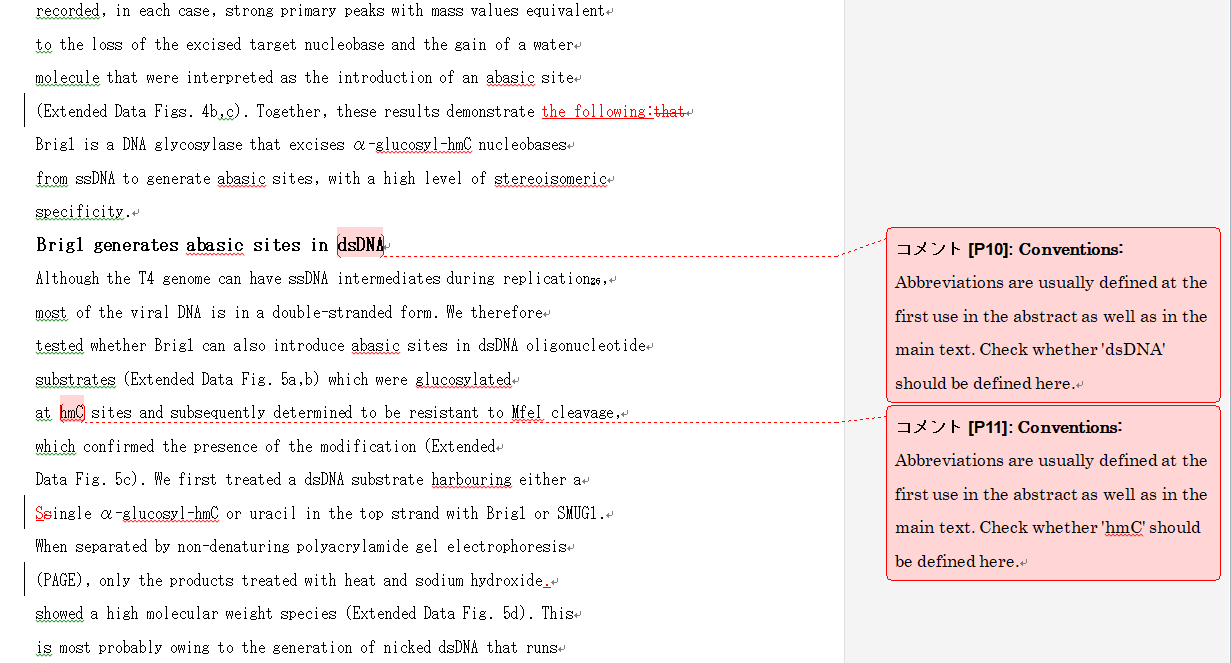
(I will explain the English editing features in more detail later.)
In this way, you can obtain suggestions that are extremely close to those of a professional editor in just a few minutes.
Check Feature 2: Plagiarism Scan
Plagiarism checking is critically important when you submit a paper.
Paperpal includes this function as a standard feature.
It compares your manuscript with similar publications and automatically detects potential plagiarism risks.

Unexpected plagiarism can occur.
So it is essential to run a reliable check.
For example, the following types of plagiarism may arise.
- Unintentional misconduct.
- Reusing English sentences from cited papers, where paraphrasing is insufficient and no citation is provided.
- Simply forgetting to include a source.
- Self-plagiarism.
- Reusing content that you have previously published yourself without clearly citing the original source.
Plagiarism checks are crucial to avoid having your target journal raise concerns about possible misconduct.

Paperpal provides outputs such as the following.
- Extracted passages that may be plagiarized.
- The percentage and a list of the sections that may involve plagiarism.
Plagiarism checking is often offered as a standalone paid service.

The fact that Paperpal includes it as a standard feature is impressive.
Writing Papers With Paperpal
Below is a summary of the key features that help you while writing your manuscript.
You can use Paperpal for writing in the following environments.
- Paperpal on the web.
- Word.
- Overleaf.
- Google Docs.
A particularly useful point is that you can install extensions and use Paperpal not only in its own interface but also directly within external tools such as Word.
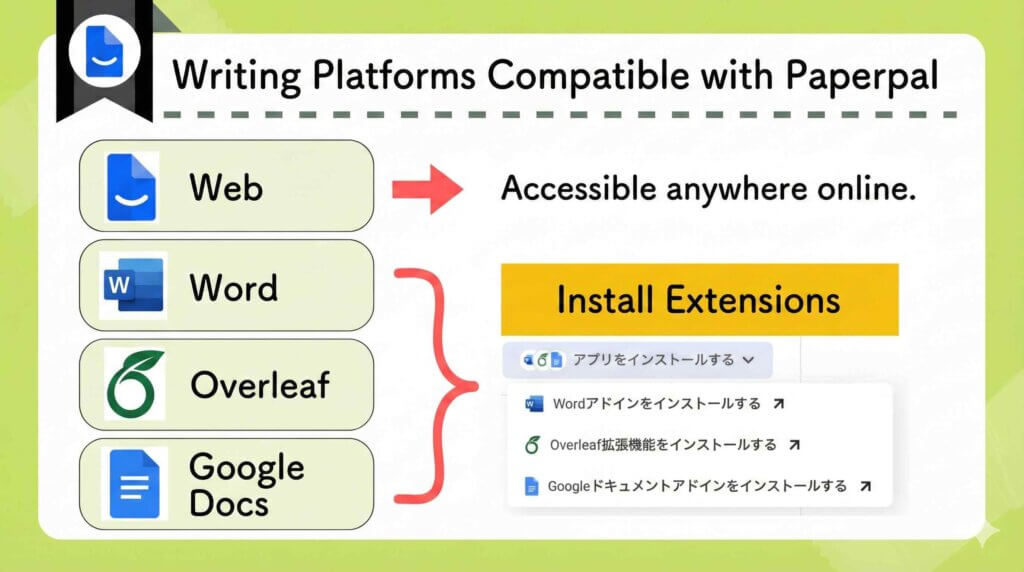
The main groups of writing features in Paperpal are as follows.
- English editing
- Rewriting
- Create a draft using templates
- Writing assistance
- Translation
Paperpal Writing: Improve Your Text
- English editing.
- Rewriting.
Improving your own text (1): English editing
You can instantly run English editing on any selected passage of text.
The content is the same as in the “pre-submission batch check” described earlier.

There are two things you can do in the “English editing” mode.
- English editing (articles, noun number, and similar points).
- Consistency check.
For English editing of grammar such as articles and singular–plural forms, Paperpal corrects grammatical errors and unnatural expressions.
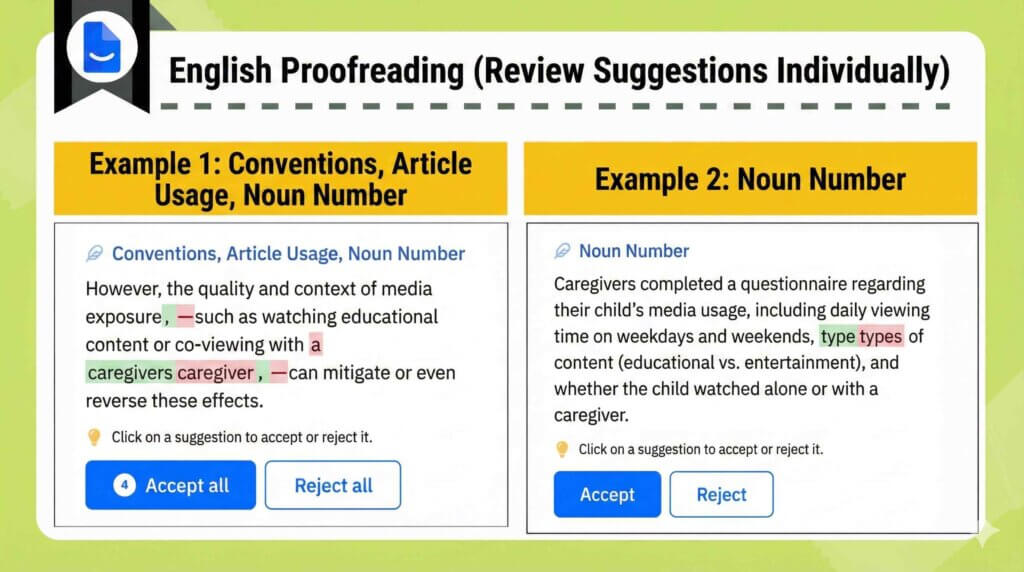
The tool presents suggestions as a list, one issue at a time.
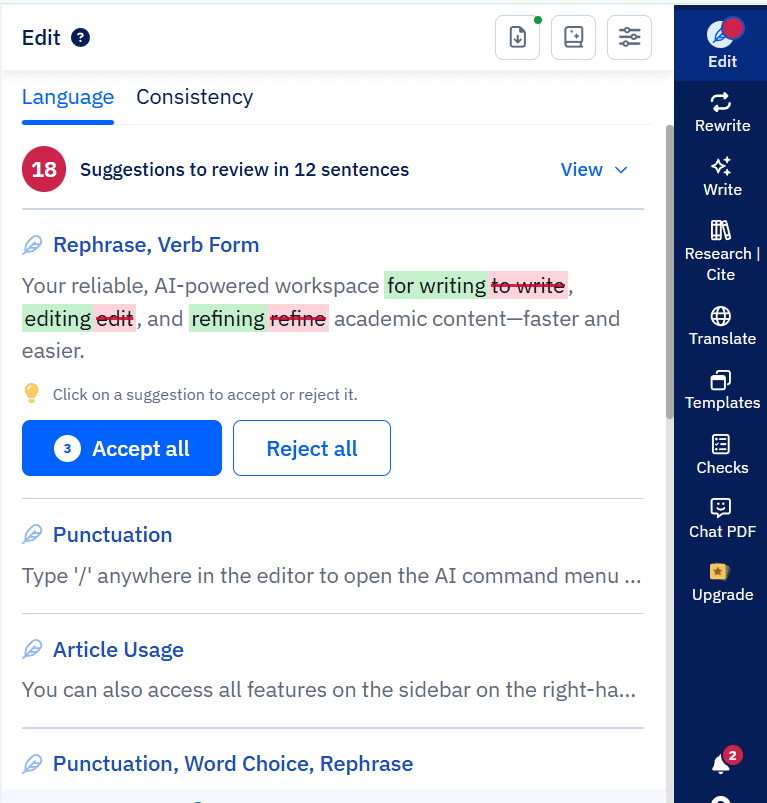
For each suggestion, you can choose to “accept” or “reject” the change.
It is very convenient to be able to review and decide on each correction individually.
For the consistency check, the AI automatically detects issues such as inconsistent terminology, tense shifts, and variations in tone, and then suggests revisions.
Improving your own text (2): Rewriting
With Paperpal’s rewriting function, the tool rewrites your text into more natural and academically appropriate English.
Even casual wording can be adjusted to a tone suitable for a scholarly article.
Rewriting offers modes such as the following.
- Paraphrase.
- Convert to academic English.
- Improve fluency.
- Simplify.
- Reduce word count.
- Change tone.
- Suggest synonyms.
Select the text you want to rephrase, and then choose the rewriting mode you prefer.
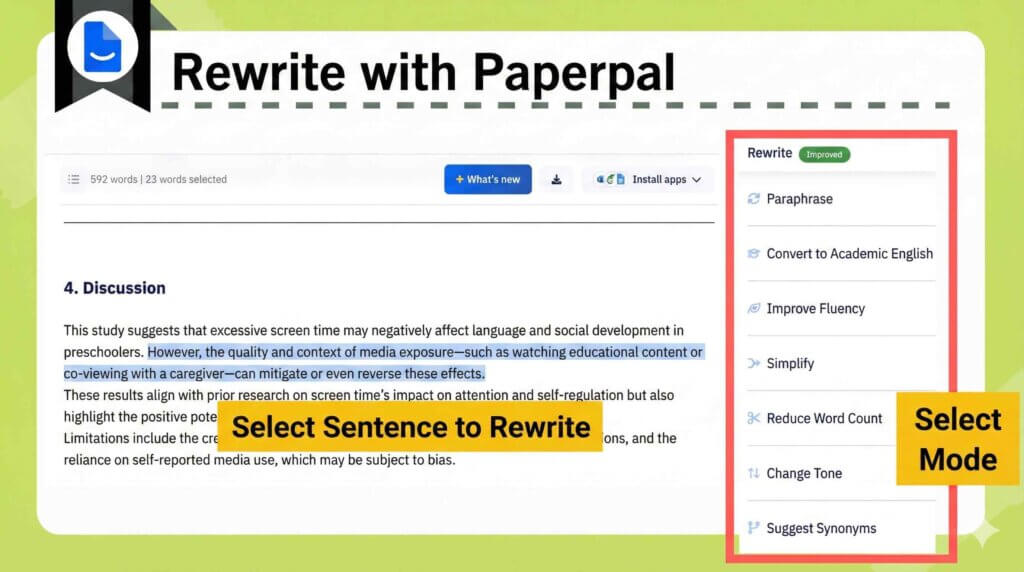
If you are not satisfied with the suggested sentence, you can generate a new version.
You can keep retrying until you find a wording that you are happy with.
Paperpal Writing: AI Text Generation
- Create Drafts Using Templates.
- Writing Assistance.
- Translation.
AI-Based Text Generation (1): Create Drafts Using Templates.
With Paperpal’s Write feature, you can generate a manuscript draft automatically by simply entering your research topic and a brief summary.
The structure and phrasing are formatted in an academic paper style, making it an effective starting point for writing.
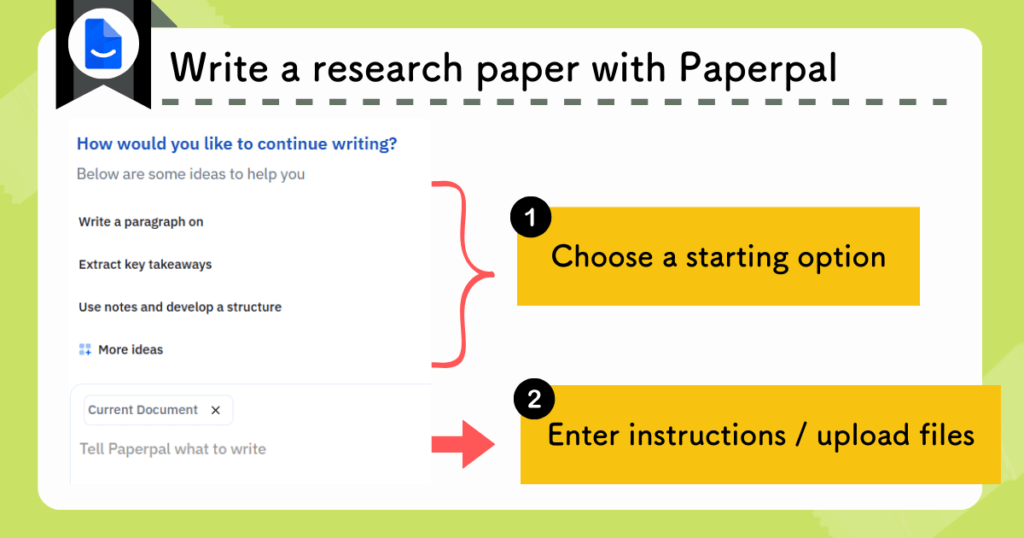

At first, it may feel difficult to figure out how to give the right instructions.
However, the writing process becomes far smoother than starting a paper from scratch.
You can also make use of templates.

The writing assistance includes a wide range of built-in templates.
- Outline.
- Brainstorming.
- Title.
- Abstract, and more.
For example, select Research Article from the Outline option.
- Choose the genre of the paper you are writing.
- Enter a summary of the content.
- Attach reference papers if available.
Once you provide this information, Paperpal automatically generates a paper outline.
Example of actual output

You can then continue writing on Paperpal based on this outline.
AI-Based Text Generation (2): Writing Assistance.
When advancing your writing, you can use the writing assistance features.

The AI can suggest text completions and continue your writing based on context.
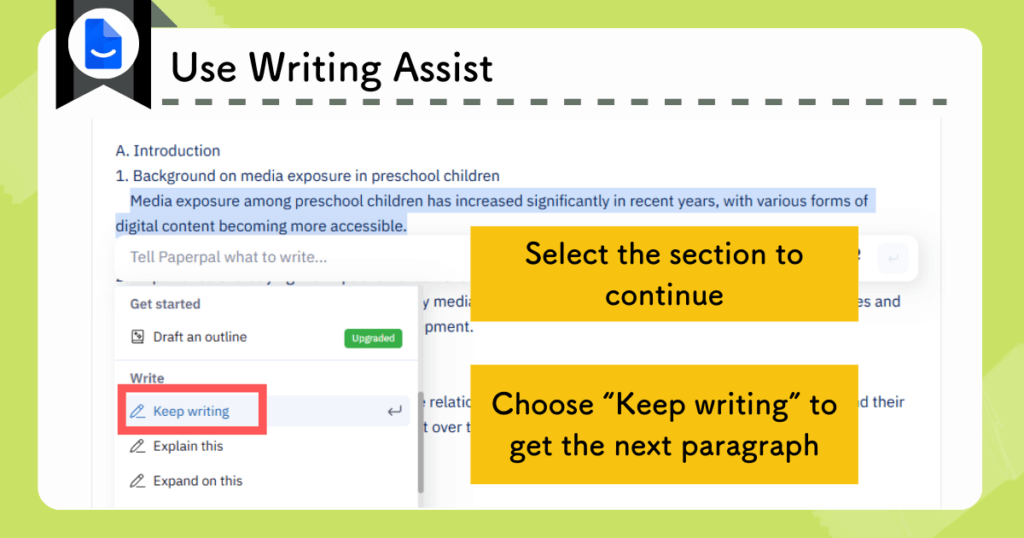
Example of actual output
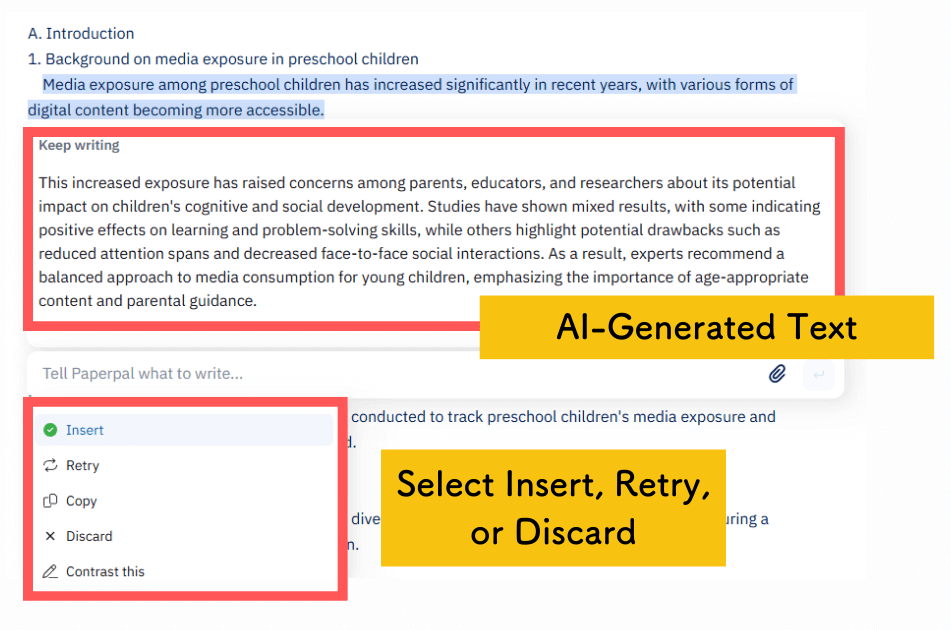
In addition to Keep writing, there are many other writing assistance options available.
- Elaborate further on the selected section.
- Explain the selected section.
- Summarize the selected section.
- Raise questions about the selected section, and more.
These features are designed to help you keep writing without interruption.
AI-Based Text Generation (3): Translation
Text written in Japanese can be translated with a single click.
Being able to translate easily within the editing screen is highly convenient.
In practice, developing the logical structure in Japanese first is often more accurate and efficient.
Paperpal Writing: Insert Citations
When you search for papers within Paperpal, they can be saved to a paper list.
You can insert citations into the text with one click from this saved list.
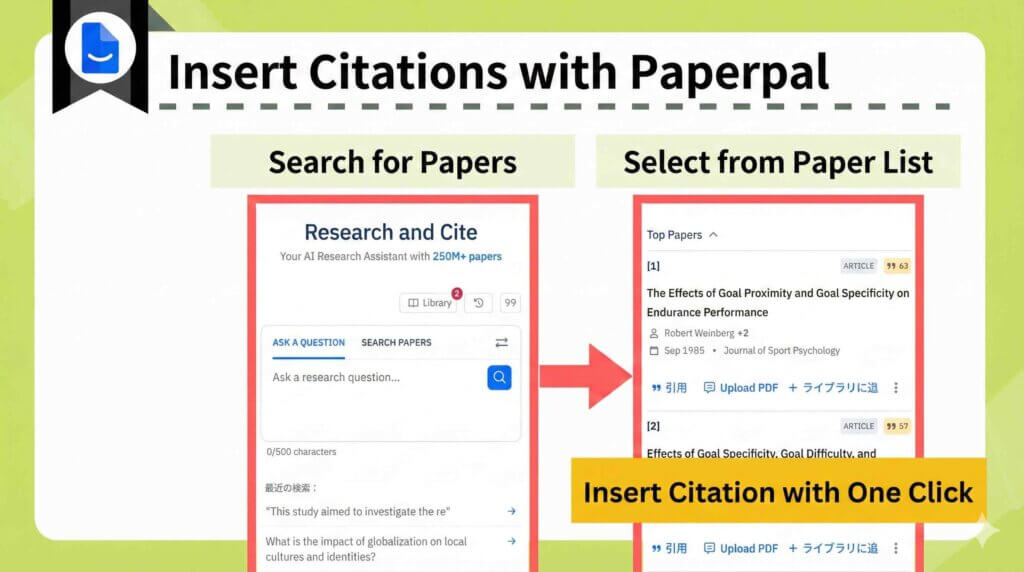
Because papers are stored in the library, once uploaded, they can be reused for citation at any time.
Example of an actual citation (in-text)

Reference list (at the end of the manuscript)

Selection of citation styles

Paperpal provides all the essential features required for academic writing.
Reading Papers With Paperpal
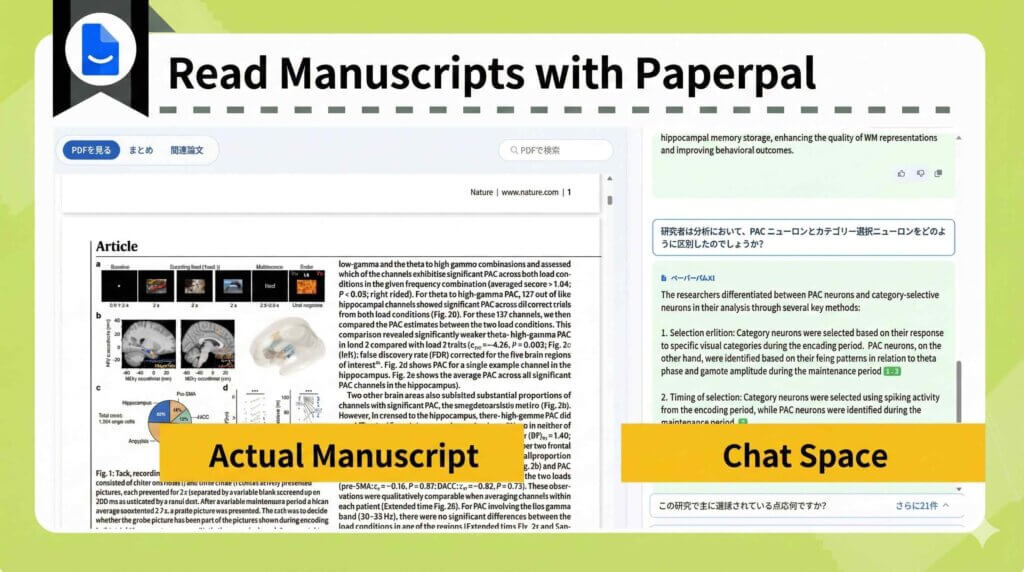
When you upload a PDF, you can use a chat feature that lets you ask the AI questions about its contents.
It helps you quickly grasp a paper’s key points and dig deeper into sections you care about.
It is also handy when you are writing and suddenly think, “What was this paper about again?”.
Why Use Paperpal
By this point, I think you have a solid sense of what makes Paperpal appealing.
But…!

Isn’t ChatGPT enough?
To address that question, I will explain why you should use Paperpal.
- Academic writing optimized for research papers.
- Consistency across edits.
- Clear change tracking.
- All-in-one support for manuscript writing.
Academic Paper-Focused Text
| Paperpal | ChatGPT and similar tools |
|---|---|
| Optimized for academic writing such as research papers. | They can handle academic writing, but they may become “too casual” or be less strict about formal conventions, which can feel risky. |
Paperpal is optimized for academic writing.
You can rewrite text into a paper-appropriate style with a single click.
Consistency in Edits
| Paperpal | ChatGPT and similar tools |
|---|---|
| Maintains consistency in articles, prepositions, and tense. | Judgments may vary depending on context, which makes it harder to keep consistency. |
For example, Paperpal checks for issues such as incorrect “a/an/the,” pluralization, and tense shifts across the entire manuscript, and keeps the writing consistent.
Visible Revision History
| Paperpal | ChatGPT and similar tools |
|---|---|
| You can see the edit history. | Because they often rewrite the whole text on the spot, it can be hard to see what changed and how. |
Paperpal shows the differences clearly between your original text and the suggestions.
Because you can review suggested changes one by one, it is convenient to choose whether to accept each change.
Some tools also explain the rationale behind corrections, which helps you learn.
Comprehensive Paper Writing Support
| Paperpal | ChatGPT and similar tools |
|---|---|
| Includes formal pre-submission checks and even plagiarism checks. | This is difficult to do with ChatGPT alone. |
Paperpal comes with comprehensive support for research writing built in by default.
In short, Paperpal is a tool optimized for researchers who write papers.
Unlike general AI tools such as ChatGPT, Paperpal doesn’t require you to write detailed prompts — it’s optimized for academic text from the start.
Benefits of Using Paperpal
- English proofreading is completed instantly.
- Support from writing through submission is fully covered.
Give it a try.
Writing Environments Compatible With Paperpal
- Paperpal on the web
- Word
- Overleaf
- Google Docs
In addition to using Paperpal on its own platform, you can also use it in external environments such as Word by installing extensions, which is a major advantage.
Paperpal Pricing Plans
Paperpal offers two plans.
- Free Plan
- Prime Plan
- You can use a coupon to get the Prime Plan from $9.26 per month.
- Coupon code: ACADEMIA20 .
Prime Plan Pricing
You can choose from three options: one-month, three-month, or annual subscriptions.
The annual subscription is by far the best value.
| Recommended Annual Plan | Three-month Plan | Monthly Plan | |
|---|---|---|---|
| 料金 | $139 / year | $55 / quarter | $25 / month |
| 月額料金 | $11.58 / month | $18.33 / month | $25.00 / month |
| 割引コード | ACADEMIA20 | ||
| 割引後の価格 | $9.26 / month | $14.66 / month | $20.00 / month |
Prices may change, so please check the official website as well.
Free vs Paid Plan Differences
If you plan to use Paperpal continuously, the paid plan, namely the Prime Plan, is recommended.
- The number of English proofreading and consistency checks.
- The number of times you can use AI features.
- The number of words allowed for plagiarism checks.
- Access to R Discovery Prime.
| Free Plan | Prime Plan | |
|---|---|---|
| English Editing & Consistency Checks | Up to 200 suggestions per month. | Unlimited. |
| AI Features※ | 5 times per day. | Unlimited. |
| Citation Generation | Unlimited. | Unlimited. |
| Plagiarism Check | 7,000 words per month. | 10,000単語/月 (無料プランより高品質) |
| Pre-submission Bulk Check | Available with limitations. | Unlimited. |
| R Discovery | Free features only. | Paid features available. |
AI features include rewriting, research and citation, text generation, and templates.
The limit of 200 suggestions per month for “English proofreading and consistency checks” is used up very quickly.
The Free Plan is suitable for trial use, while the Prime Plan is better for serious work.
When you subscribe to the paid plan, R Discovery Prime is automatically included.
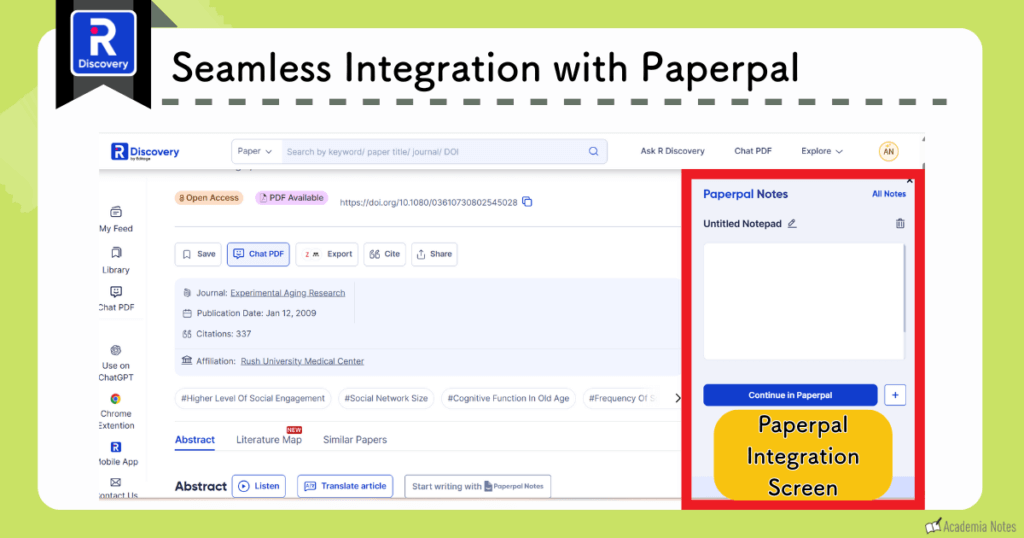
R Discovery and Paperpal work extremely well together.
You can create an efficient workflow by searching for papers in R Discovery while writing with Paperpal.
The Paperpal interface appears alongside R Discovery.
Can You Submit Papers With Only Paperpal?
That said, is Paperpal alone really sufficient for English proofreading?
In some cases, it may be better to use a professional English editing service.
I will explain the differences.
Cases Where Paperpal Alone Works for Submission
In the following situations, you can complete paper submission using only Paperpal.
- Your paper’s logical structure is already solid.
- You are familiar with the communication involved in journal submission.
Compared with professional English editing services, Paperpal is significantly cheaper and much faster.
When to Recommend Expert English Proofreading
Professional English editing services are recommended in the following situations.
- You want to improve the logical structure of your paper.
- You feel uneasy about the communication involved in paper submission.
Paperpal does not provide editing that deeply revises the structure of a manuscript.
If you want to improve the logic and narrative flow to make your paper stronger, a professional English editing service is recommended.
Summary
In this article, I have summarized the AI English proofreading tool “Paperpal.”
- Final checks before submitting your manuscript.
- Batch checks before submission, including English language editing.
- Plagiarism checks.
- Writing your manuscript.
- Improving text you have written yourself.
- English editing.
- Rewriting.
- Generating text with AI.
- Drafting using templates.
- Writing assistance.
- Translation.
- Inserting citations.
- Improving text you have written yourself.
- Reading papers.
Paperpal offers such a wide range of features that you can practically complete the entire submission process using Paperpal alone.
Why you should use Paperpal
- Writing optimized for academic manuscripts.
- Consistency in the edits.
- A clear, accessible edit history.
- Checks tailored to the specific requirements of academic papers.
- A paid plan is recommended if you intend to use Paperpal continuously.
- With the coupon, plans start from $9.26 per month.
- Coupon “ ACADEMIA20 ”.
- R Discovery is also included in the price.
Paperpal’s AI English editing helps researchers write manuscripts more efficiently and can dramatically reduce both time and effort.
Benefits of Using Paperpal
- English proofreading is completed instantly.
- Support is comprehensive, covering the full workflow from writing to submission.
Give it a try.
If you are already familiar with the submission process, you can cut English editing costs significantly.
Thank you for reading to the end.
I share updates on new posts on X and Instagram.
Please follow me to stay updated!
A Request
Thank you for reading.
This is a personal blog that I update little by little in my spare time.
If you found this content helpful, I would appreciate it if you could share your thoughts on social media.
Your feedback encourages me to keep creating new articles.