
The Complete Guide to Research Rabbit: Citation Networks Explained by a Current Researcher<span class="wtr-time-wrap after-title"><span class="wtr-time-number">9</span> min read</span>
This article explains the AI-assisted academic support tool Research Rabbit.

For researchers, overlooking previous research is a critical oversight that can result in predicaments such as these:
“I started my research only to realize that a similar study already exists.”
“I started writing my article without checking crucial papers. Now I have to redo the discussion section.”
Research Rabbit visualizes related papers as an interactive network built around a source article, helping ensure you don’t miss influential studies that are essential in your field.
Surprisingly, it’s completely free to use.
- Discover and visualize papers as they relate to a source paper
- Reduce the risk of overlooking important citations
- Completely free to use
Official Website: Research Rabbit (https://www.researchrabbit.ai/)
Research Rabbit Overview
Key Features
- Extract related studies starting from a single core paper and visualize them as a connected research network
- Organize results chronologically to track developments over time
- Refine your search by focusing on specific authors, citation counts, and other key filters
- Available entirely free of charge
4 Key Features of Research Rabbit

Now, let’s explain its various features.
Feature 1: Visualize Related Papers
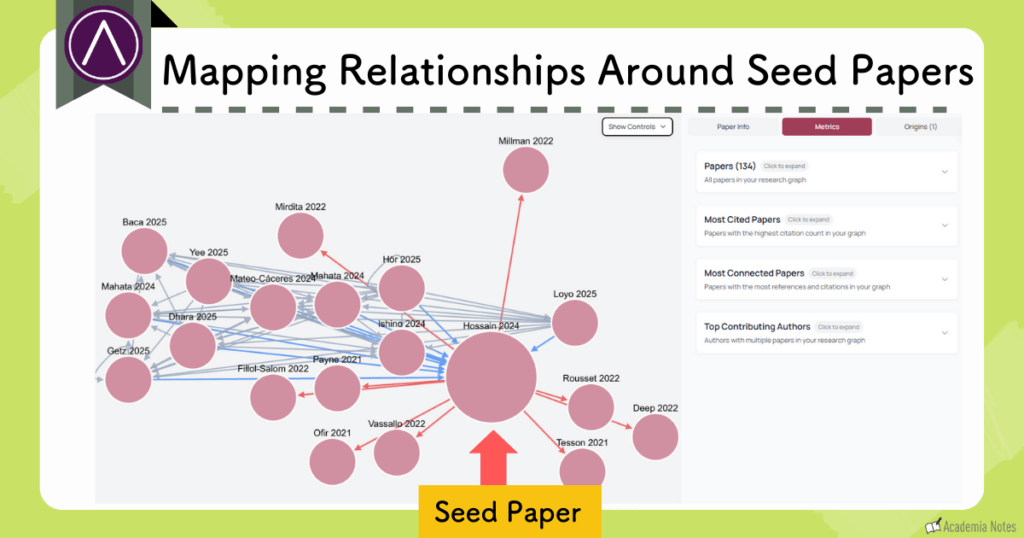
When you upload a single paper, Research Rabbit automatically generates a visual map of related studies connected to the original article:
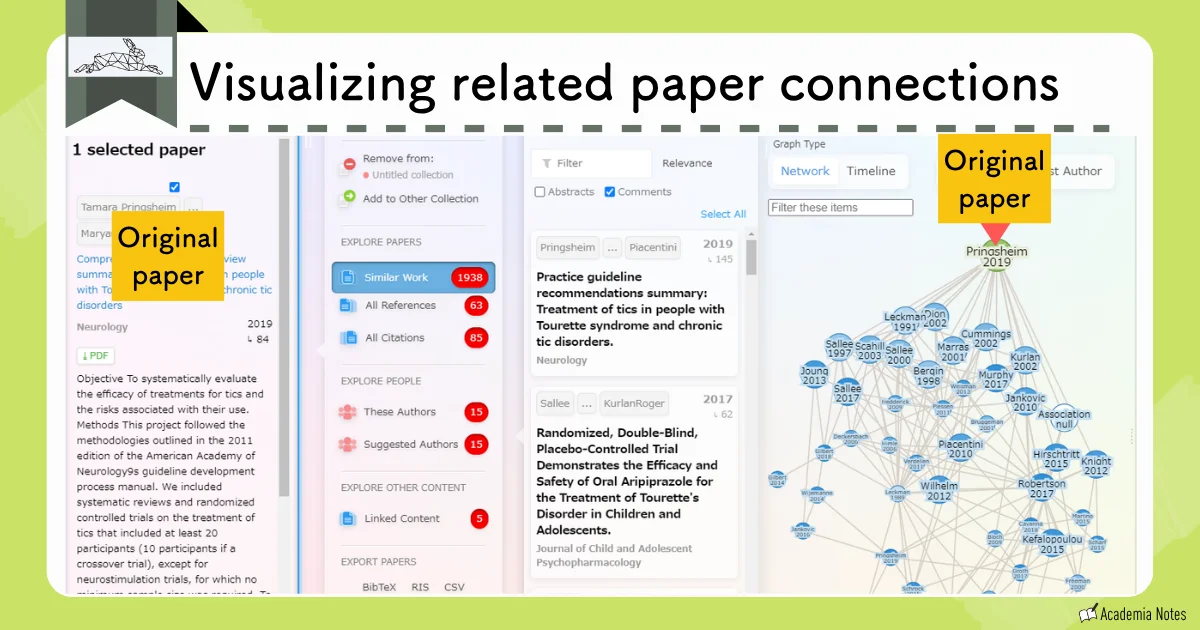
Research Rabbit also integrates seamlessly with Zotero, making it easy to import and manage your papers without disrupting your existing workflow.
By visualizing the broader landscape of the research, you can significantly reduce the risk of overlooking important citations in your literature review.
Feature 2: Deep-Dive into Related Papers
If a particular paper catches your attention, you can click on it to view detailed information and continue exploring its connections in greater depth:
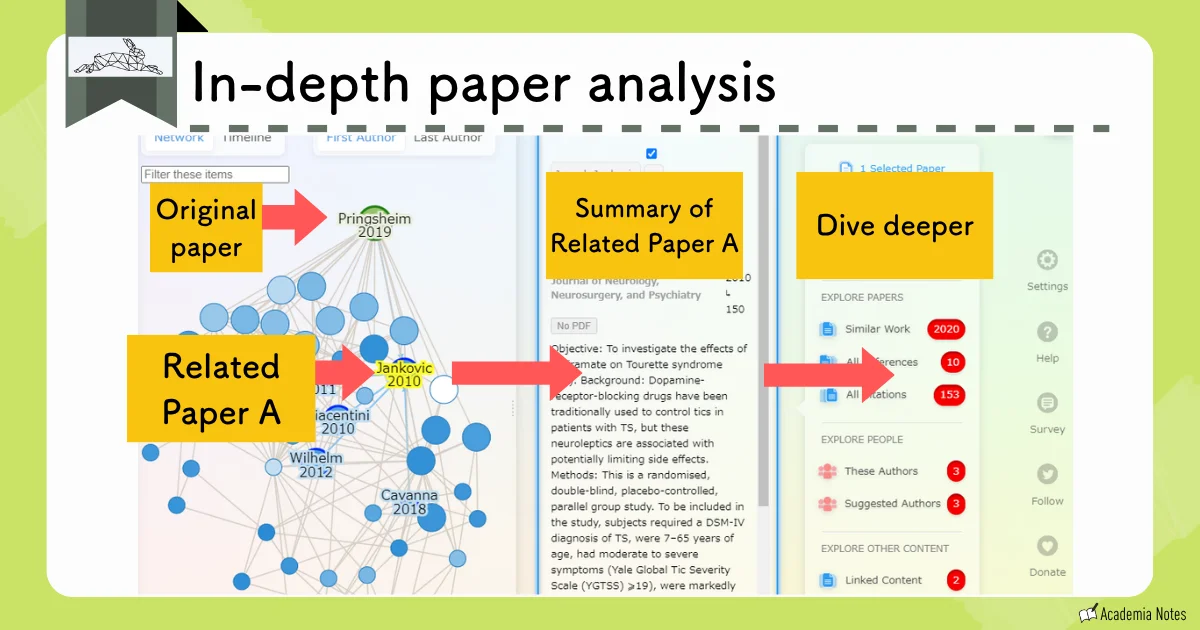
You can also select a related paper—let’s say Paper A—and generate a new visualization centered on that article, allowing you to expand your search from a different starting point.
Feature 3: Organize Results Chronologically
You can also reorganize the results chronologically, making it easier to trace how the research area has evolved over time:
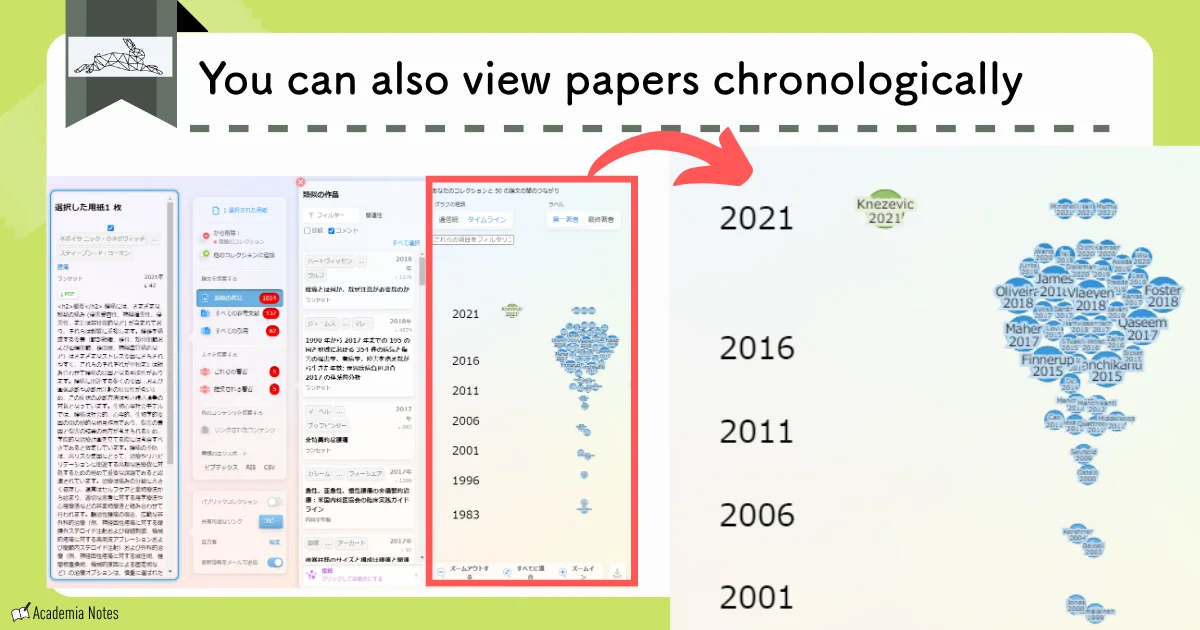
Feature 4: Advanced Search and Filtering Options
You can further refine your search by filtering for similar papers, reference lists, citing articles, specific authors, and other key criteria.
By using Research Rabbit, you can gain a comprehensive view of your field and systematically review related studies without missing key literature.
Research Rabbit Pricing Plans
Research Rabbit is offered completely free of charge.

It’s incredible that such a powerful tool is available at no cost.
To keep the platform free, the team relies on voluntary donations to support its continued development and maintenance.
Donate Here: https://opencollective.com/researchrabbit
How to Get Started with Research Rabbit
First, create an account by registering with your email address and setting a password:
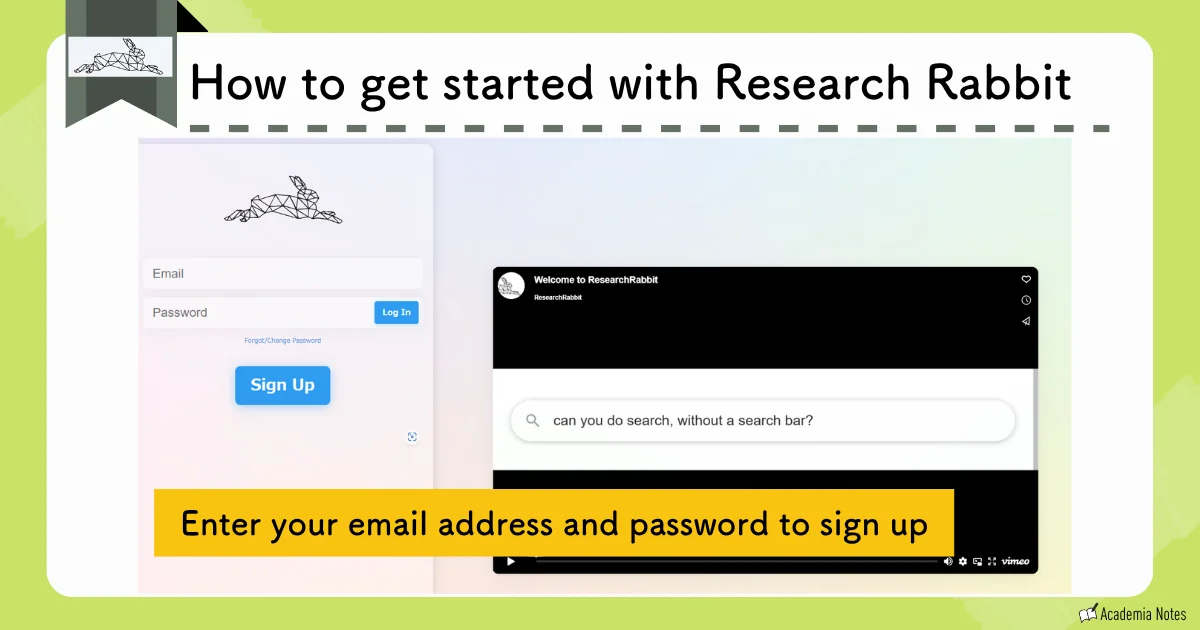
There are no additional registration requirements, so you can begin using the platform right after registering.
From the Research Rabbit homepage, upload the paper you’d like to use as your starting point:
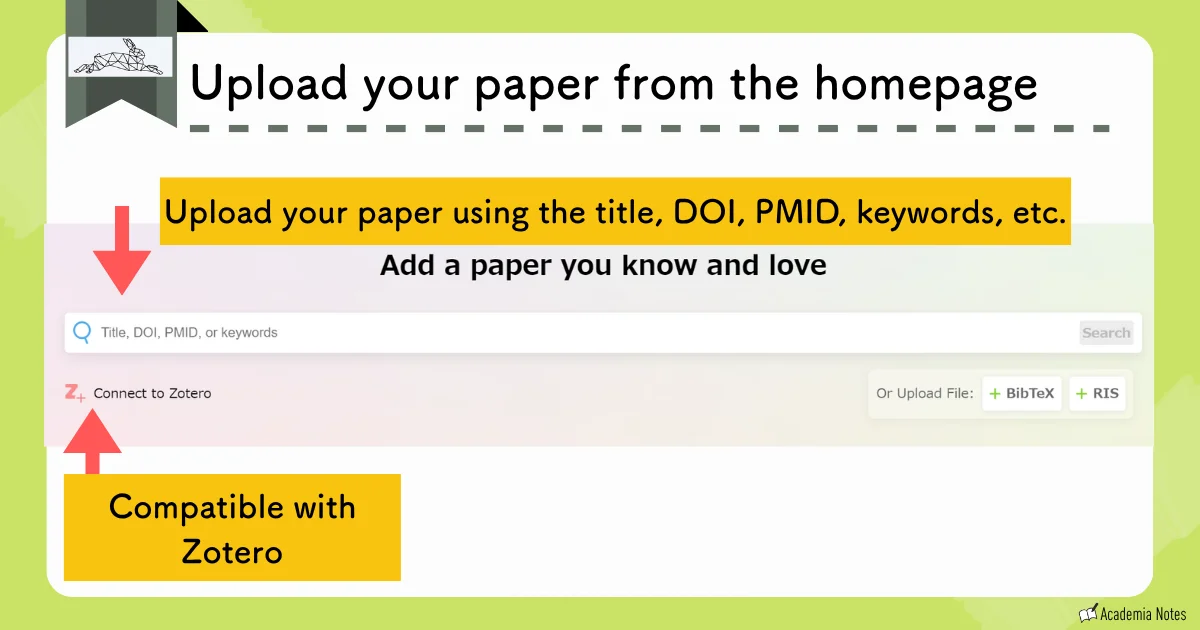
The platform then generates a network visualization of related papers, displayed in an interconnected map like the one shown below:
Similar Tools to Research Rabbit
There are several other tools that, like Research Rabbit, allow you to visualize connections among related academic papers:
AnswerThis

While many citation-visualization platforms function as standalone tools, some all-in-one research platforms—such as AnswerThis—include this capability as one of their integrated features.
With AnswerThis, the entire workflow—from literature search to uncovering related papers—can be completed within a single platform, making the research process seamless and efficient.
See the article below for more details!
Official Website: AnswerThis (https://answerthis.io)
User Guide: Learn more about AnswerThis
AnswerThis is particularly good at generating structured literature reviews, so keep that in mind as you explore its features.
Connected Papers

Similar to Inciteful, Connected Papers visualizes connections among articles by mapping them related to the article you upload as the source paper.
From the generated graph, you can extract insights such as the relationships among key papers, citation patterns, and the relative influence of individual studies within the network:
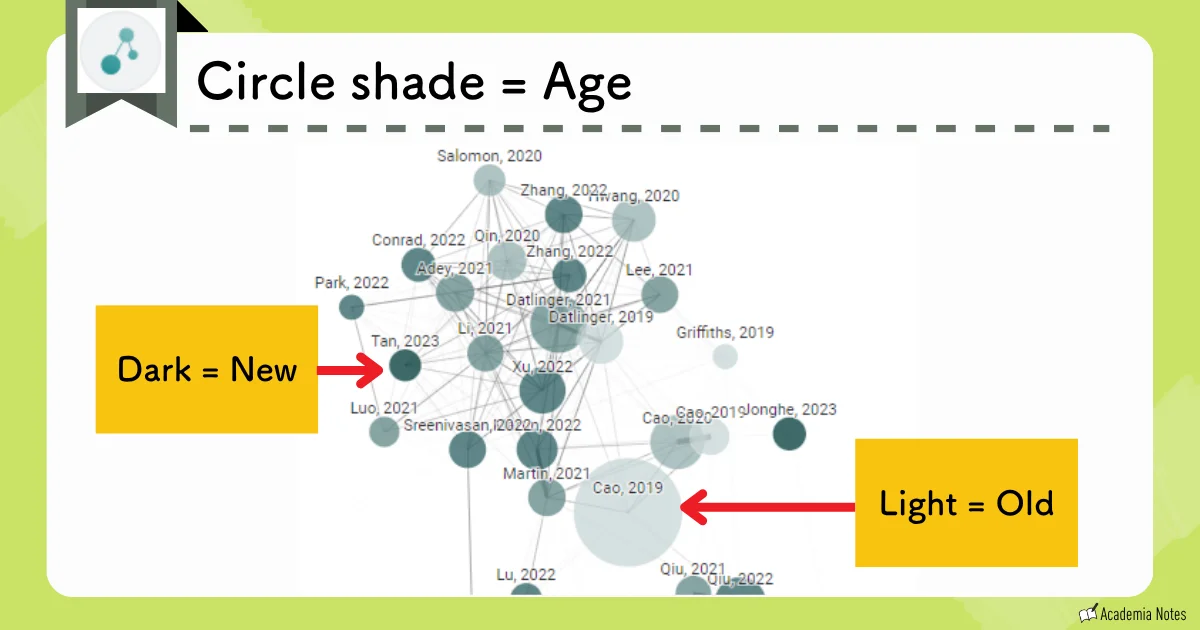
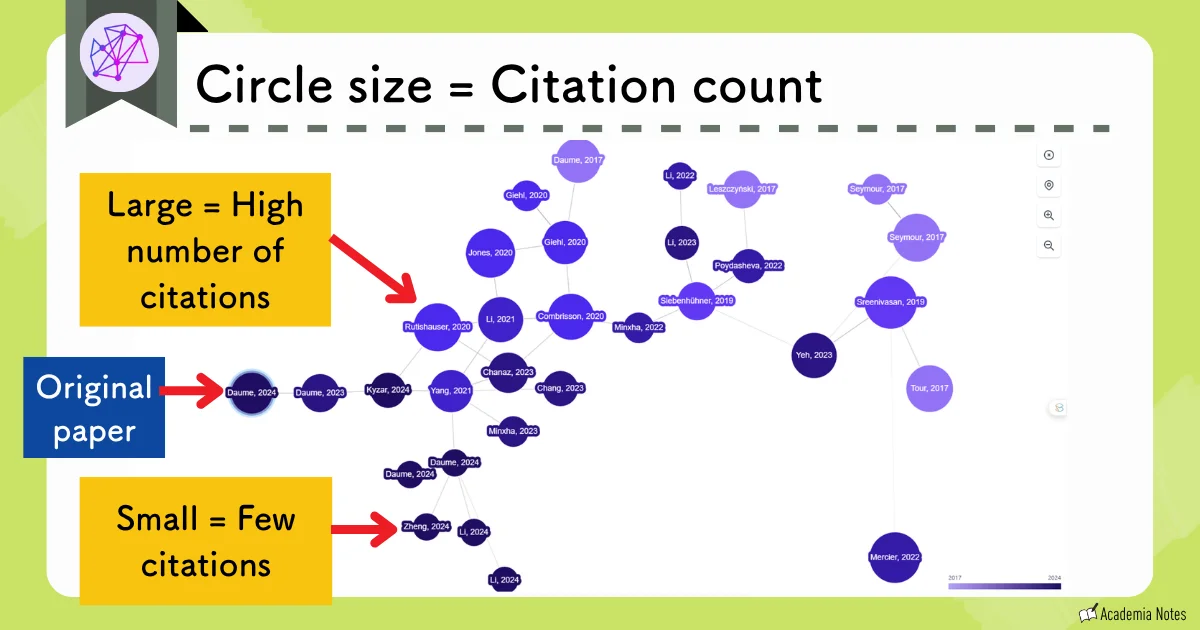
Within the visualization:
- The distance between nodes reflects the strength of the relationship between papers
- The size of each node corresponds to the number of citations it has
- The shade of each node indicates the publication year: darker nodes represent newer research, while lighter nodes represent older works
You can create up to five graphs per month with the free plan.
Connected Papers stands out for its intuitive interface and visually clear presentation, making it easy to navigate and interpret connections between various studies.
Official Website: Connected Papers (https://www.connectedpapers.com/)
User Guide: Learn more about Connected papers
Scite

Scite is a citation analysis tool that categorizes references based on context—identifying whether a citation provides supporting evidence, presents contrasting findings, or simply mentions the work in question.
It color-codes citations to indicate how each citing paper positions itself in relation to the original study:

These citation relationships can also be displayed as a network map, similar to the visualizations provided by Connected Papers:
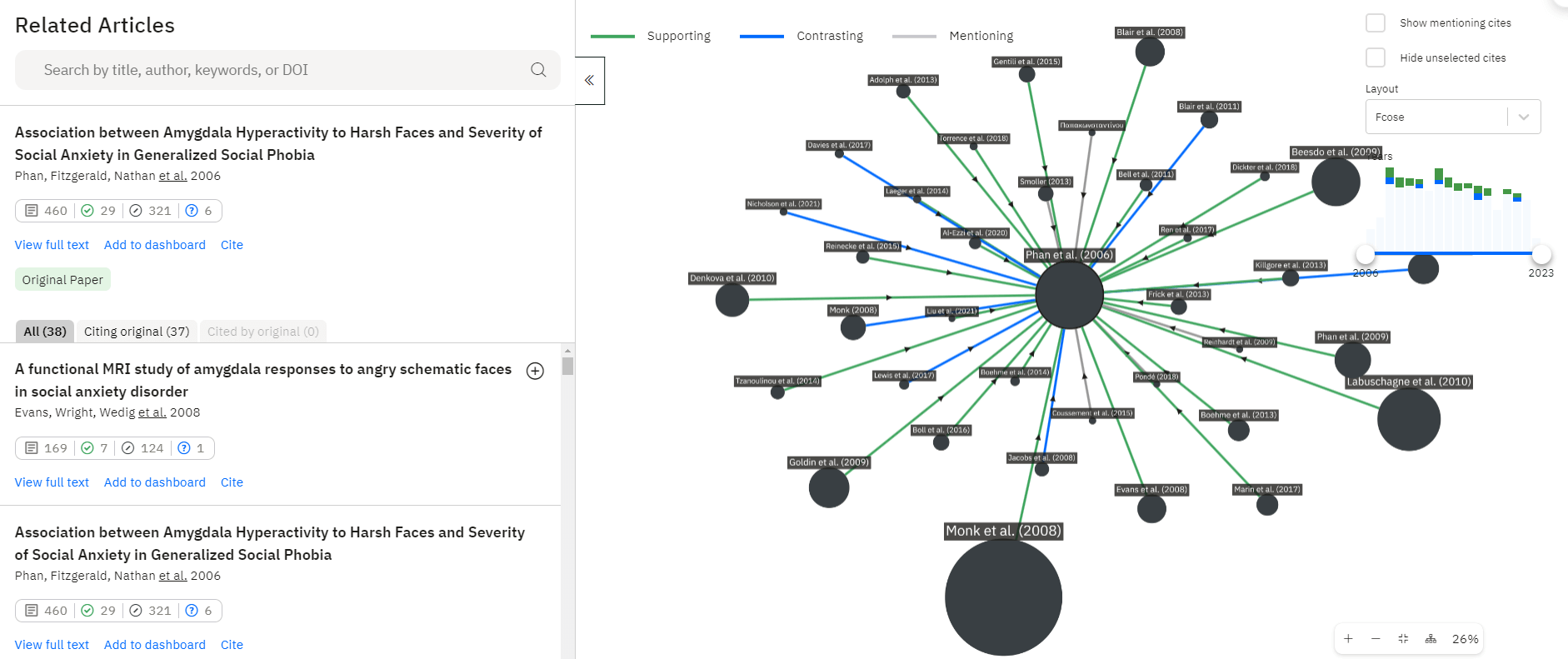
From the diagram, you can interpret the following about the relationship between papers:
- Green arrows: supporting citations
- Blue arrows: contrasting or disputing citations
- Gray arrows: neutral mentions
- Circle size: total citation count
Scite is currently the only tool that distinguishes the contextual stance of citations—clarifying whether a study is being supported, challenged, or simply mentioned by another paper.
Official Website: Scite (https://scite.ai/)
Inciteful

Inciteful, like Connected Papers, is a tool that visually maps relationships among related academic papers:
By uploading a BibTeX file, you can import multiple papers at once.

This tool is available for unlimited use at no cost.
Another advantage is that no account registration is required, making it easy to start using Inciteful immediately.
Official Website: Inciteful (https://inciteful.xyz/)
User Guide: Learn more about Inciteful
Summary of Research Rabbit
- Clearly visualizes related papers, helping you check for potential gaps in your citations
- Allows you to search and filter from multiple perspectives, such as authors, references, and citation patterns
- Completely free to use
It is a tool well worth trying out.
At AcademiaNote, I cover a range of other tools that can benefit researchers and graduate students, so feel free to explore the rest of the site to discover more resources!