
Using Inciteful to Help You Discover New Research: Seven Recommended Features Explained by a Current Researcher<span class="wtr-time-wrap after-title"><span class="wtr-time-number">12</span> min read</span>
In this article, we’ll take a close look at Inciteful, an AI-driven research tool designed to support researchers.

Reviewing the existing literature is essential when it comes to advancing your research.
But identifying the right papers out of the enormous and constantly growing body of research can be overwhelming—and ideally you want that process to be as efficient as possible.
You may have run into challenges like these in the past:

“Someone has already published something similar.”

“I found dozens of related papers, but which ones truly matter?”
Inciteful helps researchers by creating a visual representation of the relationship between different papers, allowing you to quickly identify and prioritize the most important studies in your field of research.

What’s more, it’s completely free to use.
Official Website: Inciteful (https://inciteful.xyz/)
The Seven Key Features of Inciteful
Inciteful is a free AI tool that visualizes the relationships among related academic papers.
Key Points
Feature 1: Visualization of Related Papers
This is what the homepage looks like:
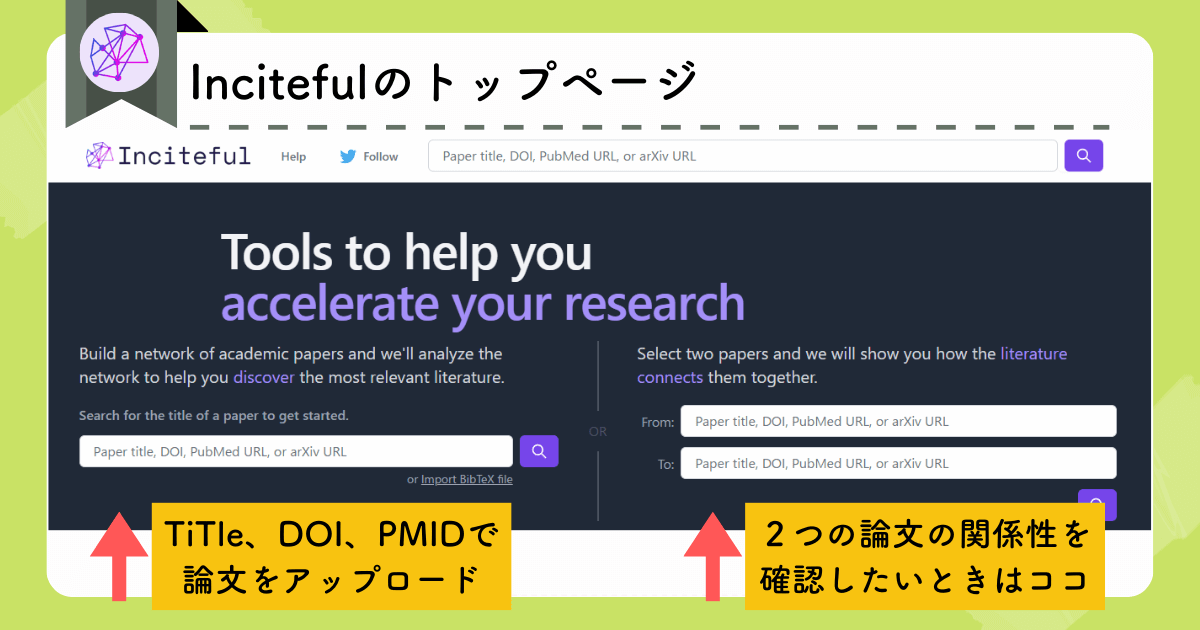
When you upload a source paper, Inciteful automatically generates a graph showing papers that are closely related to it.
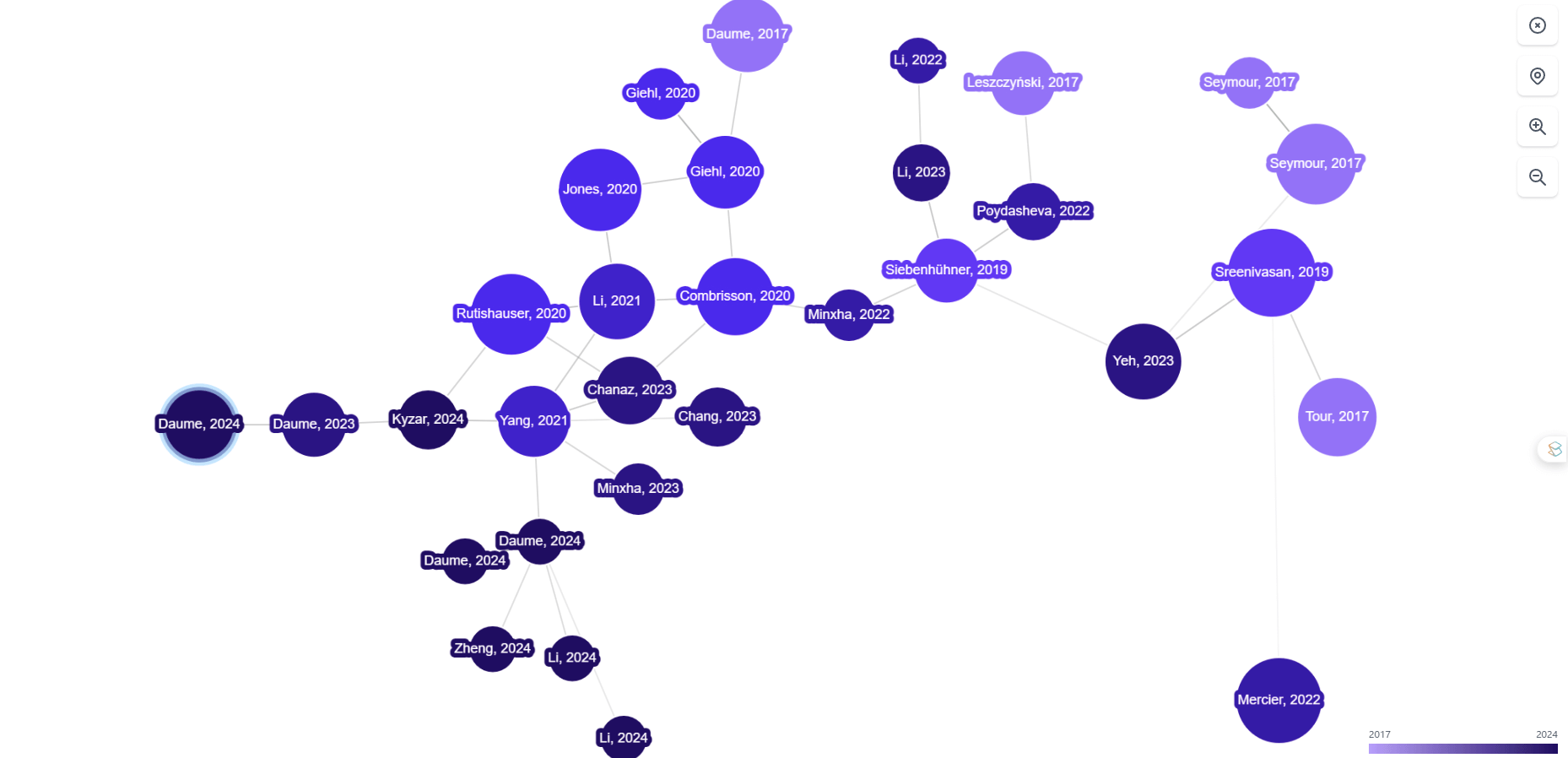
The highlighted circle represents the original paper you uploaded.
This visual format makes it easy to grasp the overall landscape of a research topic at a glance, which is useful when you’re trying to understand the broader context of the research field.
Hovering over any circle displays the paper’s title, and clicking on a circle reveals basic bibliographic information.
Feature 2: Citation Count is Represented by Circle Size
In Inciteful’s visualization, the size of each circle corresponds to the number of citations that paper has received.
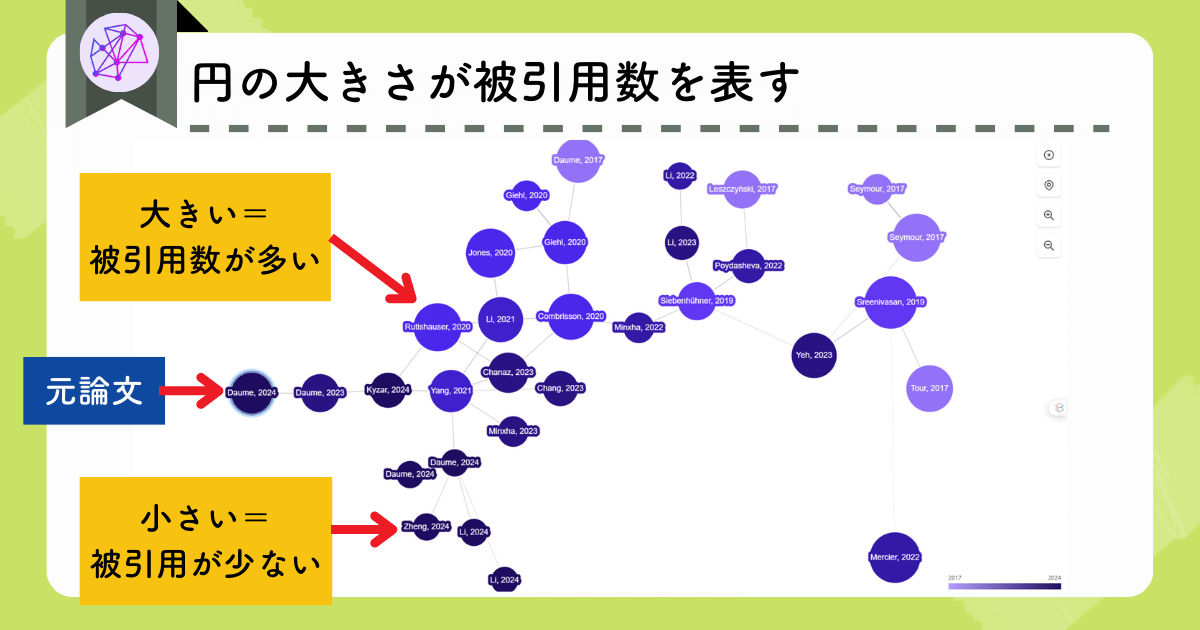
Larger circles indicate highly cited papers, while smaller circles represent papers with fewer citations.
Because heavily cited papers tend to have a stronger influence on a given research area, they’re often worth looking into.
Feature 3: Publication Year is Represented by Circle Color
The intensity of the color of each circle represents how recent the paper is.
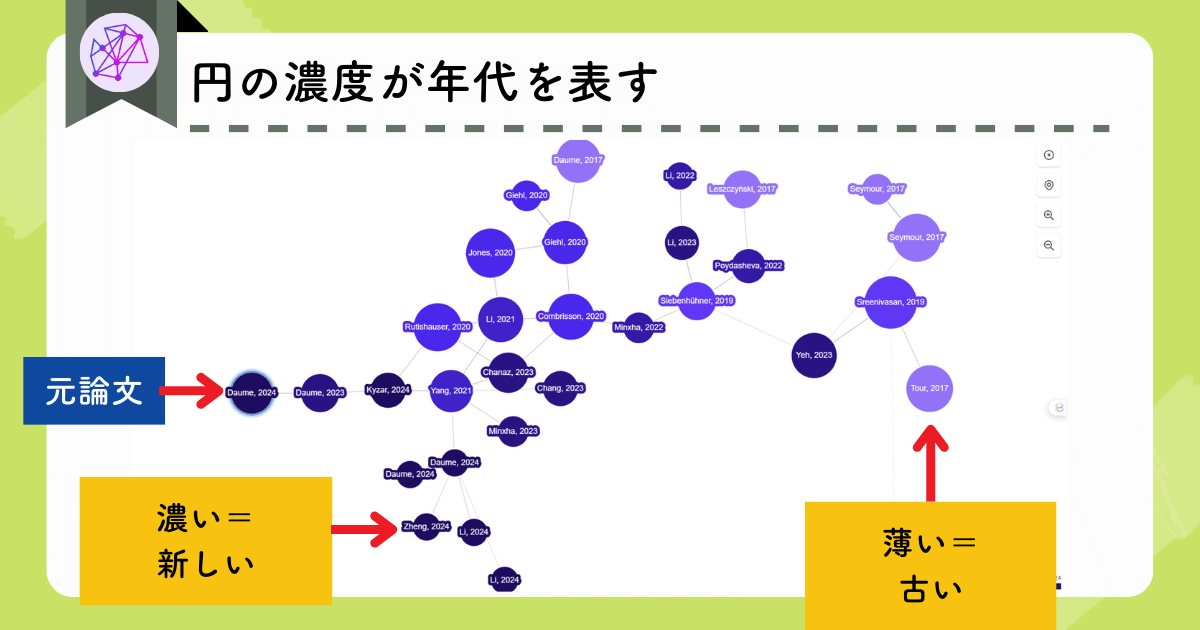
Darker, more saturated circles indicate newer publications, while lighter colored circles indicate older ones.
Starting your review with the most recent studies can help you quickly identify the latest findings in the field.
Feature 4: Ability to Filter Related Papers
Inciteful includes a filtering tool that lets you narrow down the list of related papers.
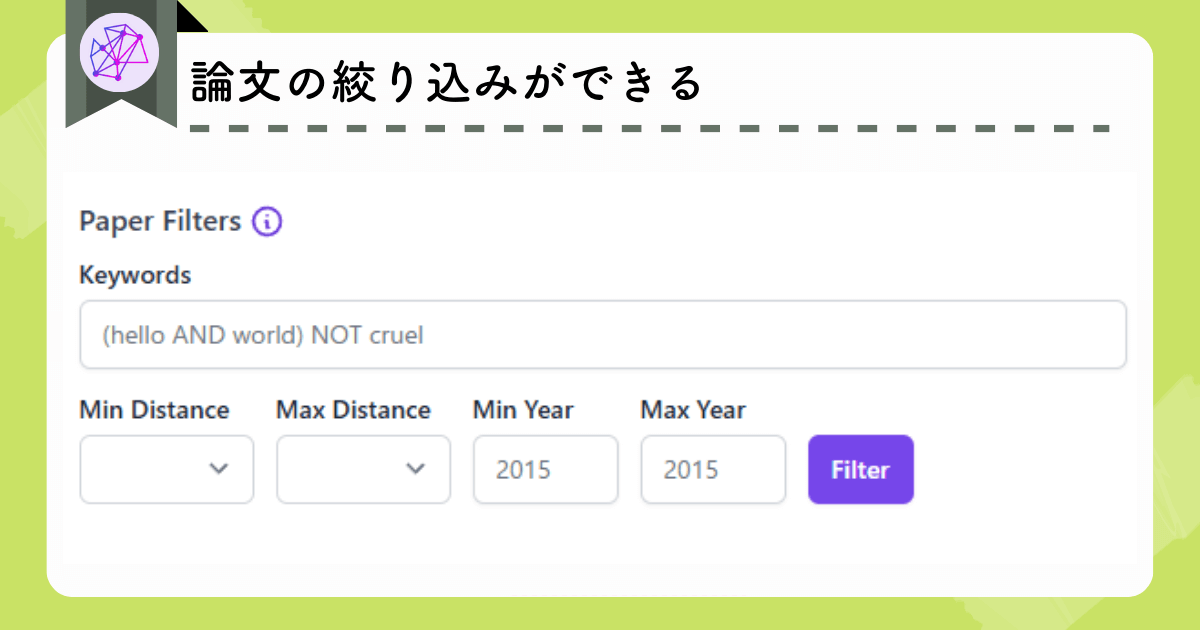
You can filter by publication year, keywords, or the “distance” between papers in the citation network.
This makes it easier to focus your literature review on the studies most relevant to your current research question.
Feature 5: Visualization of the Relationship Between Two Papers
If you want to explore how two specific papers are connected, use the panel on the right side of the homepage.
Enter the two papers you want to compare, and Inciteful will display the papers that form the citation links between them.
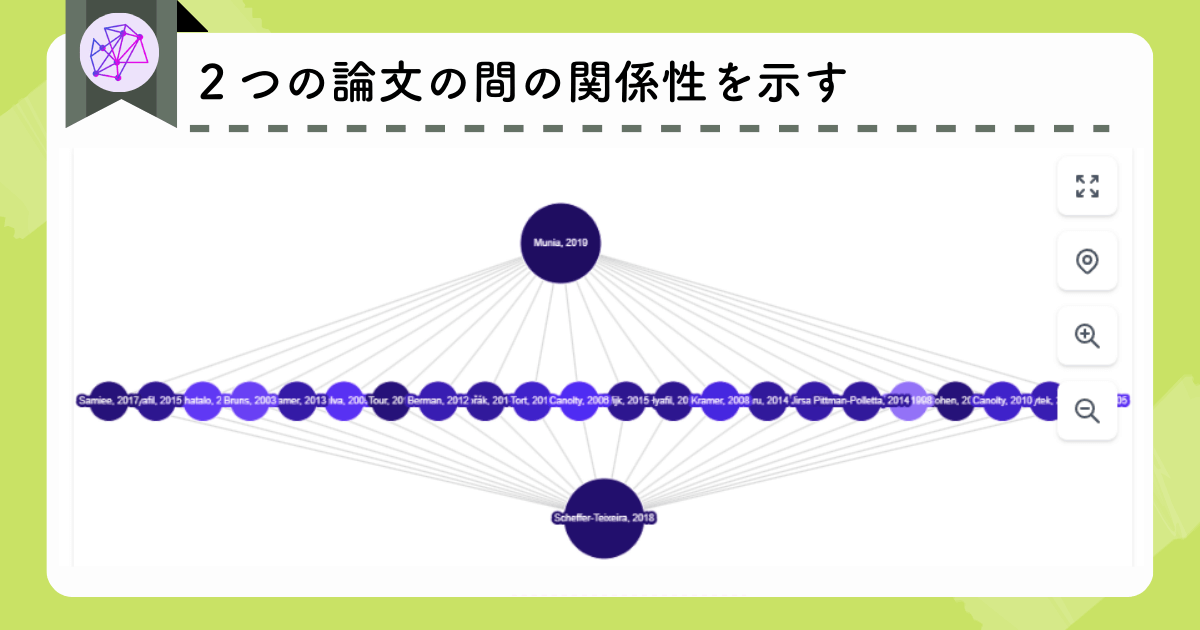

Inciteful highlights the studies that cite (or are cited by) both papers, making it easier to understand how the two works intersect within the broader literature.
Feature 6: Automatic Generation of Lists of Related Papers
Below the related-papers visualization, Inciteful displays a Similar Papers list.
If you scroll further down, you’ll find four additional, categorized lists:
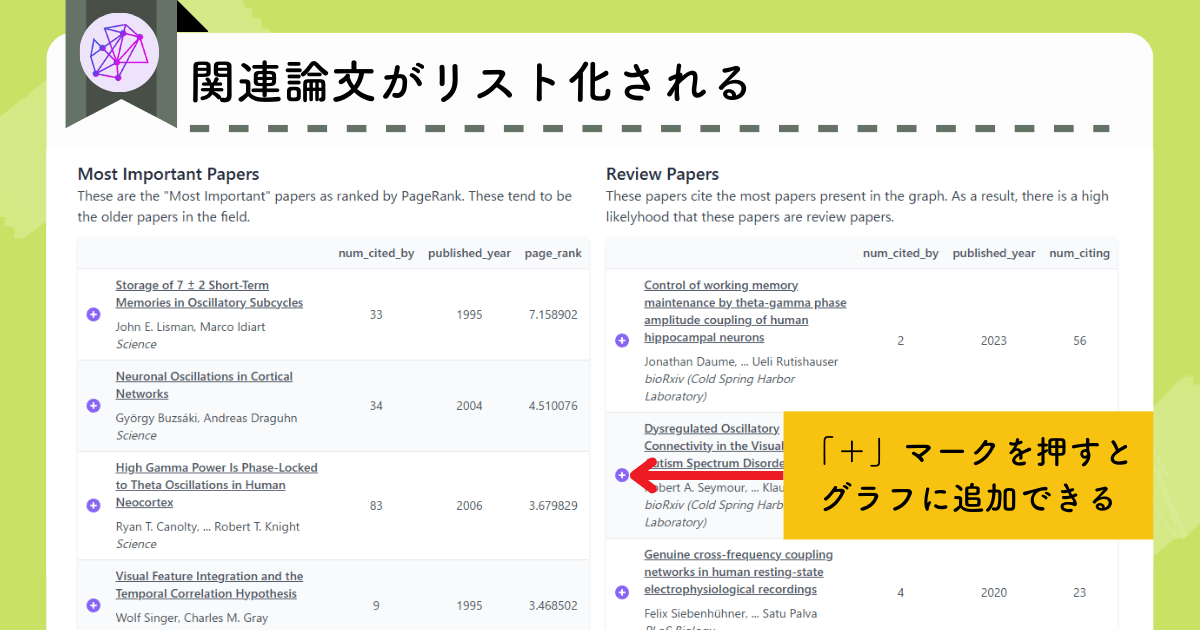
- Most Important Papers
- Review Papers
- Recent Papers by the Top 100 Authors
- The Most Important Recent Papers
Even a quick scan through these lists can give you a good overview of the field.

This is a big help when conducting a literature review!
Feature 7: View Top Authors, Institutions, and Journals
At the bottom of the page, Inciteful automatically generates several additional lists based on the papers in your graph:
- Leading authors
- Affiliated research institutions
- Relevant and similar journals that publish in the research area
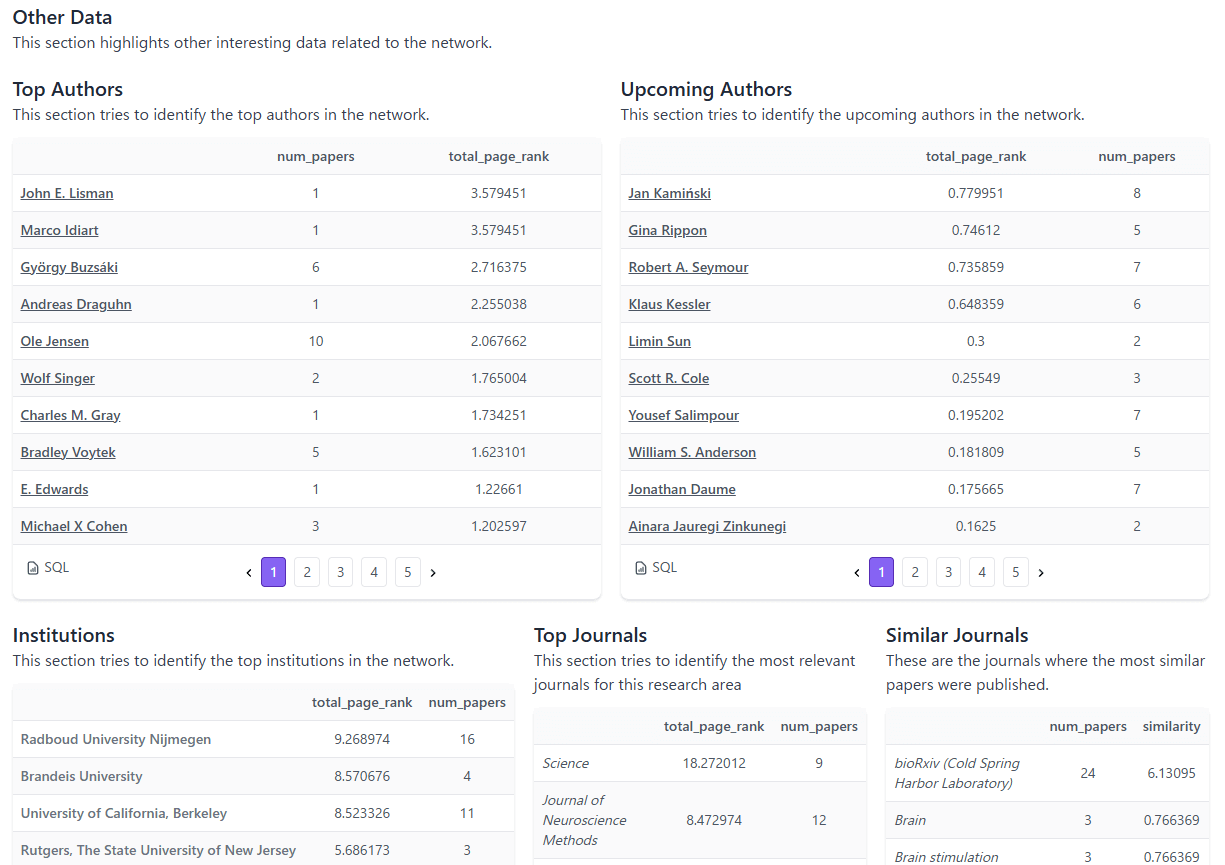
These provide multiple angles for understanding the research landscape.

The Top Journals list is especially helpful when you’re deciding which journal to submit your work to.
Advantages of Inciteful
It’s Completely Free to Use and Has No Usage Limits
At present, Inciteful is completely free to use and imposes no usage limits on users.
You don’t even need to create an account, which makes it easy to try out with minimal commitment.
By using the seven features described above, Inciteful becomes a powerful tool for getting a clear overview of any research topic.
Seamless Integration With Zotero
Another appealing feature is the ability to integrate Inciteful with Zotero
This makes it easy to upload the papers you want to visualize with just a few clicks.
Disadvantages of Inciteful
It Doesn’t Save Previously Generated Graphs
Because the tool doesn’t require you to make an account, any graph you create will disappear once you leave the page.
This means that if you want to revisit a visualization you made earlier, you’ll need to regenerate it from scratch.
Abstracts Cannot Be Viewed on the Graph Page
You can’t view abstracts directly within the visualization page.
If you want to check a paper’s abstract or other detailed information, you have to open each page individually.
How to Get Started with Inciteful
Open the official website.
On the left side of the homepage, you’ll see a white input box. Enter the title, DOI, PubMed URL, or arXiv URL of the paper you want to analyze.
Select the correct paper, click View Graph, and you’re ready to go.
Since no account registration is required, you can start using the tool at any time.
Tools Similar to Inciteful
There are four other tools similar to Inciteful that visualize relationships among research papers:

Here is a brief overview of each.
AnswerThis

Unlike many visualization tools that exist as standalone platforms, AnswerThis offers paper-relationship visualization as just one feature within a broader, all-in-one research workflow.
With AnswerThis, you can search for papers and explore related literature with the same tool, making the entire research process smooth and efficient.
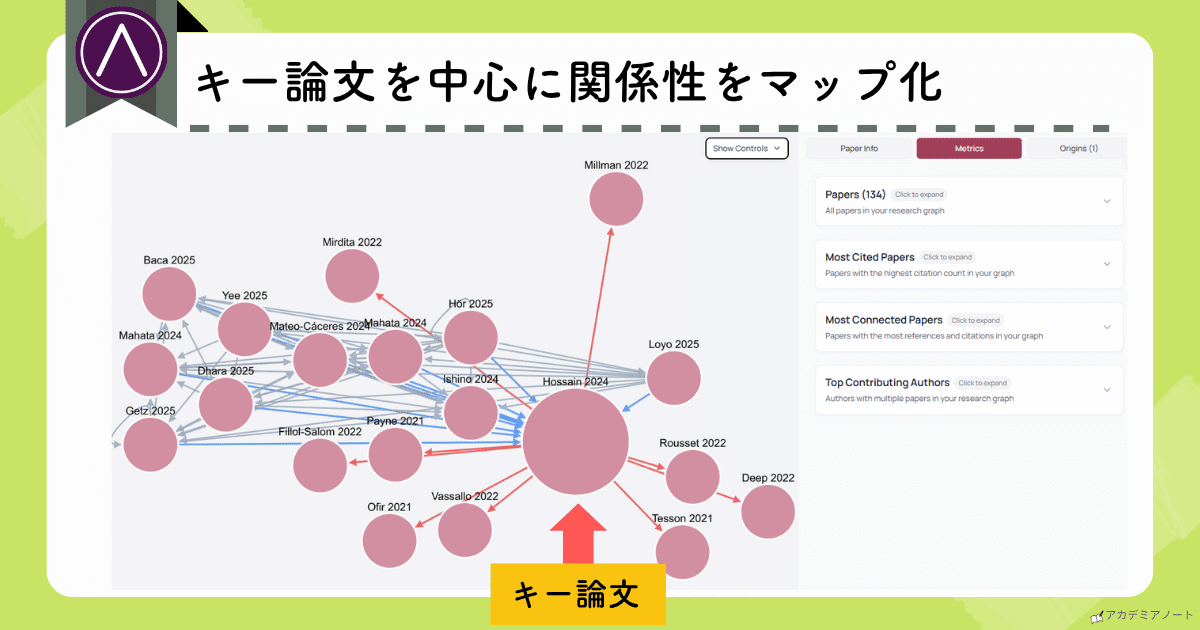
👇More details are available from the links below:
Official Website: AnswerThis(https://answerthis.io)
User Guide: 最新研究AI】AnswerThisとは?機能7選と料金プランを詳しく解説
AnswerThis is especially useful when it comes to the literature review stage, so keep that in mind as you read the above article.
Research Rabbit

Research Rabbit, like Connected Papers, visualizes related papers as an interactive graph.
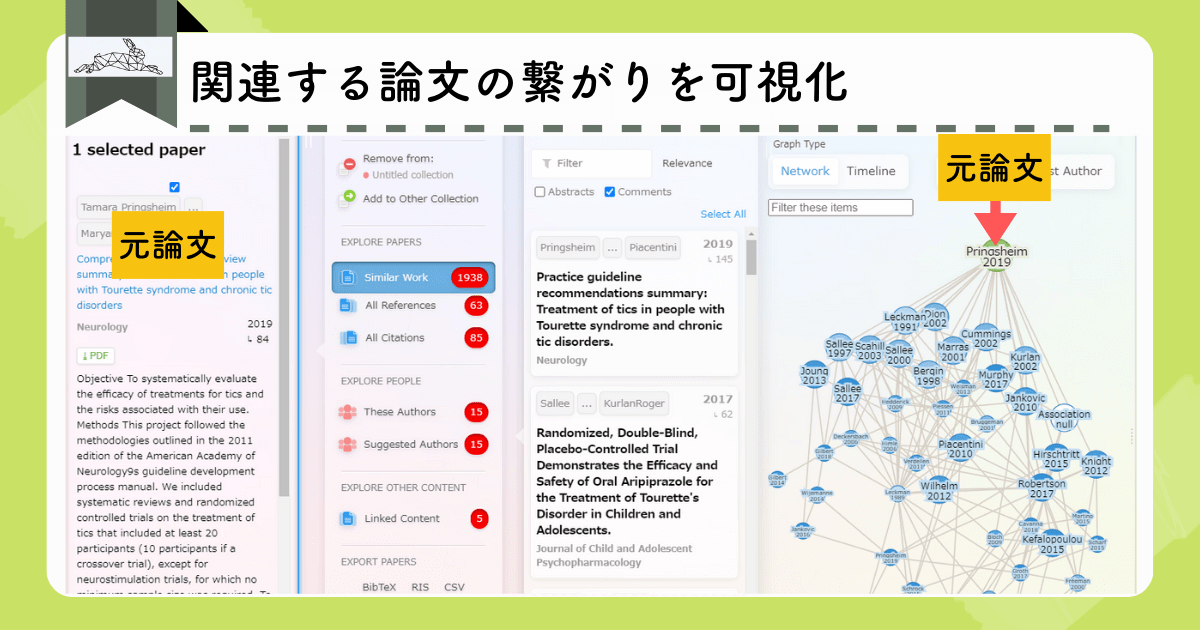
It also integrates with Zotero, making it easy to upload articles directly from your research library.
With Research Rabbit, you can dig deeper into the related literature.
If a paper catches your attention, you can click on it to view its details and explore further connections.
Compared to Connected Papers, it displays a larger number of related studies, making it a good choice when you want to do a more in-depth investigation.
Official Website: Research Rabbit(https://www.researchrabbit.ai/)
User Guide: Research Rabbitとは?関連論文を視覚化してくれるAIツールを現役研究者が解説
Research Rabbit is also completely free to use.
Connected Papers

Like Inciteful, Connected Papers visualizes the relationships among papers based on the article you upload. It then generates a graph that helps you see how studies are connected within a given research area.
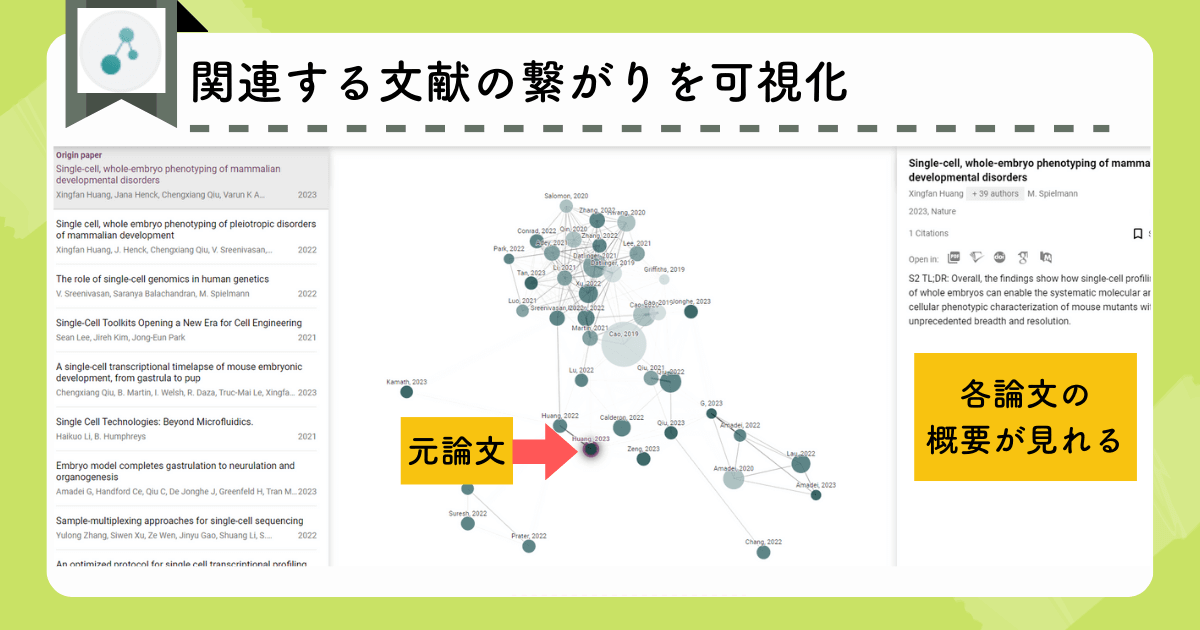
The following information is represented by circles in the graph:
- The distance between circles reflects the strength of the relationship between papers.
- The size of each circle corresponds to the paper’s citation count.
- The saturation (color) of each circle indicates publication year.
You can create up to five graphs each month for free.
Connected Papers’ interface is simple and highly visual, which makes it easy to grasp the overall structure of a topic at a glance.
Official Website: Connected Papers(https://www.connectedpapers.com/)
User Guide: Connected Papersを使うメリットは?おすすめ機能7選と料金プランを解説
Scite_

Scite_ is a tool for examining how a paper is cited in other papers—specifically, whether citations pertaining to that paper are supportive, contradictory, or neutral mentions.
For any given paper, Scite_ color codes how subsequent papers have cited it, making it easy to understand the work’s overall reception.
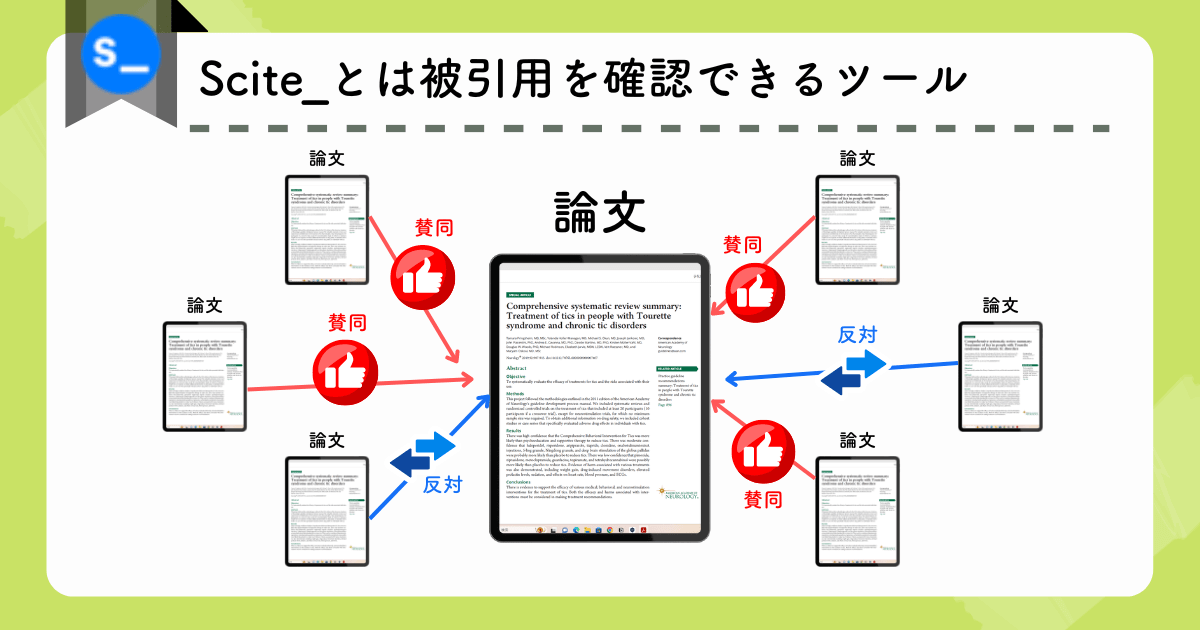
Like Connected Papers, Scite_ can also display these citation relationships as a network graph.
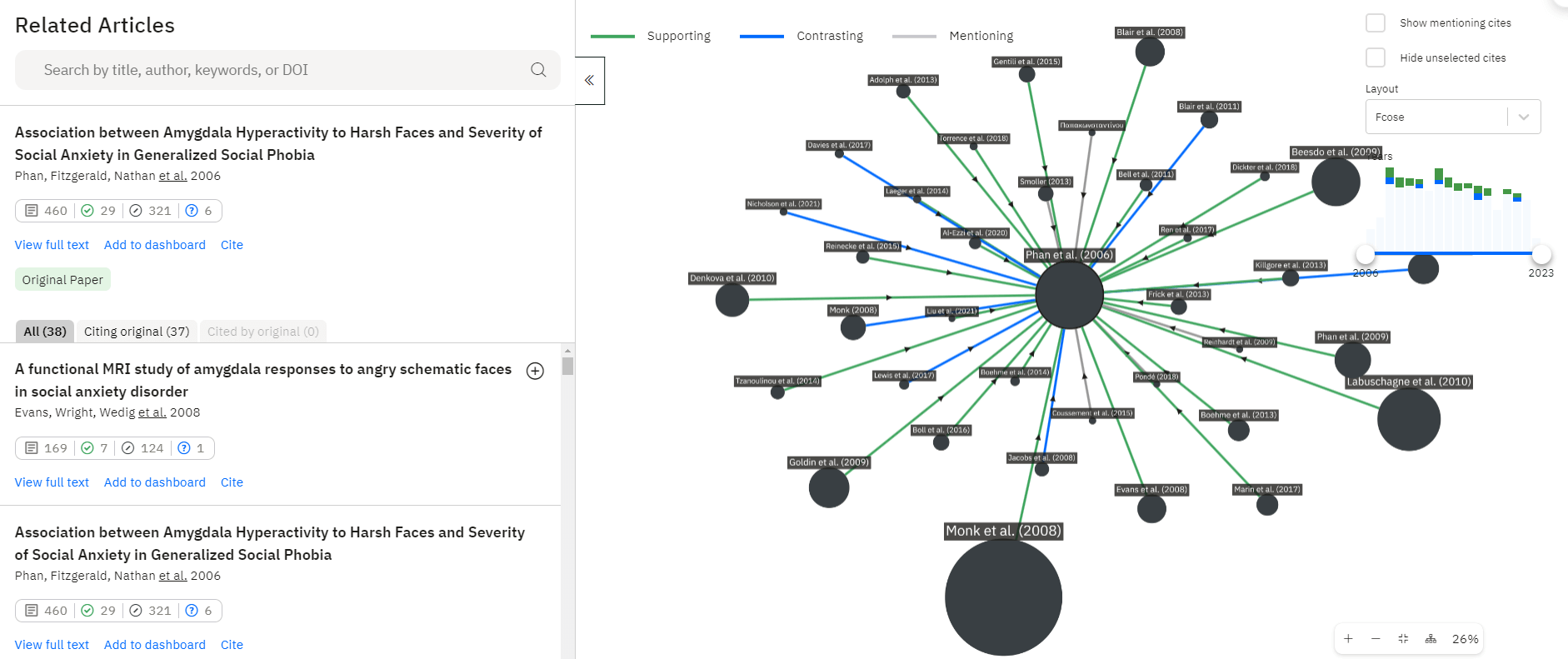
The following information is represented by arrows and circles in the graph:
- Green arrows: supporting citations
- Blue arrows: contradicting citations
- Gray arrows: neutral mentions
- Circle size: number of citations
Scite_ is currently the only tool that categorizes citation stance in this way, which makes it uniquely valuable when assessing the impact and reliability of a study.
Official Website: Scite_(https://scite.ai/)
User Guide: 【現役研究者が解説】Sciteの使い方やメリット:AIが論文の引用をチェック!
Frequently Asked Questions About Inciteful
- In what circumstances is Inciteful most useful?
-
Inciteful is especially helpful when you want to:
- Quickly grasp the overall landscape of a research topic
- Identify key papers, articles, and highly cited studies
- Explore how papers relate to one another without having to read everything
- Start a literature review and need an organized overview before diving deeper
Basically, Inciteful offers a fast way to map the terrain of a research topic before you begin any detailed reading.
- What sets Inciteful apart from similar tools?
-
You don’t need to create an account, so you can start using it at any time and without any hassle.
- How should I use other research tools alongside Inciteful?
-
I recommend starting by getting a broad overview of the research landscape with Inciteful or Connected Papers, and then use Research Rabbit to dig deeper into the specific areas you want to examine more closely.
Summary of Inciteful
- Inciteful visualizes relationships among related papers
- It helps you quickly grasp a research topic from multiple angles
- It’s completely free and offers unlimited use
Inciteful is a powerful tool for examining related literature from different perspectives, and it can significantly reduce the time you spend searching for and organizing papers.
And since it’s free to use, it’s worth trying it out as part of your literature-review workflow!