
Best AI Tools for Literature Search in 2026: Top 5 Compared by a Researcher<span class="wtr-time-wrap after-title"><span class="wtr-time-number">23</span> min read</span>
Search proficiency dictates research outcomes.
This is an undeniable reality.
Immediately after defining your research topic and formulating a plan, you face a significant challenge:

…A vast ocean of literature.
You might think to yourself:
“I can’t find the papers I need.”
“Have I spent this much time searching the literature without realizing it?”
“I’m anxious about missing citations…”
This article introduces literature search methods that use AI to resolve these concerns.
The tools introduced here are SciSpace, Paperguide, Elicit, Consensus, and Connected Papers.
- Search intent is conveyed more clearly
- Target papers are easier to locate
- Eliminates the labor of manually reading abstracts
- Anxiety regarding missing citations is resolved
By using AI tools, the time required for literature search is drastically reduced, and search precision is significantly improved.

There’s no reason not to utilize these tools.
Choosing the Best AI Literature Search Tool for Your Research

The author of this blog is an active researcher with over 10 years of experience.
I use different AI tools for different purposes as follows:
- For daily literature searches: SciSpace, Paperguide
- For finding high-quality papers when I need them: Elicit, Consensus
- For deep-diving into related literature: Connected Papers
New tools are constantly emerging, but these five remain the ones I most frequently use.
Literature search has obviously become much easier.
Here is the search methodology I use.
SciSpace: A Versatile Assistant for Everyday Literature Search

The reason I use SciSpace on a daily basis is simple:
It is exceptional at not only searching the literature but also offers reading support.
It’s incredibly convenient to be able to search for literature and immediately open the papers you find, as is the case with SciSpace.
Moreover, SciSpace is equipped with numerous features designed for daily use by researchers, such as the Library function and writing tools.
There are plenty of reasons to use it.
Here’s what you can do with SciSpace’s literature search:
- Enter a question in sentence format
- Receive a summary (with citations) in response to your question
- View a list of insights and results for each paper
- Ask follow-up questions about each paper
- Conduct more advanced literature searches with “Deep Review”
Literature Search Via Natural Language Questions
On the SciSpace top page, first type the question you want to search for.
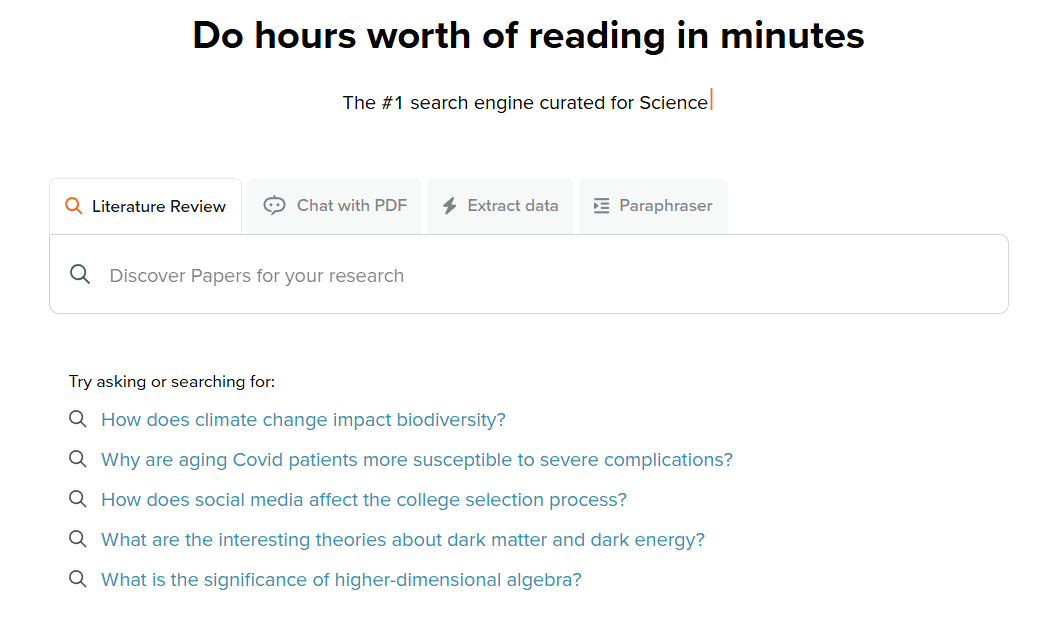
For example:
“How effective is radiotherapy for early-stage (stage I or stage II) lung cancer patients compared to surgery or chemotherapy?”
A rough question like this is sufficient. Inputting questions in languages other than English is also possible.
This way of searching is very easy because you simply need to include the keywords you want to cover within a sentence.
I’m on SciSpace’s top-tier plan, so I use the Agent feature quite often. Being able to narrow the search database to PubMed and others makes it incredibly useful.
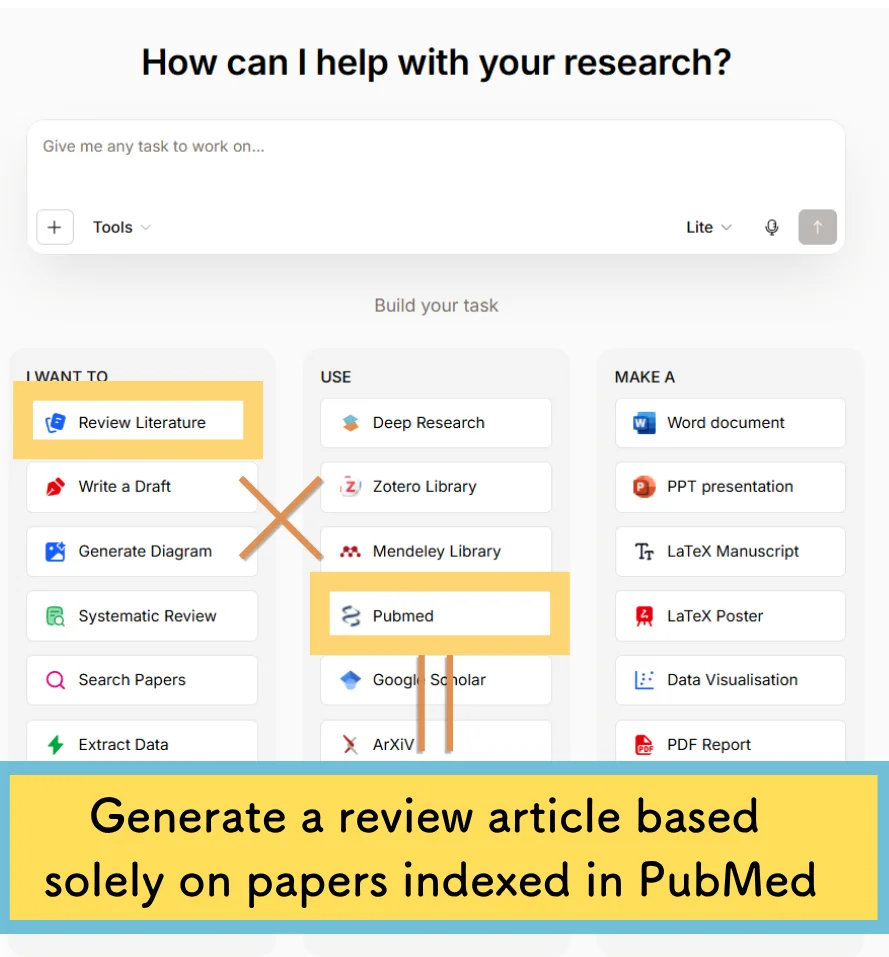
How to search in Agent mode:
- Click “I WANT” and select Review Literature
- Choose your database under “USE”
- Enter your query in the input field
Customizable Tabular Displays for Data Comparison
Now, let’s look at the actual output. Below is the output screen:
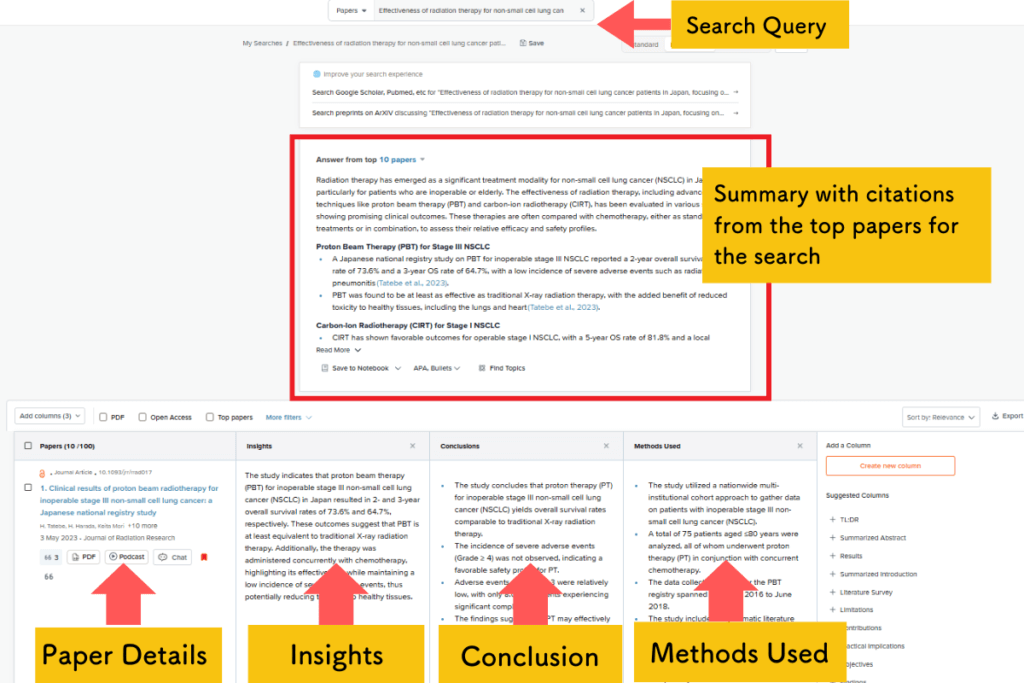
The top of the output screen features a summary with citations.
At the bottom of the output screen is a list of information, insights, and conclusions for each paper:

Not only is the basic information of each paper displayed, but the content and insights are also tabulated.
Furthermore, everything is translated into the language of your choice!
This level of output is generated in less than 30 seconds.
The speed is remarkable. According to SciSpace, it searches a database of over 200 million documents.
The Output Table is Editable
Even more convenient, the table columns can be selected and edited as desired.

For example, you can add sections such as “Methodology” or “Limitations of the Study.”
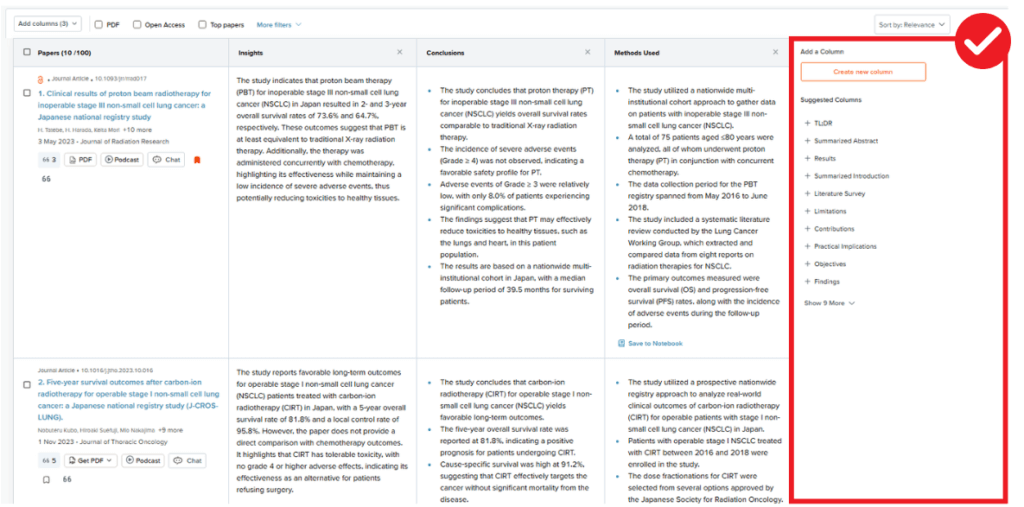
How convenient!
Furthermore, if you’re interested in the details of a specific paper, you can ask the AI specific questions about it:
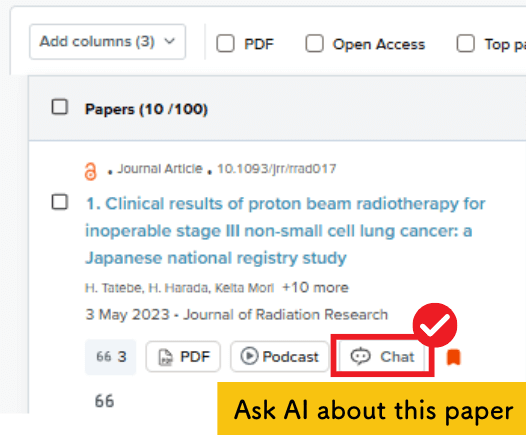

This eliminates the time wasted navigating to a paper’s page and reading the abstract, only to realize, “This isn’t what I was looking for!”
Efficient Organization of Papers in Your Library
Next, I recommend importing any interesting papers you find during your literature search into the SciSpace Library.
By adding them to your Library, you can read the papers anytime using the SciSpace reading support function.
Below is an example of the screen inside the Library:
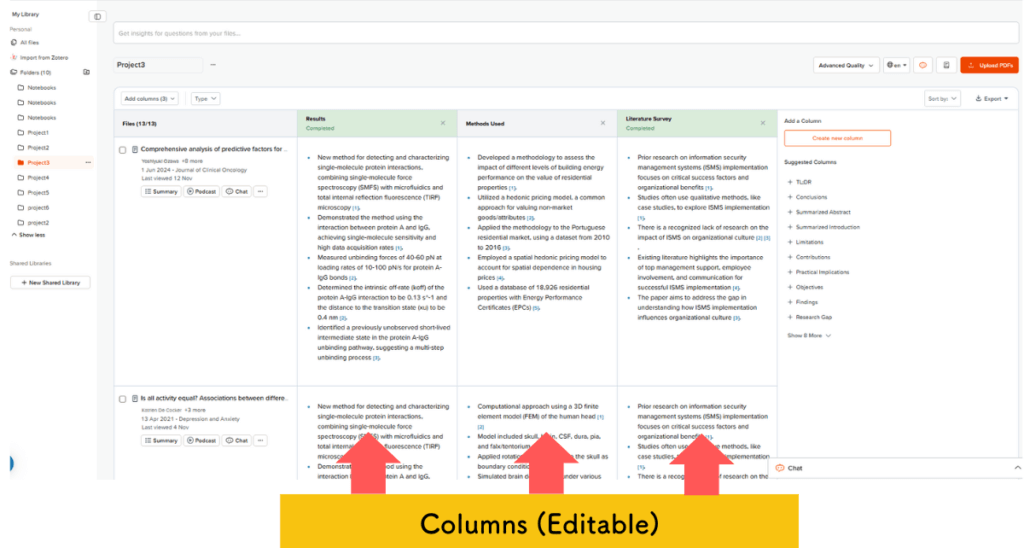
In addition to basic information about the paper, details like Results and Methods are organized into a table (these columns are also editable).
Looking at a list of paper titles in other reference management software often leaves you wondering, “What was this paper about again?”
Having them listed like this is incredibly convenient.
Furthermore, SciSpace‘s Reading Support feature allows you to proceed through difficult papers at ultra-high speed.
While I highly recommend SciSpace, there is one caveat: although a free version is available, I recommend upgrading to the paid version if you decide to use the tool on a regular basis.
I also use the paid version!
I recommend a paid plan for regular use because the AI quality across all features is noticeably lower in the free plan.
However, the paid version is available for about US$7.20 per month.
Coupon Codes:
Annual Plan (40% OFF):
ATSAID40
Monthly Plan (20% OFF):
ATSAID20
Deep Review Allows for High-Performance Literature Search
SciSpace is constantly evolving, and a new literature search feature, Deep Review, was added in February 2025.
If you use Deep Review, you can conduct a search with even higher precision.
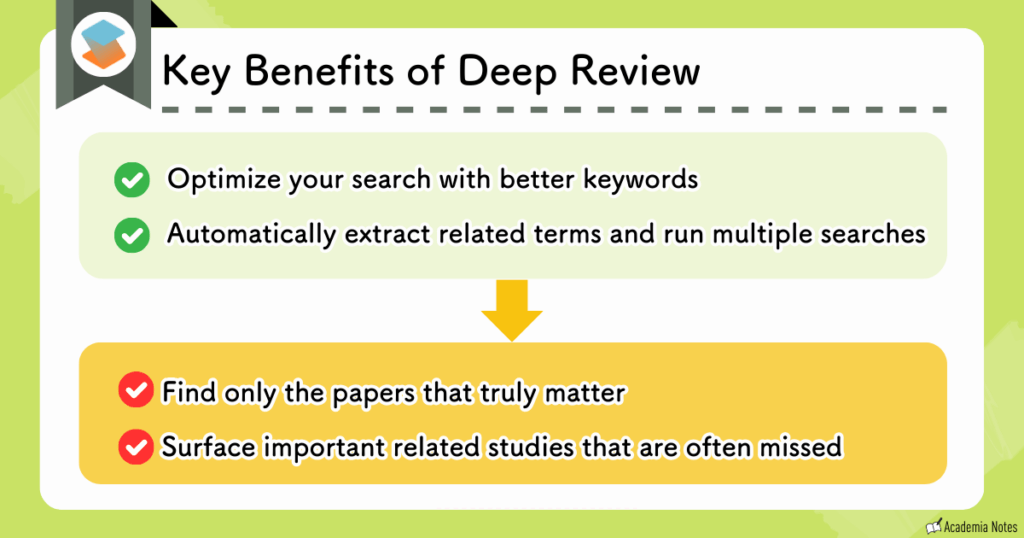
- How does it optimize searches with better keywords?
-
Before executing a search, use the Chat feature to delve deeper into your search intent and optimize your keywords.
- What do you mean by “automatically transform keywords and execute multiple searches?”
-
Deep Review automatically extracts keywords related to your search. Conducting multiple searches for each keyword significantly improves search results.
In order to extract better keywords, the AI deep-dives into your search question via chat:
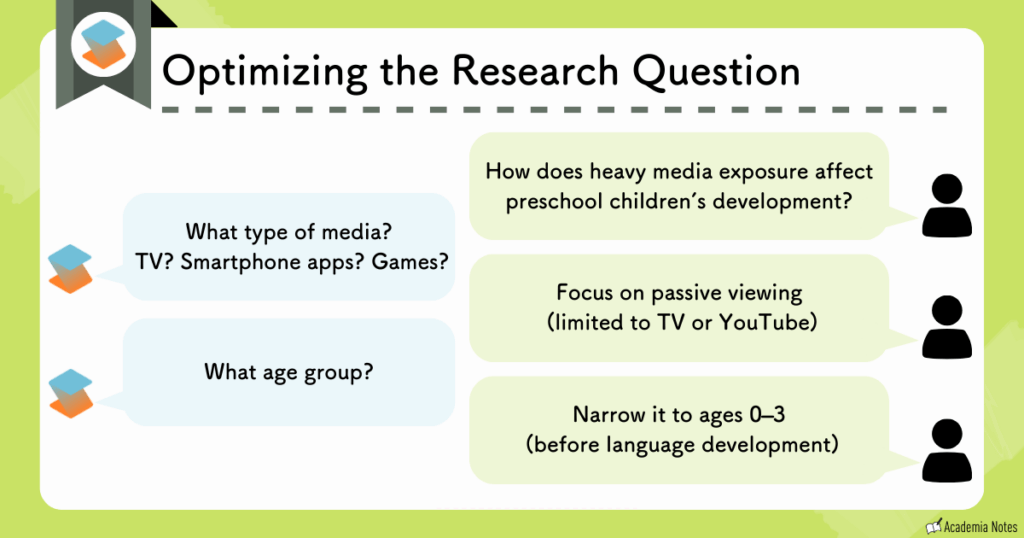
Through the questions asked by the AI, you may identify factors you hadn’t considered.
Furthermore, the AI automatically extracts related keywords to broaden the search scope:
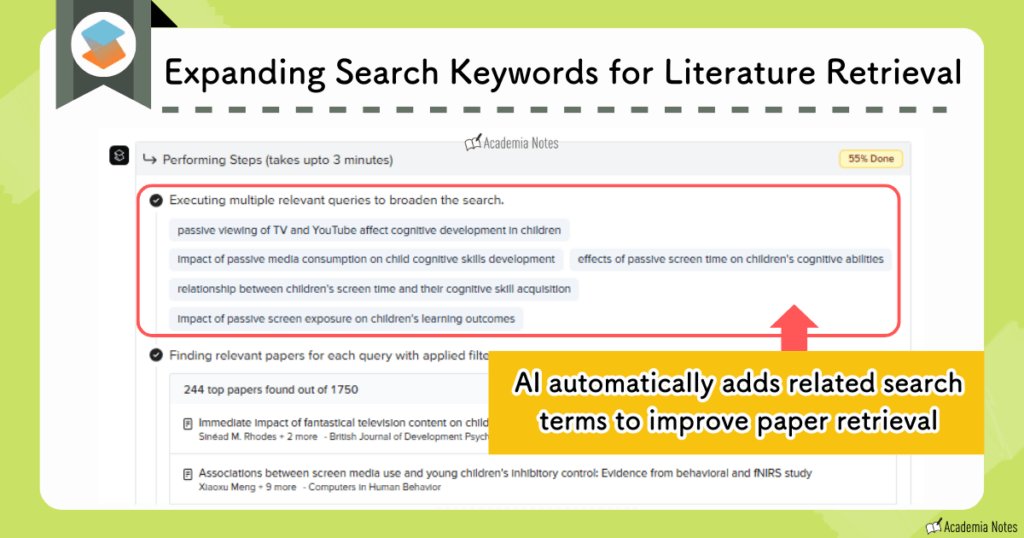
It then executes multiple searches for each newly added keyword.
This prevents search omissions due to differences in phrasing.
In this way, Deep Review achieves overwhelming search precision by adding these two features:
- Optimization of search keywords
- Automatic keyword conversion and simultaneous execution of multiple searches
Actual Review Produced by Deep Review
These features are only available with SciSpace‘s Advanced Plan.
Details regarding Deep Review, including actual output examples and plans, are provided in a separate article.
In addition, SciSpace is packed with features such as writing support (AI-assisted writing and citation insertion), reading support, and podcasts.
It’s truly an all-in-one tool for researchers.
Please read these explanatory articles as well:
Official Website:SciSpace (https://typeset.io/)
Coupon Codes:
Annual Plan (40% OFF):
ATSAID40
Monthly Plan (20% OFF):
ATSAID20
User Guide:Learn more about SciSpace, Learn more about SciSpace
Paperguide: High-Performance Search and Deep Research

Paperguide is a tool that has recently been gaining popularity among researchers.
It offers nearly equivalent features to SciSpace at a significantly lower price.

With the arrival of “Deep Research” in June 2025, its performance has further improved.
Paperguide’s focus on the AI Writer feature also differentiates it from SciSpace!
Three Specialized Literature Search Modes
Paperguide offers the following three types of literature search modes:
| AI Search | Literature Review | Deep Research |
|---|---|---|
| For when you want an overview of the literature | For when you want to find papers | For when you want to find papers and create a detailed review based on them |
In Deep Research, keyword optimization is first performed via chat (similar to SciSpace).
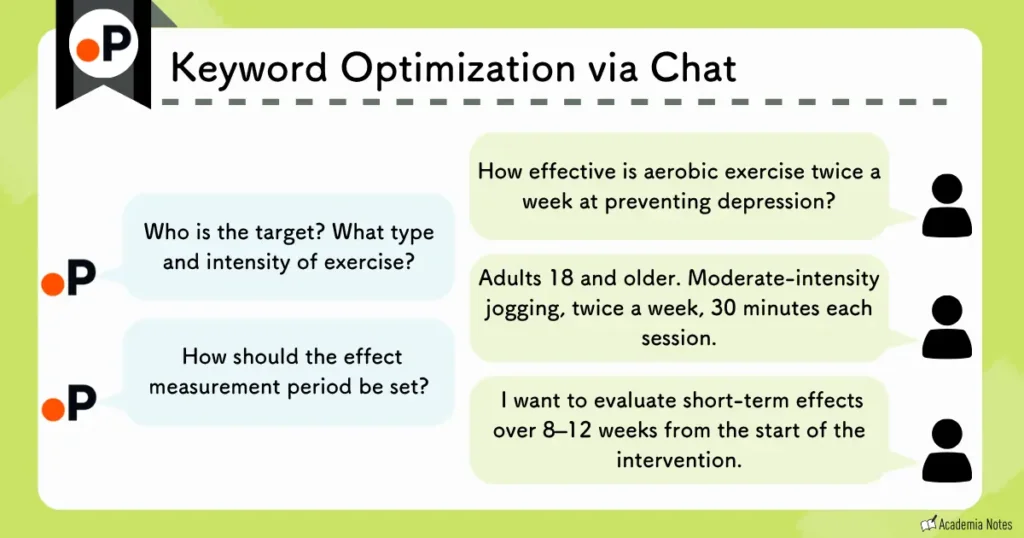
After the chat, the research question is significantly refined:
| Before | After (Generated by AI via chat) |
|---|---|
| How effective is aerobic exercise twice a week for preventing depression? | How effective is moderate jogging twice a week (30 minutes per session) for preventing depression based on self-reported depressive symptom scores (e.g., PHQ-9) in general adults aged 18 and older? (Focusing on randomized controlled trials, but also including observational studies.) |
Furthermore, Paperguide features a Controlled Deep Research mode, allowing users to add, modify, or delete the following points:
- Sub-questions (questions used to broaden the search)
- Screening criteria for papers
- Selected papers
Users can intervene significantly when creating their literature review. This is what distinguishes Paperguide’s Deep Research from SciSpace‘s Deep Review!
A detailed review like the one below is generated:
Paperguide allows the use of Deep Research even with the free plan.
However, because there is a limit on the number of searches, you will need to upgrade your plan if you wish to use Deep Research more frequently.
Deep Research Usage Limits:
- Free Plan: Up to 2 times
- Plus Plan: Up to 10 times
- Pro Plan: Up to 50 times
Price comparison with SciSpace:
| SciSpace (Advanced Plan) | Paperguide (Free – Pro Plan) |
|---|---|
| US$42/month (after using the 40% discount coupon on this site) | US$0 – $19.20/month (after using the 40% discount coupon on this site) |
Moreover, Paperguide offers a student discount of 40% off.
The value for money is outstanding.
Besides Deep Research, Paperguide’s other literature searches are also user-friendly.
Use AI Search when you want to get an overview in response to a research question:
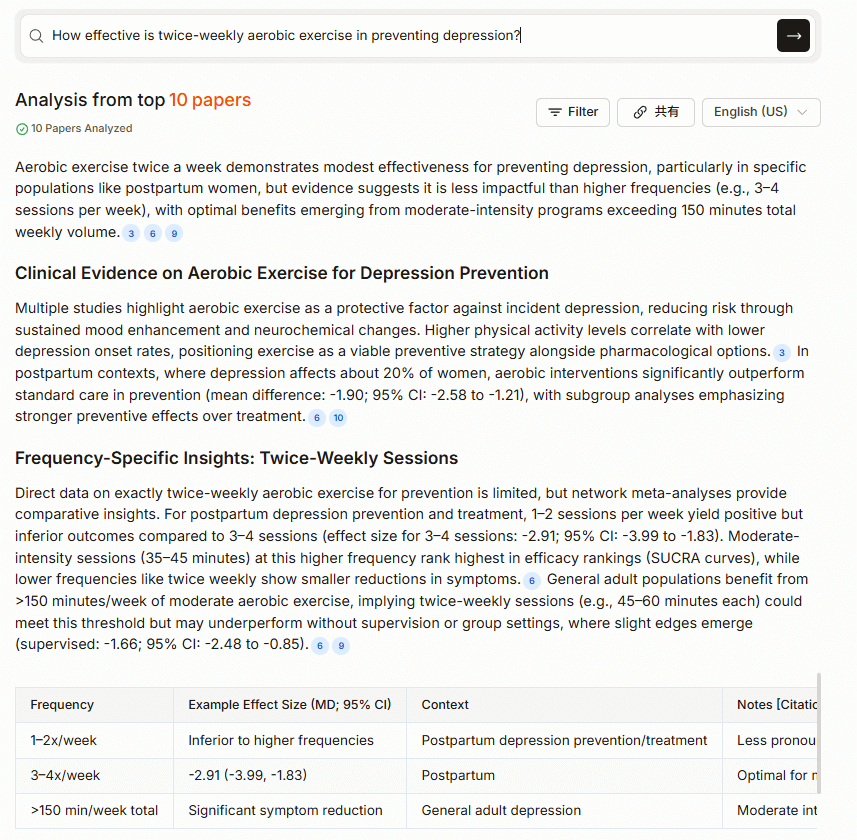
Use Literature Review when you want to find papers in response to a research question:

You can use these search modes selectively, depending on your needs.
Furthermore, Paperguide is a competitor of SciSpace, also offering writing support, reading support, and library functions.
Please take a look at the explanatory articles about Paperguide:
Official Website:Paperguide (https://paperguide.ai/)
Coupon Code (20% OFF, annual and monthly): ACADEMIA20
User Guide:Learn more about Paperguide
Elicit: Comprehensive and Systematic Reviews

Elicit is particularly useful when you want to explore a new research area.
Its most compelling features are:
- Exploration of new research areas with an agentic platform
- Automatic generation of high-quality systematic reviews
- A table of papers that lets you jump directly to each cited passage
Exploration of New Research Domains with an Agentic AI Platform
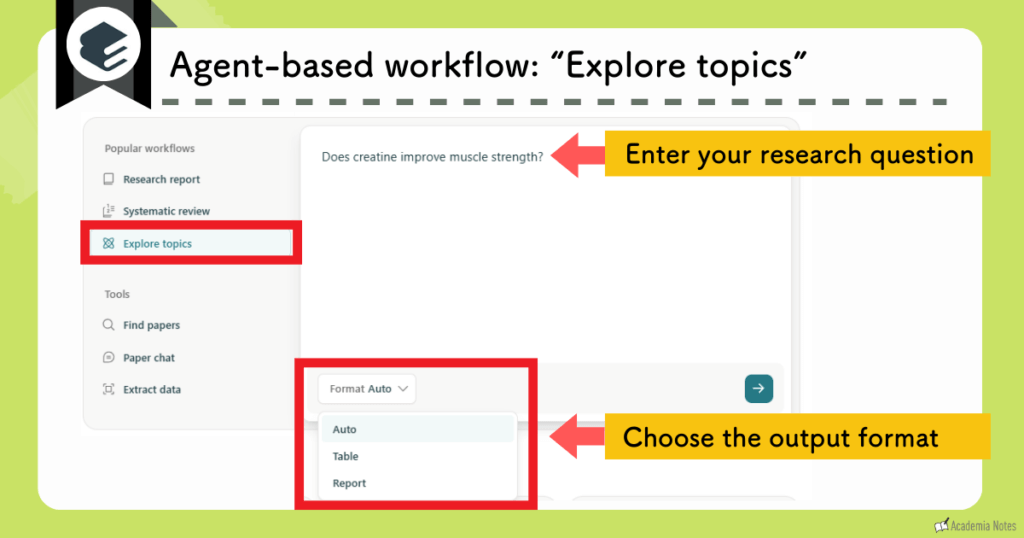
The new feature “Explore Topics” uses agentic AI in its platform.
Here’s what it can do:
- It draws not only on academic papers but also on many other sources of information
- It allows customization of the output format and refinement of the report via chat
On the main screen, you enter your research question and choose an output format:
You then specify the direction of the output:
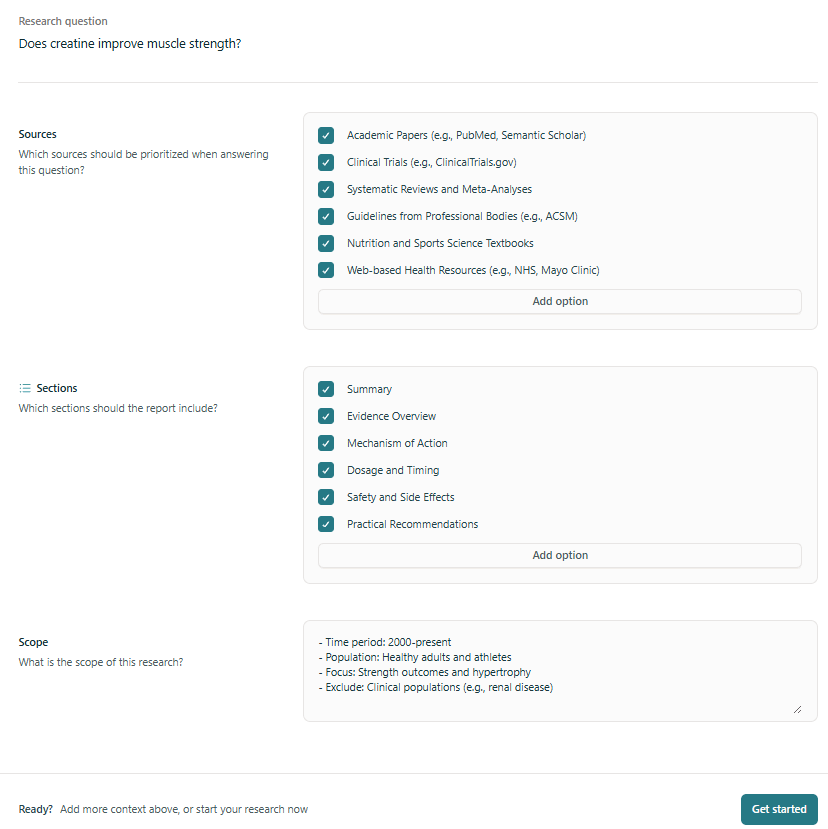
Select Sources & Sections: Elicit allows you to pull information from diverse sources, including academic papers, clinical trials, guidelines, and textbooks. You can then customize the structure of your report by selecting sections such as Evidence Overviews, Mechanisms of Action, or Practical Recommendations.
Refine the Scope: Elicit automatically defines the search scope—such as time period, population, and exclusion criteria—which you can easily review and adjust to ensure relevance.
Elicit then generates a detailed report:
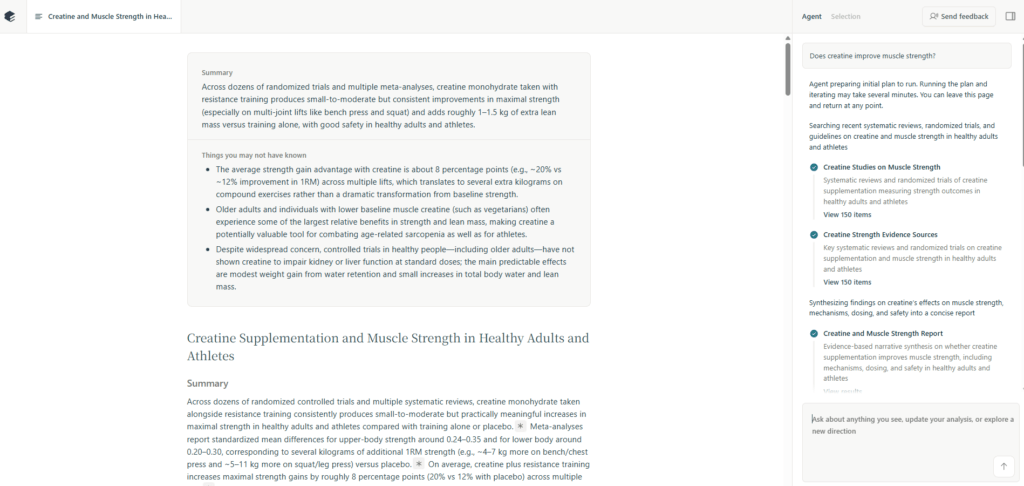
This is where the feature really shines: you can use the chat window in the bottom-right corner to request further deep-dives.
Examples of follow-up deep-dives:
- Narrow the scope: “Limit the population to women/older adults and revise the conclusions”
- Tabulate results: “Summarize key meta-analyses in a table with effect sizes and citations”
- Discover critical insights: “List the limitations and potential biases of these conclusions”
With previous AI tools, you typically got a one-shot output and had to rerun the search whenever you wanted to tweak it.
Elicit removes that friction and lets you iteratively refine the output while you review it, so you can extract information that better matches your research intent.
This feature is extremely useful when you are trying to break into a new research area.
Streamline Systematic Reviews with High-Quality Synthesis
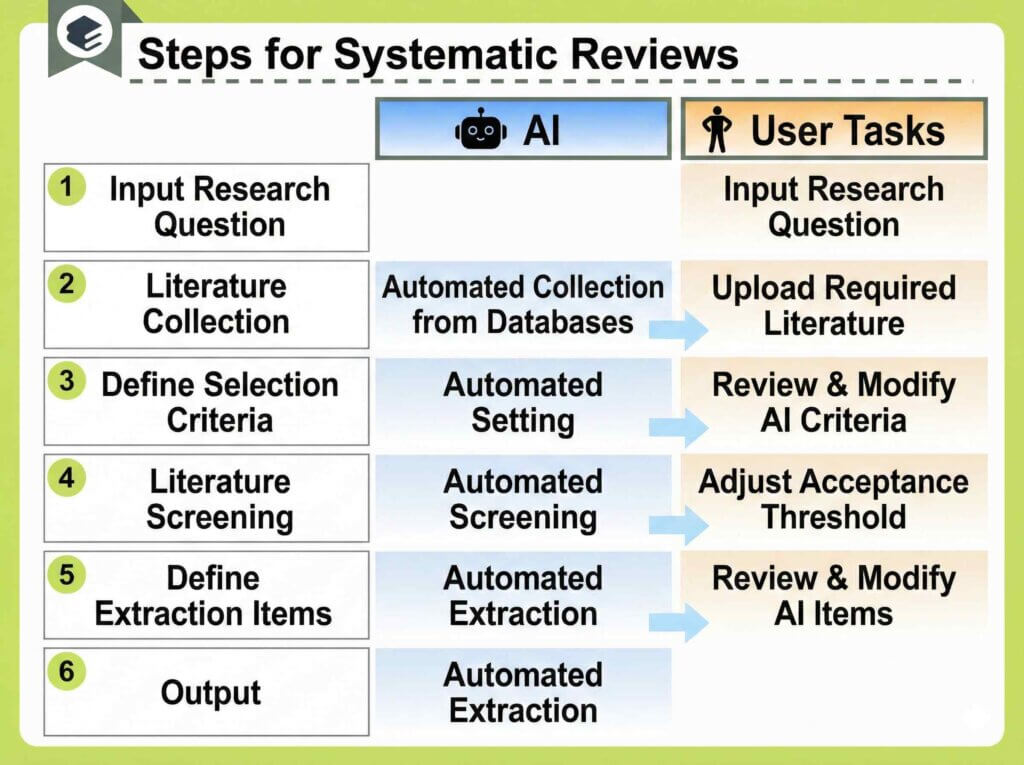
In a nutshell, Elicit‘s Systematic Reviews feature fully automates the major steps of a review while allowing for human adjustments at each stage.
The key benefit is the ability to intervene.
Here is an example of the kind of report Elicit can generate:

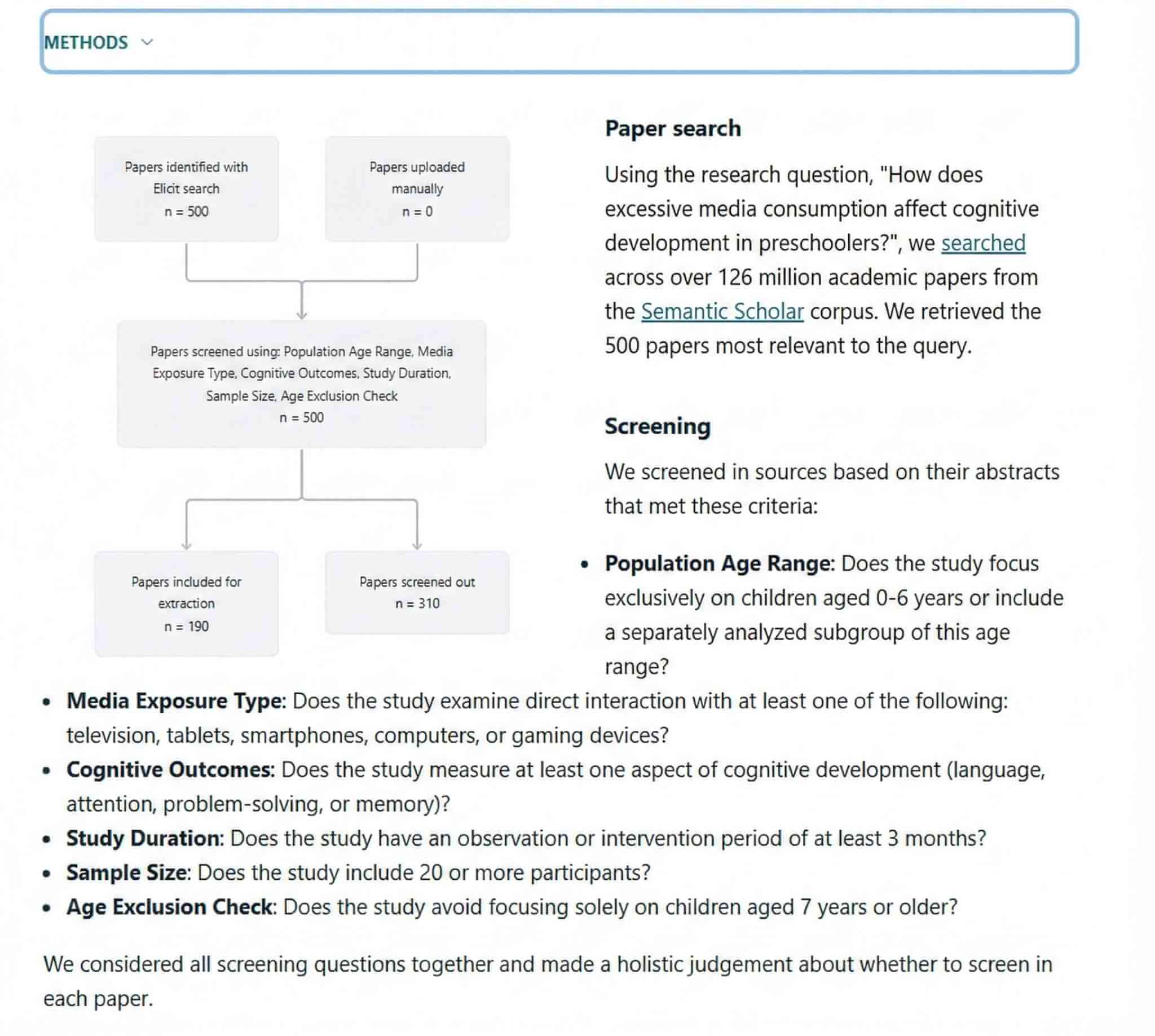
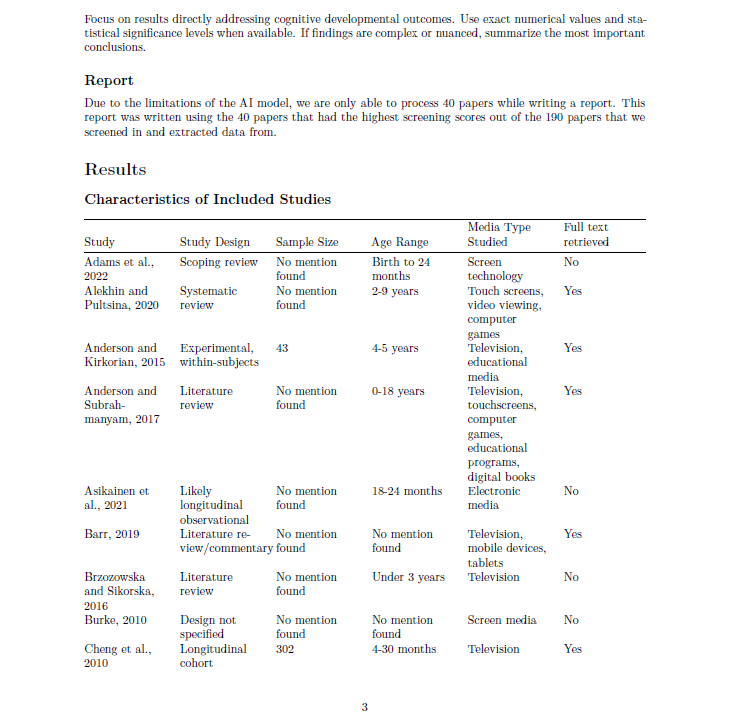
A review article created with reliable procedures is completed in a single workflow.
Honestly, the performance far exceeded my expectations.
Interactive Tables with Direct Citation Links
The Paper Search results screen is also tabulated and very easy to view:
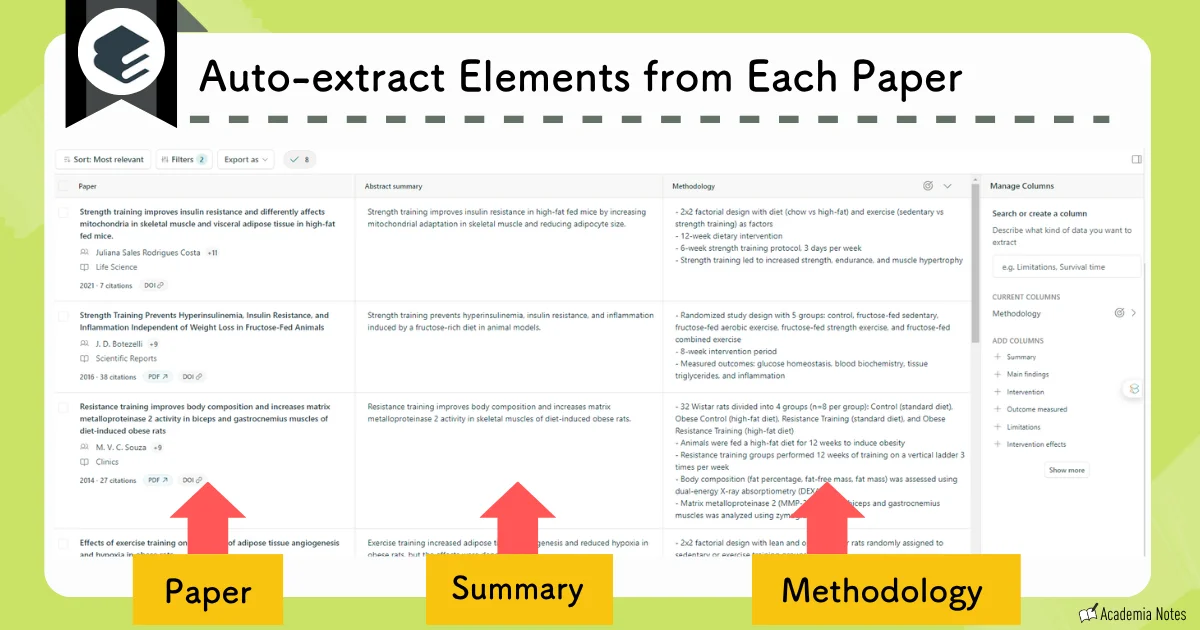
In this regard, the layout is similar to SciSpace.
One area where this table is superior (compared to SciSpace) is the ability to click on an extracted sentence and be taken directly to the corresponding section of the full text:
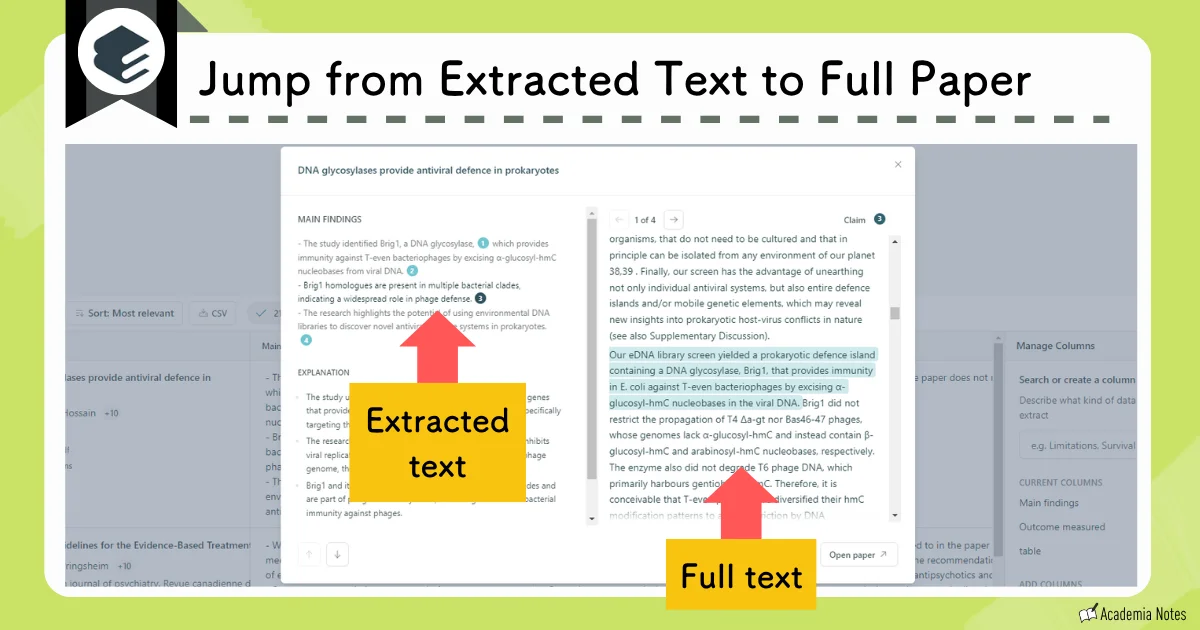
Also, when you use the High-Precision Mode of the paid plan, each extracted sentence is numbered, allowing you to check the cited parts in detail.
You should definitely enable High-Precision Mode for important research items.
Elicit is a tool that can be used regularly, even with the Free Plan.
I recommend upgrading to a paid plan when you want to use High-Precision Mode more frequently.
First, please try it out within the limits of the Free Plan.
The differences in plans are described in detail in the following article:
Official Website:Elicit (https://elicit.com/)
User Guide: Learn more about Elicit
Consensus: Find Evidence-Based Answers in Critical Moments

The literature search capabilities of Consensus are gaining momentum and now surpass even SciSpace and Elicit.
The following is a list of what you can achieve with Consensus’s literature search:
- Enter search queries in natural language (Yes/No questions are highly recommended)
- Get a summary with citations generated in response to the search
- Identify papers quickly using labels in the search results
- Use flexible filtering options to refine search results
Optimized Query Methods for High-Precision Results
Consensus has an established reputation for screening and displaying high-quality papers.
Consensus explicitly states their recommended search methods as follows:
- Ask questions regarding the relationship between concepts
(e.g., “Does creatine improve cognition?”) - Ask questions that can be answered with “Yes/No”
(e.g., “Can zinc supplements improve depression?”) - Ask questions regarding the effects of a certain concept (e.g., “What are the economic impacts of immigration?”)
I recommend search questions that can be answered with “Yes/No.”
For example, let’s toss in a simple question like this:
“Does creatine improve muscle strength?”
Synthesize Evidence with Summaries and the Consensus Meter
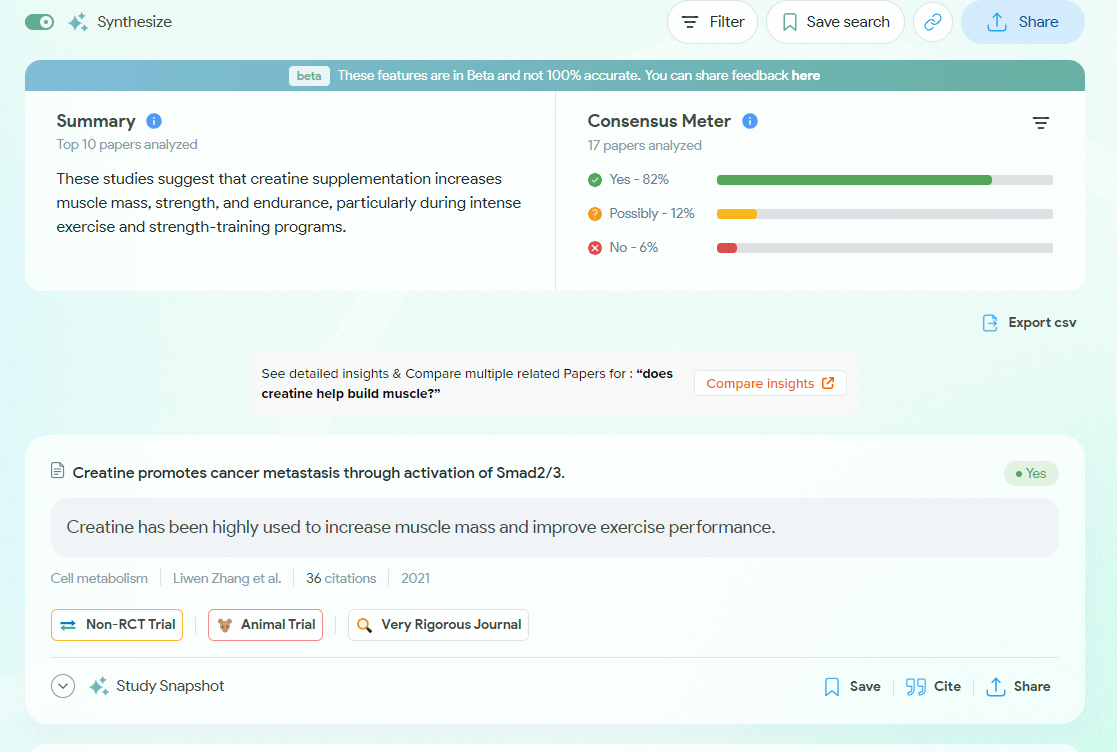
The interface features a summary on the top left, the Consensus Meter on the top right, and individual search results below.
While summaries are now standard in AI search, the Consensus Meter is a truly unique feature.
It aggregates the results of top-ranking papers and generates a graph like this:
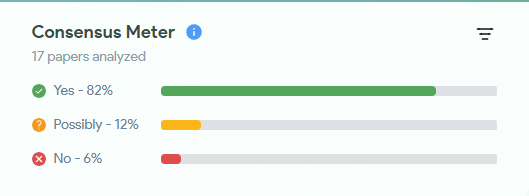
It’s pretty incredible, isn’t it? When entering a new field or establishing a new experimental system, questions like “What is the mainstream opinion on this question?” are resolved instantly!
Visual Labels for Instant Insight into Research Content
Additionally, Consensus features extremely rich labeling functions, making it excellent for easily understanding the quality and overview of research on the search results screen.
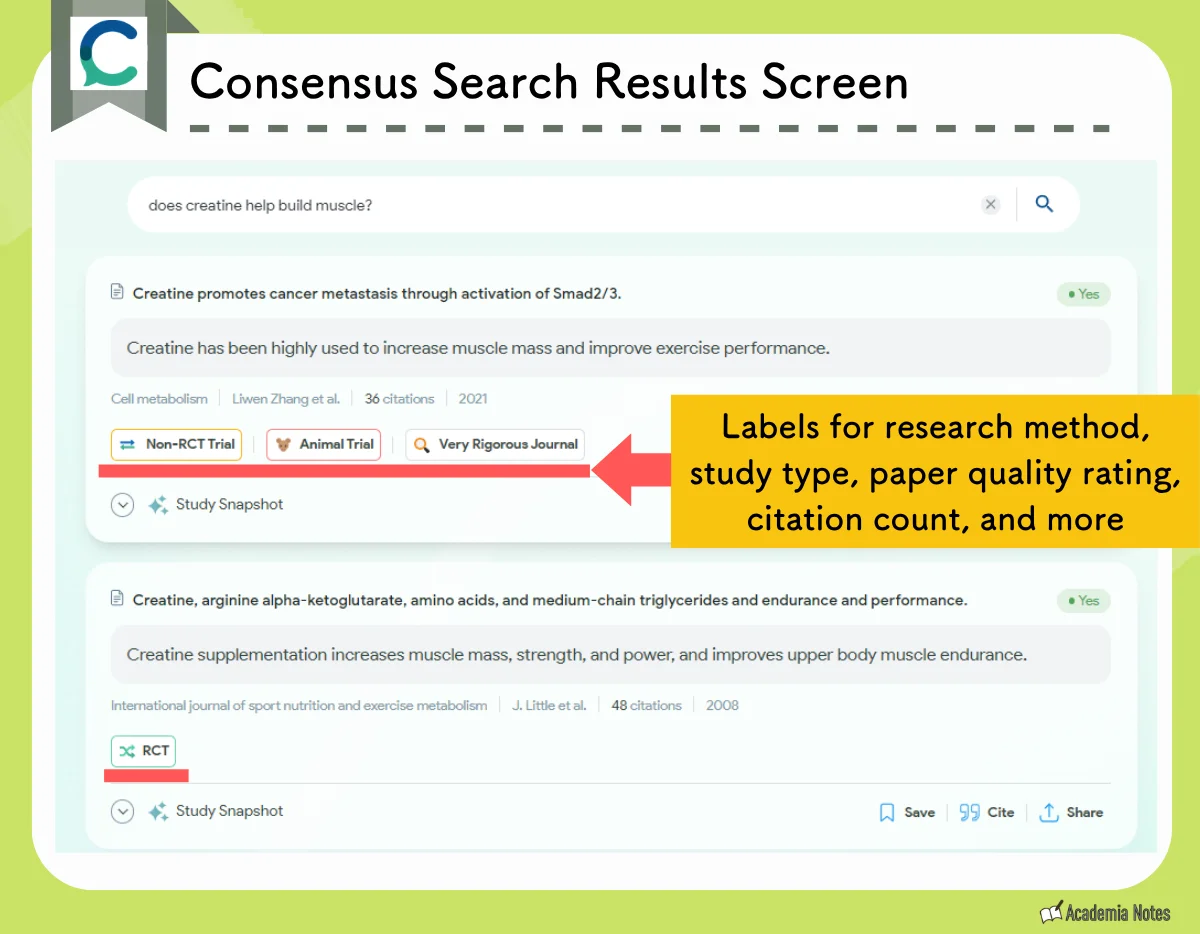
Types of Labels:
- Study Quality: “Rigorous Journal,” “Very Rigorous Journal”
- Impact: “Highly Cited”
- Study Design: “RCT,” “Non-RCT Trial,” “Case Report,” etc.
- Research Type: “Animal Trial” (basic research), etc.
It is incredibly easy to locate papers when these labels are present.
Advanced Filtering for Targeted Discovery
Furthermore, the filtering functionality in Consensus is user-friendly. An example is shown in the figure below:
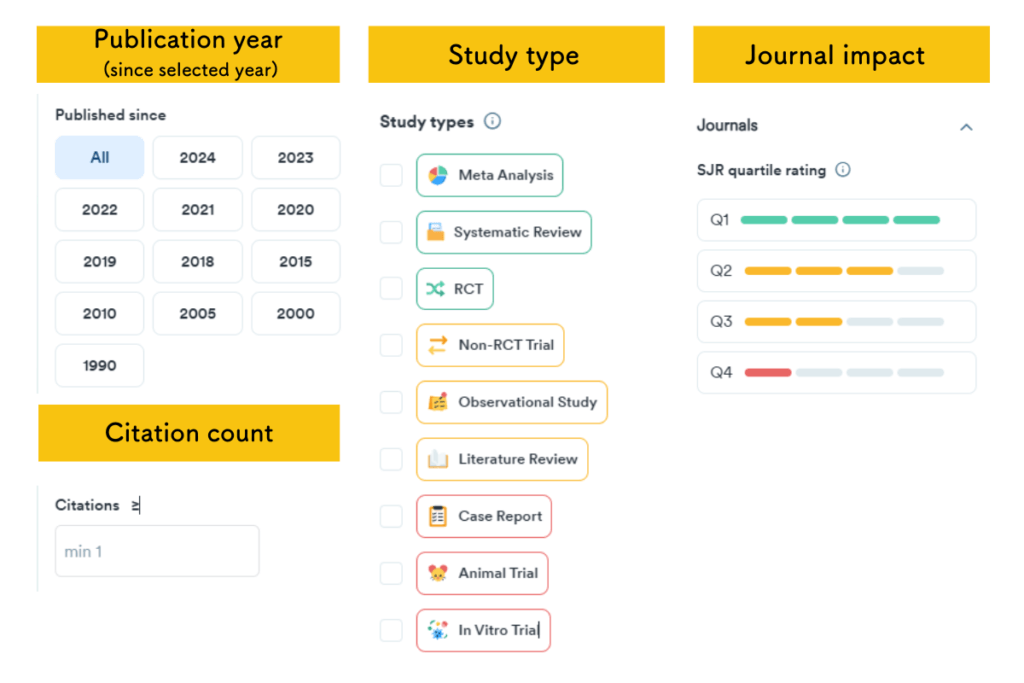
Make extensive use of this filtering function to thoroughly narrow down papers. By doing so, you will certainly find the “perfect” paper.
Consensus offers high-quality AI features for free, though the free version has usage limits.
If you find yourself frequently reaching the usage limits, consider upgrading to a paid plan. Monthly plans start at US$10, and student discounts or limited-time campaigns are often available.
I currently use the free version.
Details:
Official Website:Consensus (https://consensus.app/search/)
User Guide: Learn more about Consensus
Connected Papers: Visualize and Deep Dive into Citation Networks

Connected Papers is an AI literature search tool that is completely different from SciSpace and Consensus!
This tool is truly amazing:
- It visualizes related literature as a network of circles
- The distance between circles represents the strength of the relationship between papers
- The size of the circles represents the number of citations a given paper has
In the past, we performed the daunting task of manually tracing references to avoid missing citations.
Even after spending considerable time doing that, we sometimes missed important papers.
In the modern era, Connected Papers completes this task instantly!
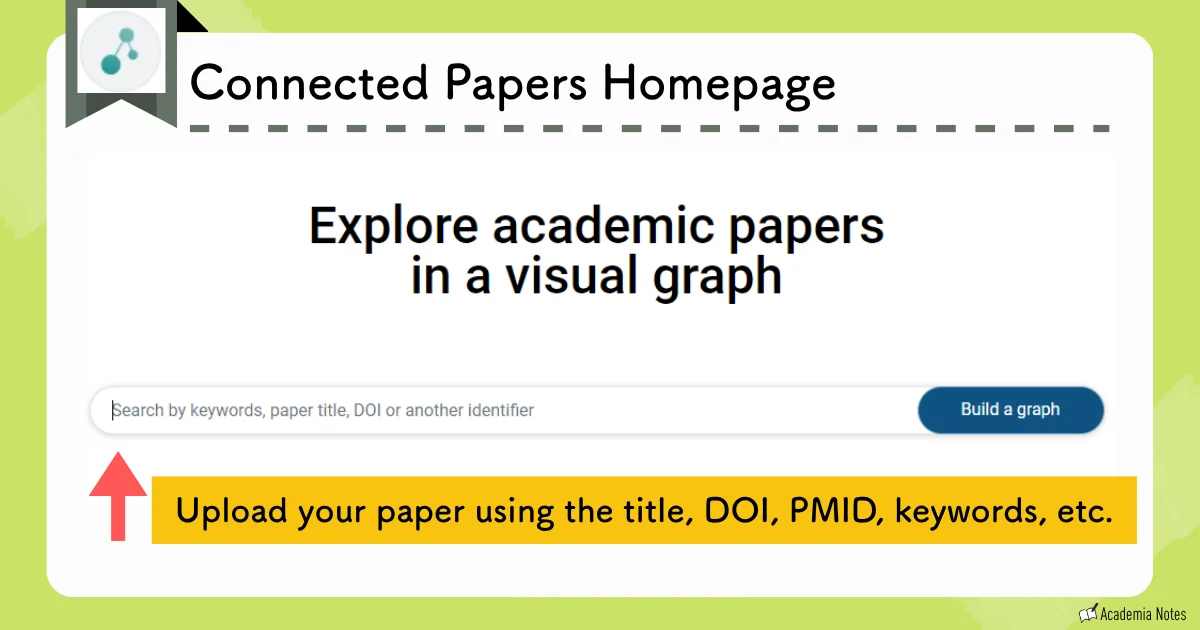
First, upload a paper from the top page:
Connected Papers visualizes related papers, centering on the original paper:
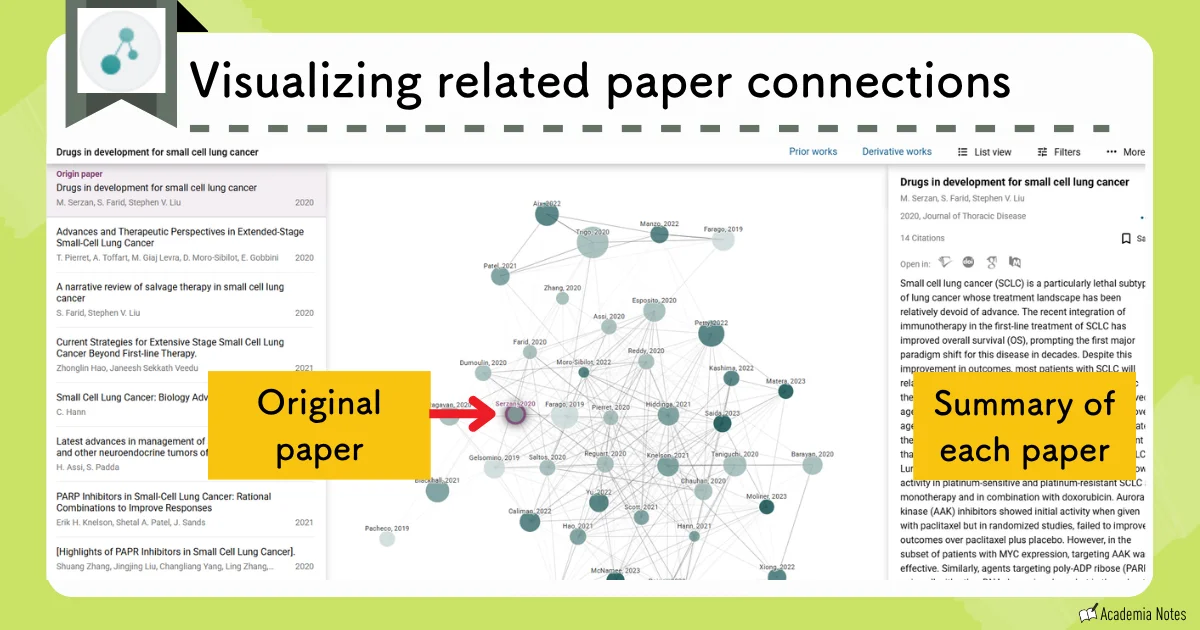
The distance between the circles represents the strength of the relationship between papers, and the size of the circles represents the number of citations a given paper has.
If you notice you’ve missed citing a paper visualized by a large circle, please check that paper immediately.
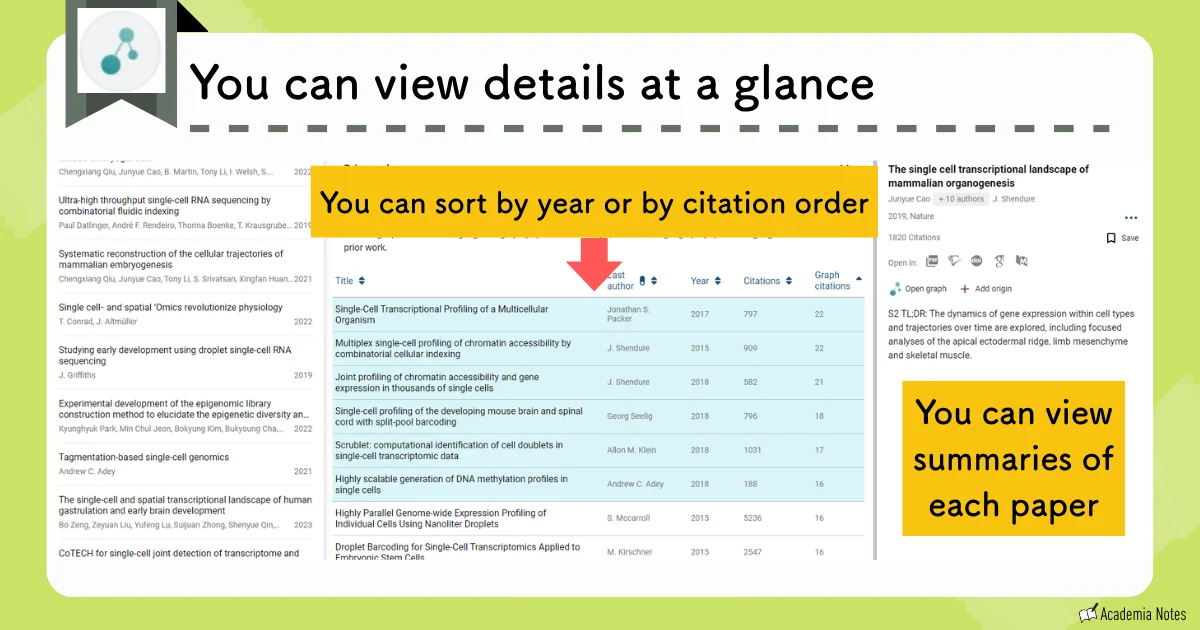
You can also view details in a list format:
It is quite similar to Research Rabbit.
One slight difference, however, is that the distance between circles holds no meaning in Research Rabbit.
Furthermore, Connected Papers allows you to create up to five graphs per month for free.
If you wish to create more graphs, the annual plan costs around US$5 per month.
Details:
Official Website:Connected Papers (https://www.connectedpapers.com/)
User Guide: Learn more about Connected papers
Conclusion: Summary and Recommendations
In this article, I have summarized ways to use AI tools to save time on literature searches.
Literature Search Tools: