
Paperguide Now Builds Full Systematic Reviews: How the New PRISMA Feature Works<span class="wtr-time-wrap after-title"><span class="wtr-time-number">18</span> min read</span>

Paperguide has launched Systematic Review, a feature that generates a systematic review through a PRISMA-compliant workflow!

It is built so that you can produce a draft simply by following the on-screen steps.
Writing a systematic review normally takes a team of researchers several weeks, but with Paperguide you can bring that down to 1 or 2 days at best.
It is just as useful when you simply want a solid grasp of how the prior research has developed, not only when you are writing.
In other words, when you are surveying prior research, you build the review you wanted to read yourself.
In this article, I walk through Paperguide’s newest feature, Systematic Review, in detail.
Key points of this article
A feature that lets you build a systematic review through a PRISMA-compliant workflow
- Generated through a PRISMA-compliant workflow
- Protocol building
- Screening criteria setup
- Data extraction
- Finished just by following the screens
- Protocol — Set your research question, screening criteria, and extraction fields
- Paper search — Search research databases, or import your references
- Title and abstract screening — Screen titles and abstracts against your eligibility criteria
- Full-text screening — Screen full texts against your full-text criteria and finalize the included papers
- Data extraction — Extract structured data from the included papers into an evidence table
- Report generation — Generate a cited review draft from the synthesized findings
- Promo code for 20% off: ACADEMIA20
- From about $7.20 per month
Details below
Official Website: Paperguide (https://paperguide.ai/)
Full guide: Streamline Your Research with Paperguide: Features and Pricing Explained by a Researcher in the Field
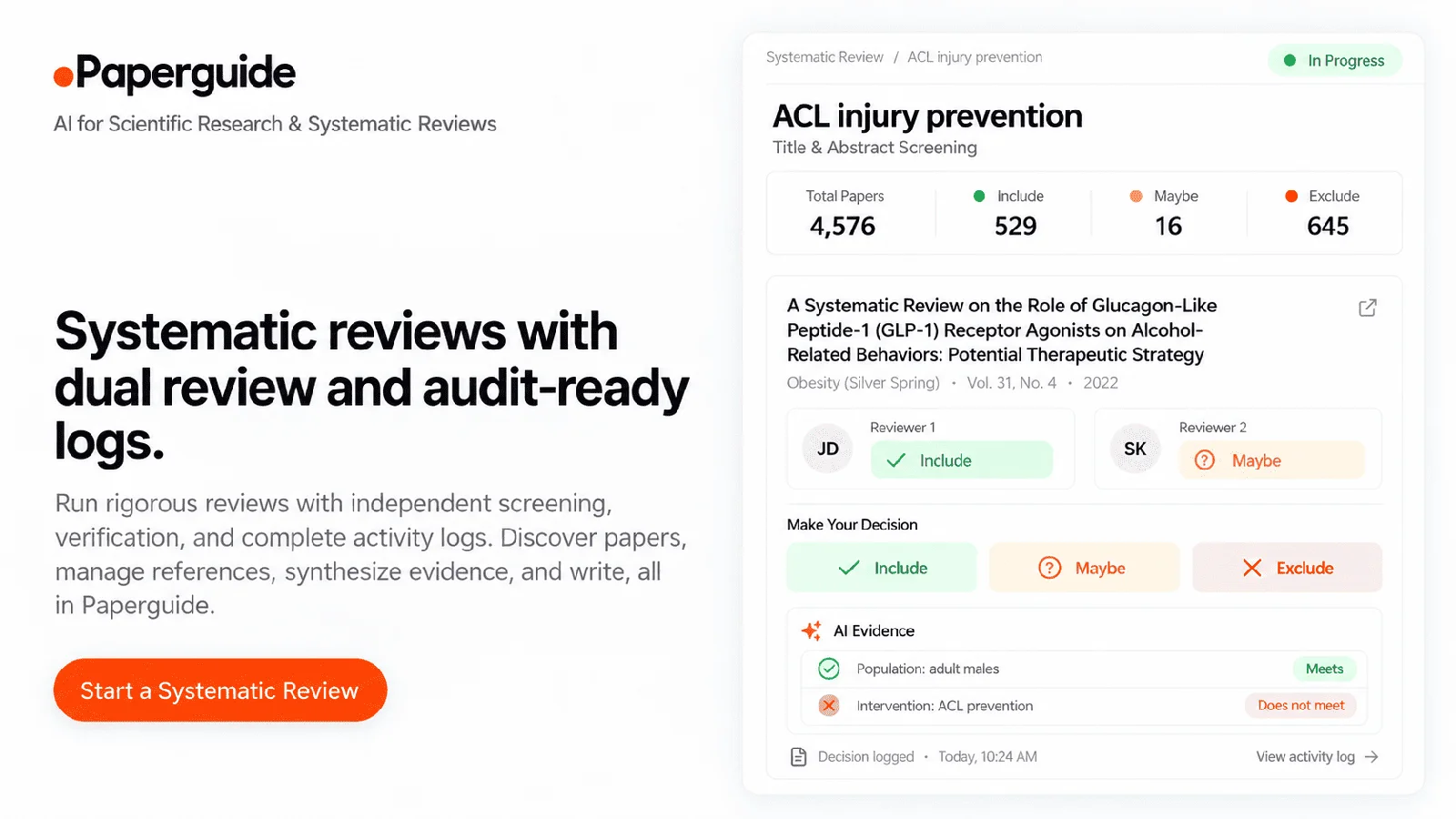
What makes Paperguide’s Systematic Review stand out
What makes Paperguide’s Systematic Review stand out
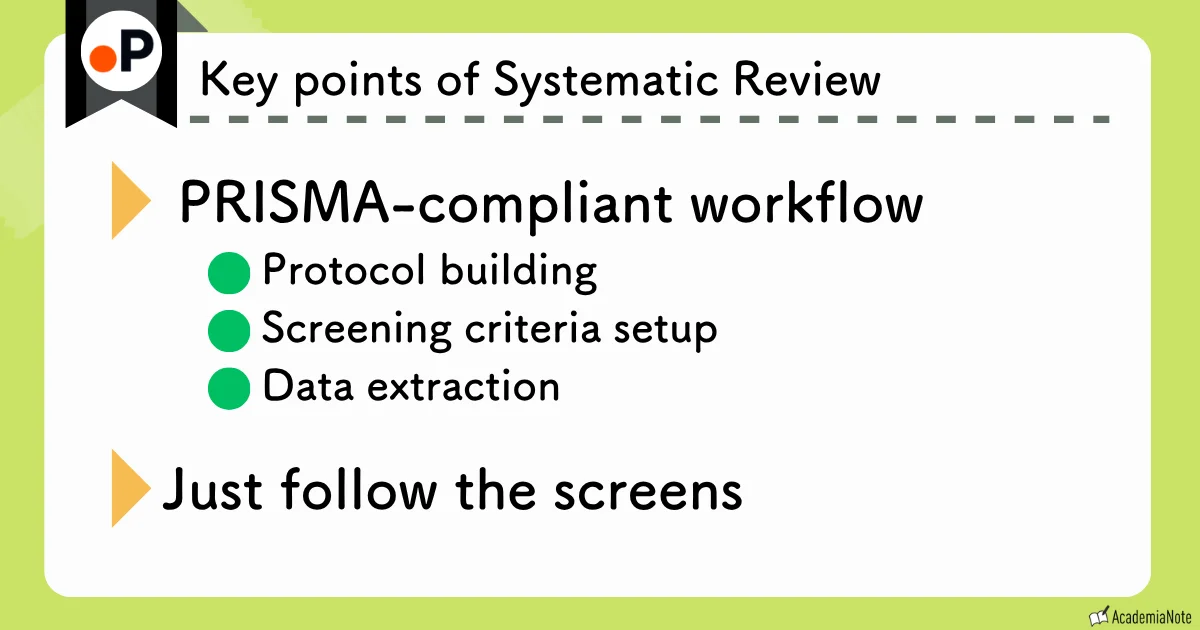
- Generated through a PRISMA-compliant workflow
- Protocol building
- Screening criteria setup
- Data extraction
- Finished just by following the screens
The biggest thing about Paperguide‘s Systematic Review is this: you can generate a genuine systematic review through a PRISMA-compliant workflow, simply by working through the screens.
What exactly is PRISMA?
PRISMA (Preferred Reporting Items for Systematic Reviews and Meta-Analyses) is the reporting guideline for carrying out and reporting systematic reviews and meta-analyses.
Purpose
By standardizing what researchers should report, and how, when they carry out a systematic review, PRISMA aims to make reviews more transparent and reproducible. It also makes it easier for readers and peer reviewers to judge whether a review was done properly.
Main components
- The PRISMA checklist
A list of the items a paper should cover — title, abstract, introduction, methods, results, discussion and so on (27 items in the current PRISMA 2020 version). It lets you check points such as how the search string was reported and whether the exclusion criteria are stated explicitly, without missing any. - The PRISMA flow diagram
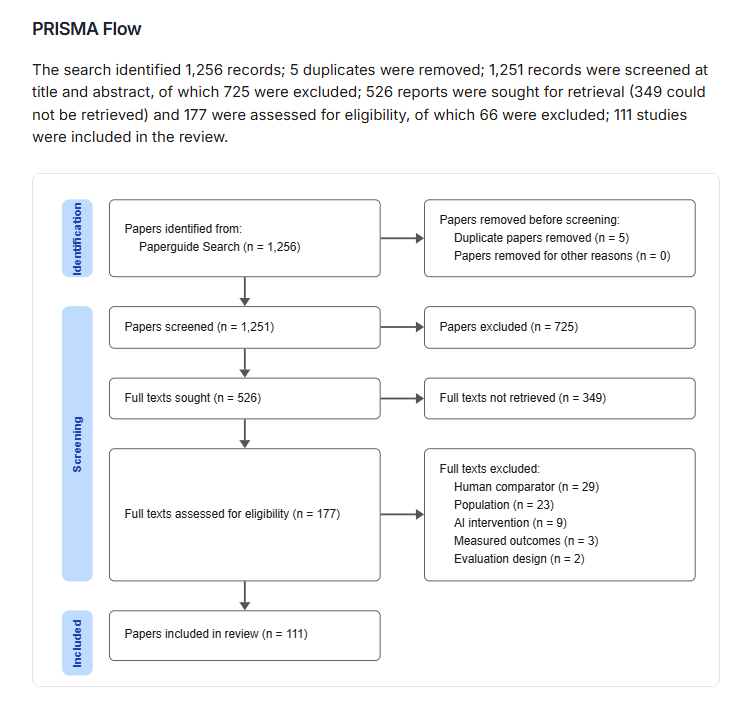
A diagram of the path from the literature search to the final number of included papers. It makes the narrowing-down visible: records found in the database search, then after removing duplicates, then after title and abstract screening, then after full-text review, and finally the number included.
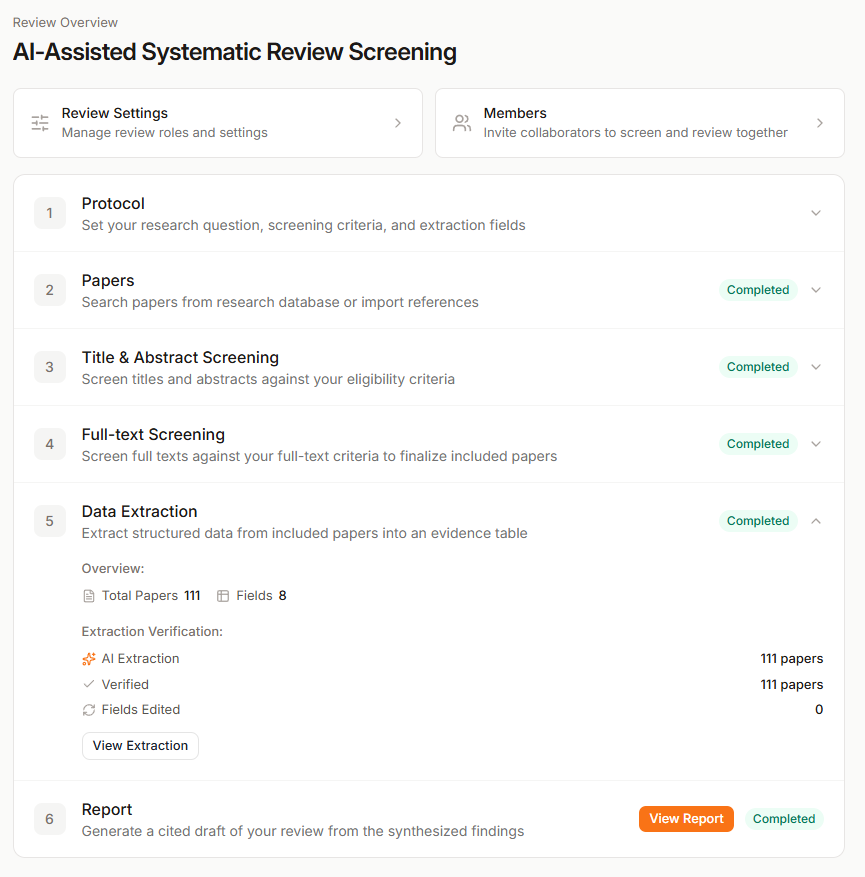
You finish the whole thing just by working through screens like the ones below, entering and confirming as you go.
Here is an example of a finished report 👇
Work that used to take a group of researchers several weeks now takes 1 or 2 days at best. That is how much this tool streamlines the process.

But I have no plans to write a systematic review.
Some of you will feel that way. But whether or not you plan to write one, it is very useful in situations like these.
- Your question is settled, but no review exists yet, or the one that exists is out of date
- If the review you want to read does not exist yet, building it yourself is a reasonable move.
- You have decided to commit to the field seriously
- It is worth investing 1 to 2 days.
- You want to firm up the background section of a grant proposal
- The groundwork carries straight over, and you can show that your coverage is comprehensive.
If you only want a quick overview, on the other hand, Paperguide’s Literature Review already gives you search results that are comprehensive enough.
First, a look at the generated report

So what kind of report do you end up with?
The report is structured like this.
- Title and summary of conclusions: A few lines at the top of the report telling you what it all came to
- Abstract: A summary of the whole review
- Methods: Which databases were searched and how. The search strings actually used are included as they were
- PRISMA flow diagram: A flow chart of how many records were found, how many were excluded, and how many were finally included
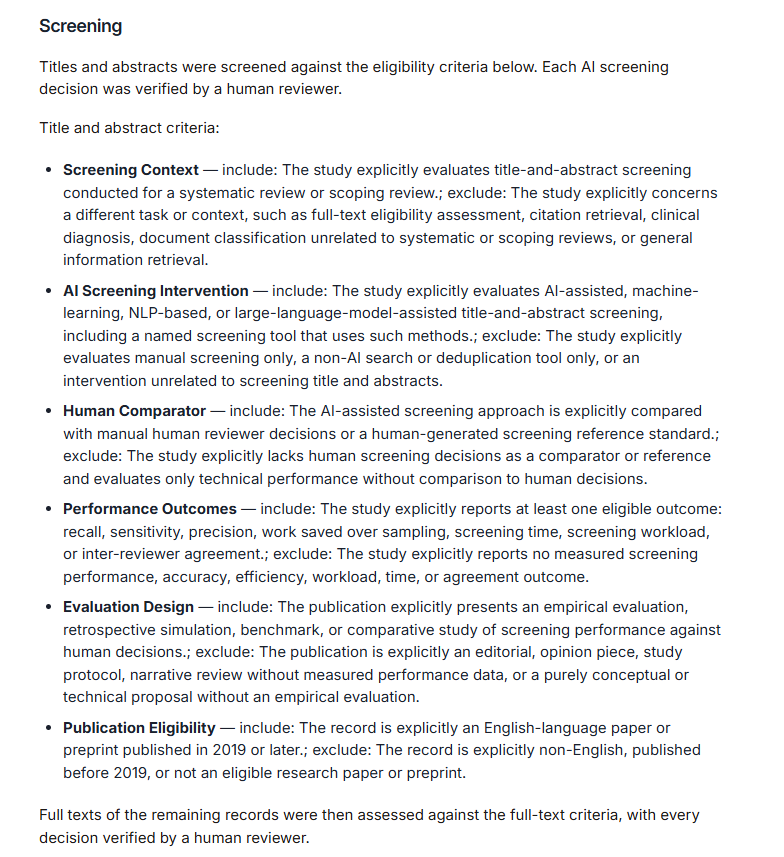
- Eligibility criteria: The conditions for including or excluding a paper, listed separately for the title and abstract stage and the full-text stage
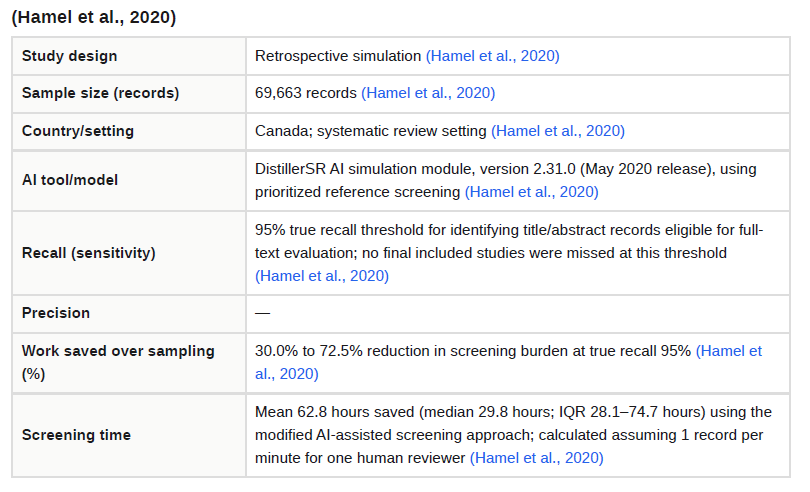
- Data extraction fields: What was pulled out of each paper (study design, sample size, country, methods, outcome figures and so on)
- Table of included papers: Every included paper laid out along the fields above, 1 paper per row. This is the longest part
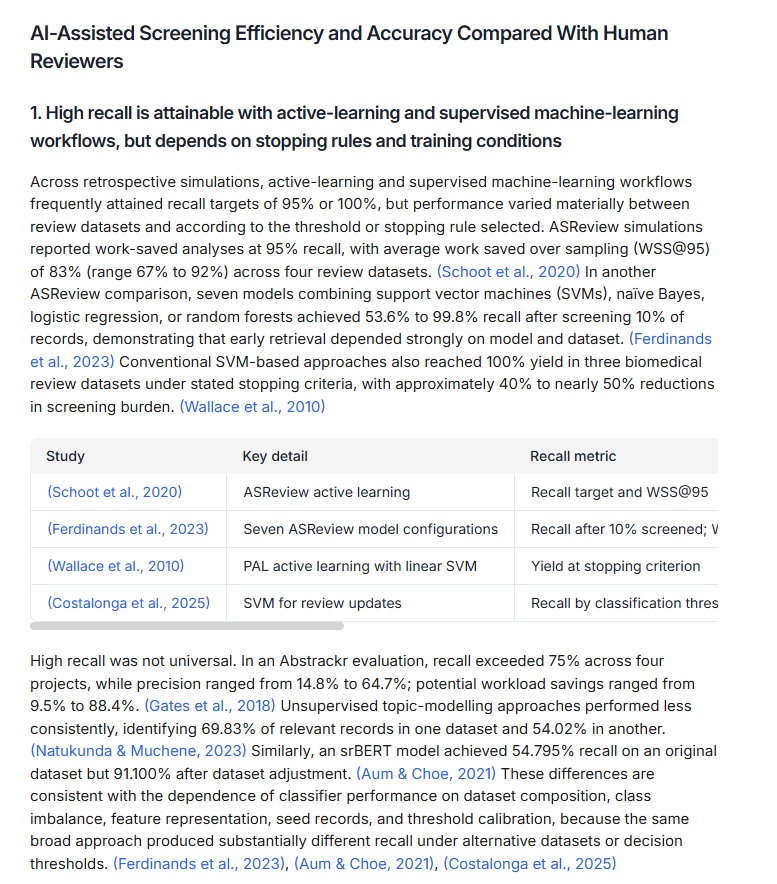
- Findings: What was found, broken out by theme. Every sentence carries its source at the end
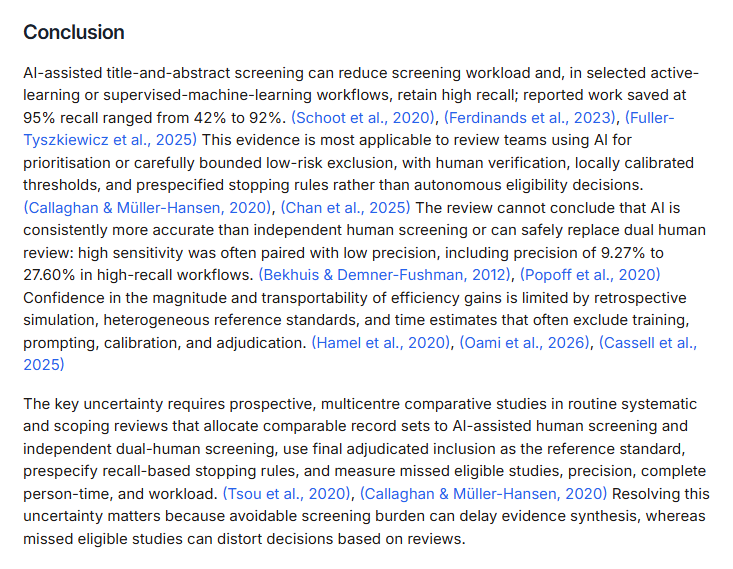
- Conclusion: An overall wrap-up, and what research is needed next
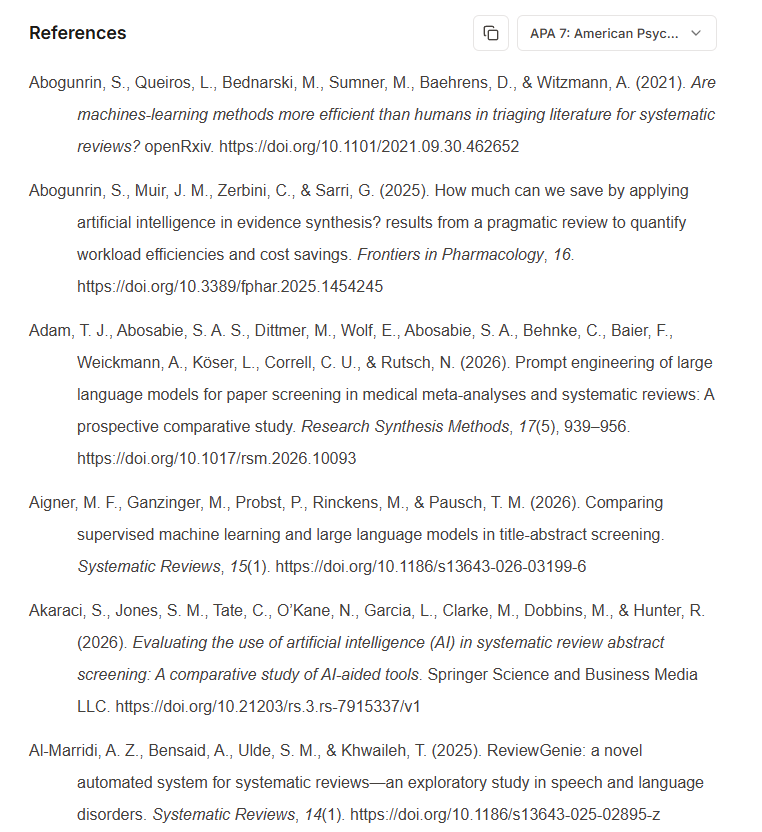
- Reference list: APA format, with DOI links
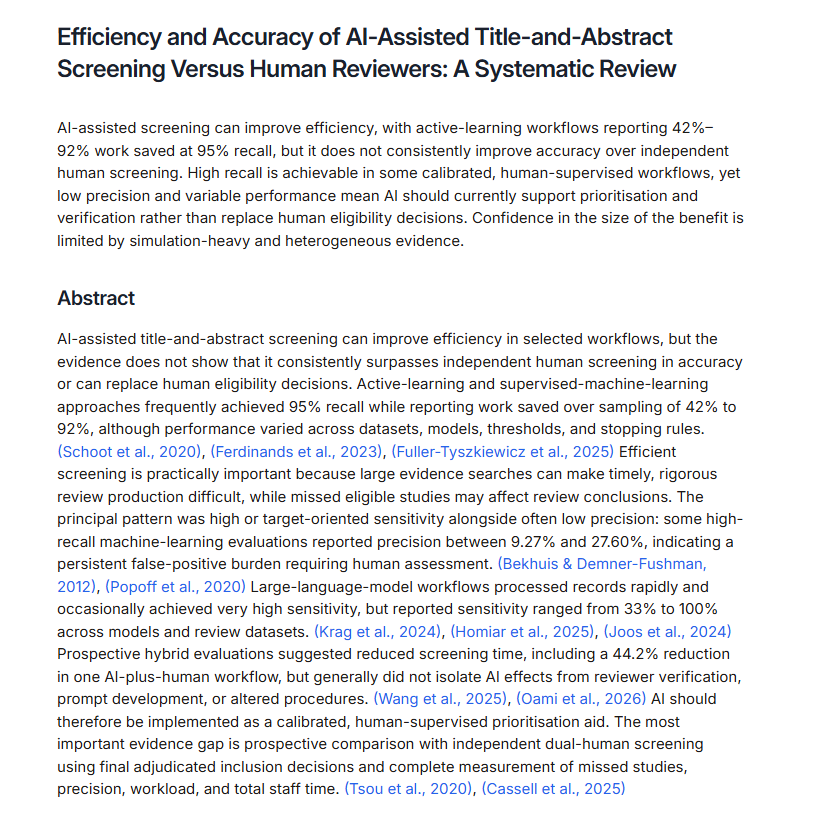
Here is what an actual report looks like.
An actual report
The opening 👇
The PRISMA flow diagram 👇
The eligibility criteria used for screening 👇
Individual summaries of the studies selected for the review 👇
Primary outcomes 👇
The conclusion 👇
References 👇
The full report on video 👇
We have reached the point where a report this complete comes together just by following the screens
Note: what comes out is a draft, of course. It is not something to submit as it stands.
How Systematic Review works, step by step
Here is a quick walk through the steps in Systematic Review.

You just follow the screens, entering information and making decisions as you go
There are 6 steps in total 👇
Set your research question, screening criteria, and extraction fields
Search research databases, or import your references
Screen titles and abstracts against your eligibility criteria
Screen against your full-text criteria and decide which papers to include
Extract structured data from the included papers into an evidence table
Generate a cited review draft from the synthesized findings
Work through the screens in order and you arrive at a finished report.
It is also nice that Paperguide lets you set your own language as the default
Start by building the protocol carefully.
Work down the screen and fill it in.
Paperguide‘s Systematic Review is designed to make building the protocol more efficient.
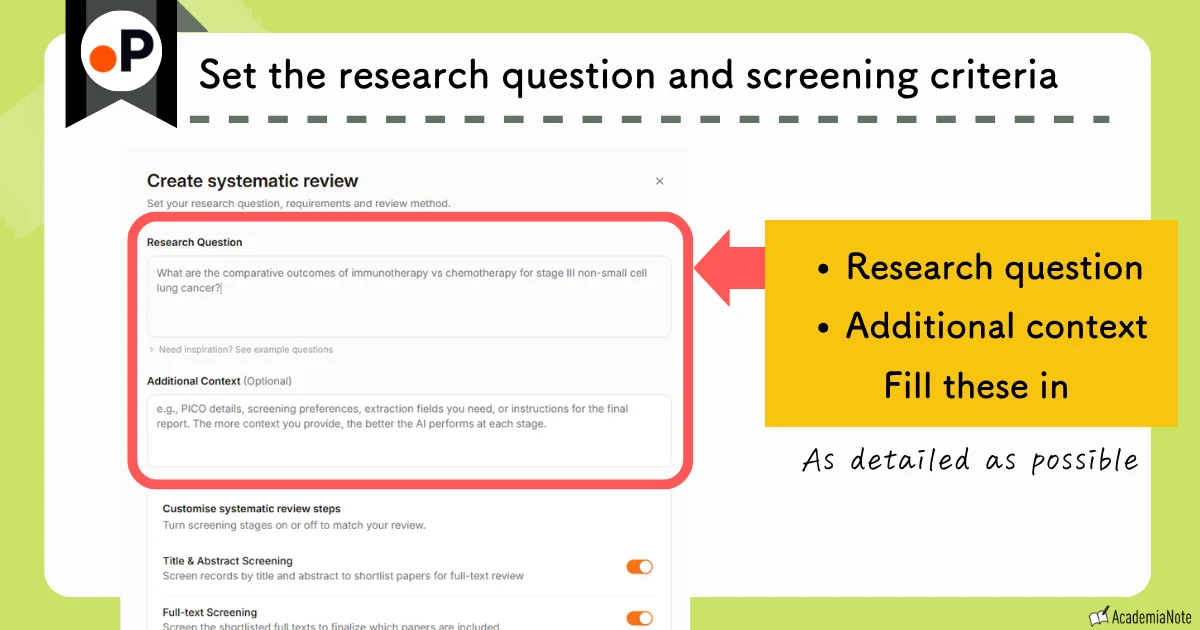
First, enter your research question and any additional context.
This is the crucial part, so take your time over it.
Rather than typing the protocol out yourself, it is easier to have a general-purpose AI write it up first.

I like voice input, so I talk through what I want to review and the conditions I have in mind, and let the AI turn it into a prompt
The AI gives you the drafts below, and you refine them from there.
- Eligibility criteria (which papers to include and exclude)
- Extraction fields (what to pull out of each paper)
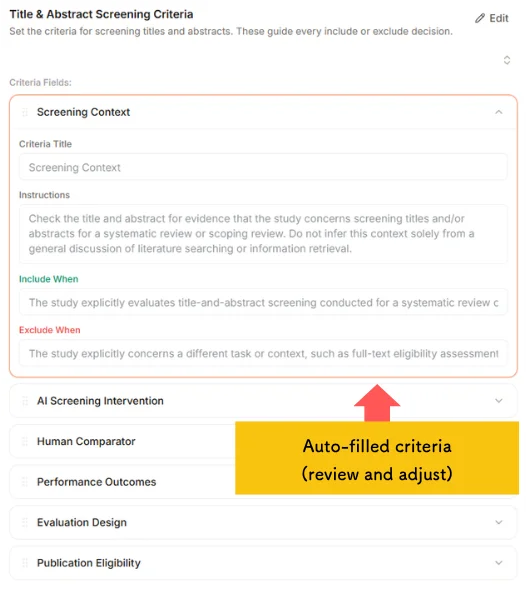
The contents are filled in automatically, so your job is to check and adjust them.
The order of the criteria matters.
They are evaluated from the top down, and the first criterion a paper fails is recorded as the reason for exclusion.
Put Population at the top and it takes priority as the reason for exclusion.
You can reorder them by dragging.
So you can build the setup carefully before the review even starts.
Search research databases for papers, or import your references.
Key points
- You can import from Zotero, Mendeley, or your Paperguide library
- Open-access PDFs are fetched automatically; paywalled papers go through your institution’s proxy
- Duplicates are removed automatically
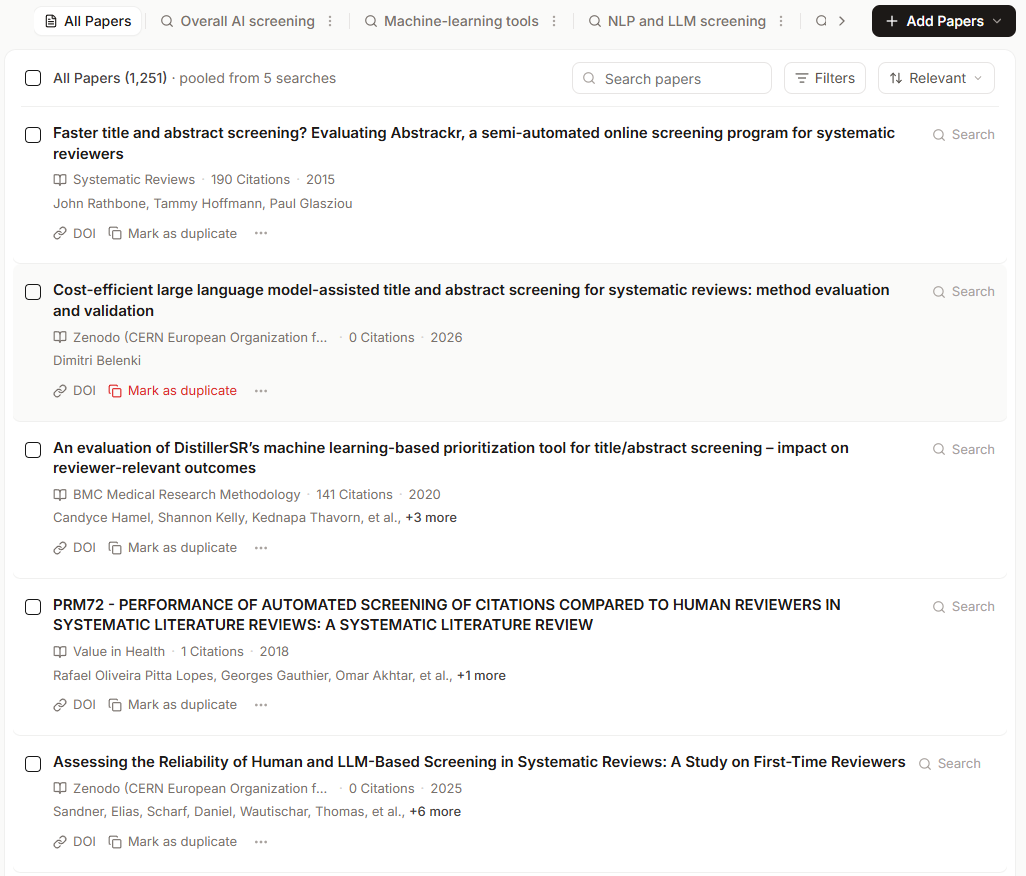
It picks up papers automatically from the research question you entered earlier.
Bring in any other papers you need from your own library.
It strips out duplicates automatically and gathers everything into 1 collection.
Key points
Screening comes in 2 stages: title and abstract, then full text
- Title and abstract screening
- Full-text screening
In a systematic review, the standard is 2 stages: weed papers out roughly by title and abstract first, then read the full text of the survivors and judge from there.
The PRISMA flow diagram is built around these 2 stages as well.
Paperguide separates them into distinct steps from the outset, so simply following the flow of the screens gives you a PRISMA-compliant process.
First comes title and abstract screening.
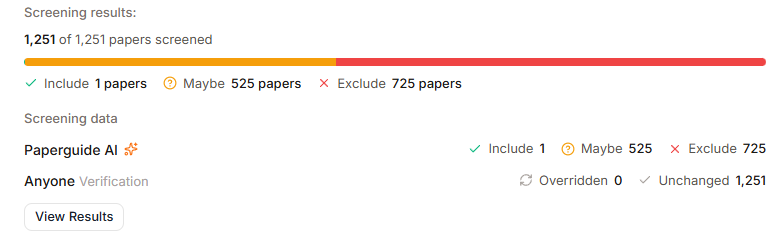
Screening runs on the criteria you set when building the protocol.
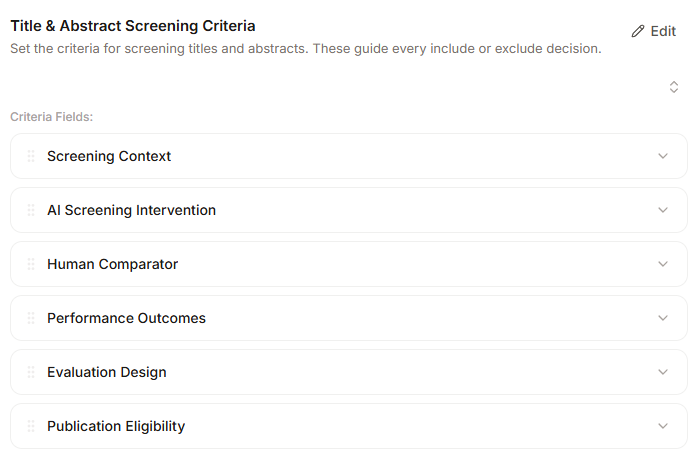
The result 👇
Key points
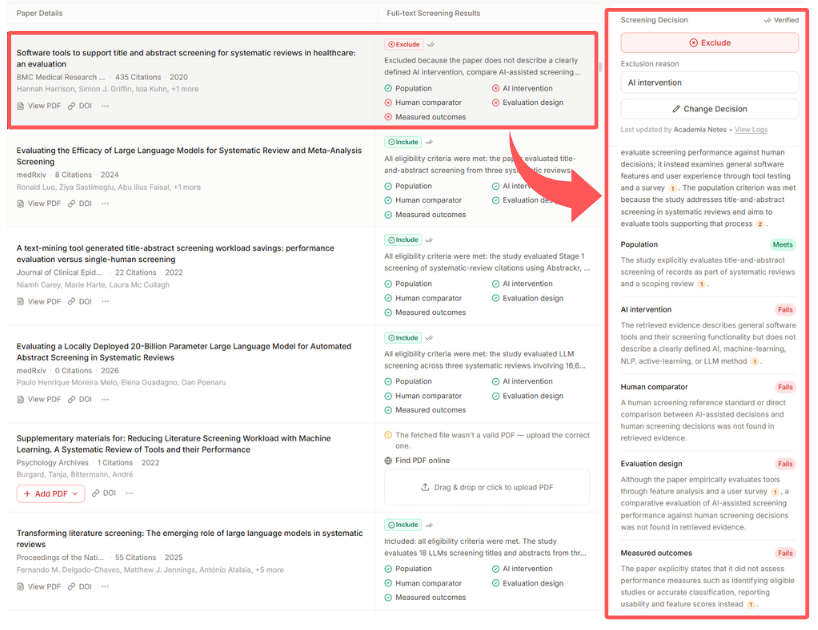
Title-and-abstract screening and full-text screening are judged against different criteria
Things that are not in the abstract but become clear once you read the full text — the details of sample size, the statistical methods, how the control group was set up — can only be judged at the full-text stage.
That is why the design gives you a separate set of full-text criteria alongside the eligibility criteria.
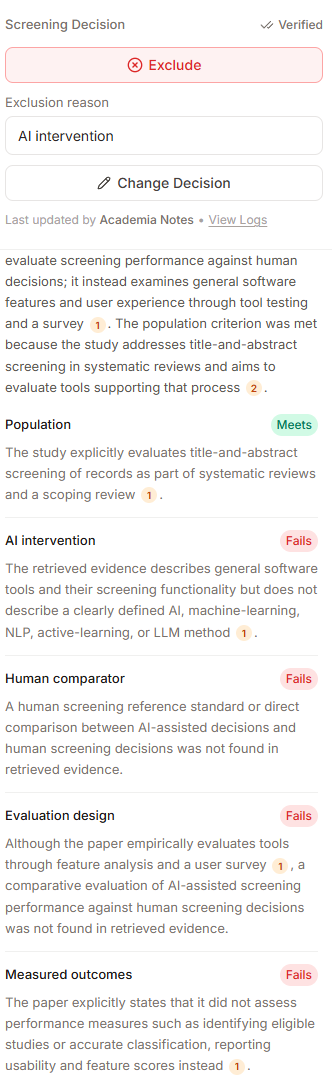
And this is the stage where the reason for exclusion matters most.
For papers dropped at full-text screening, the tool spells out why they were dropped.
Structured data is extracted from the included papers into an evidence table.
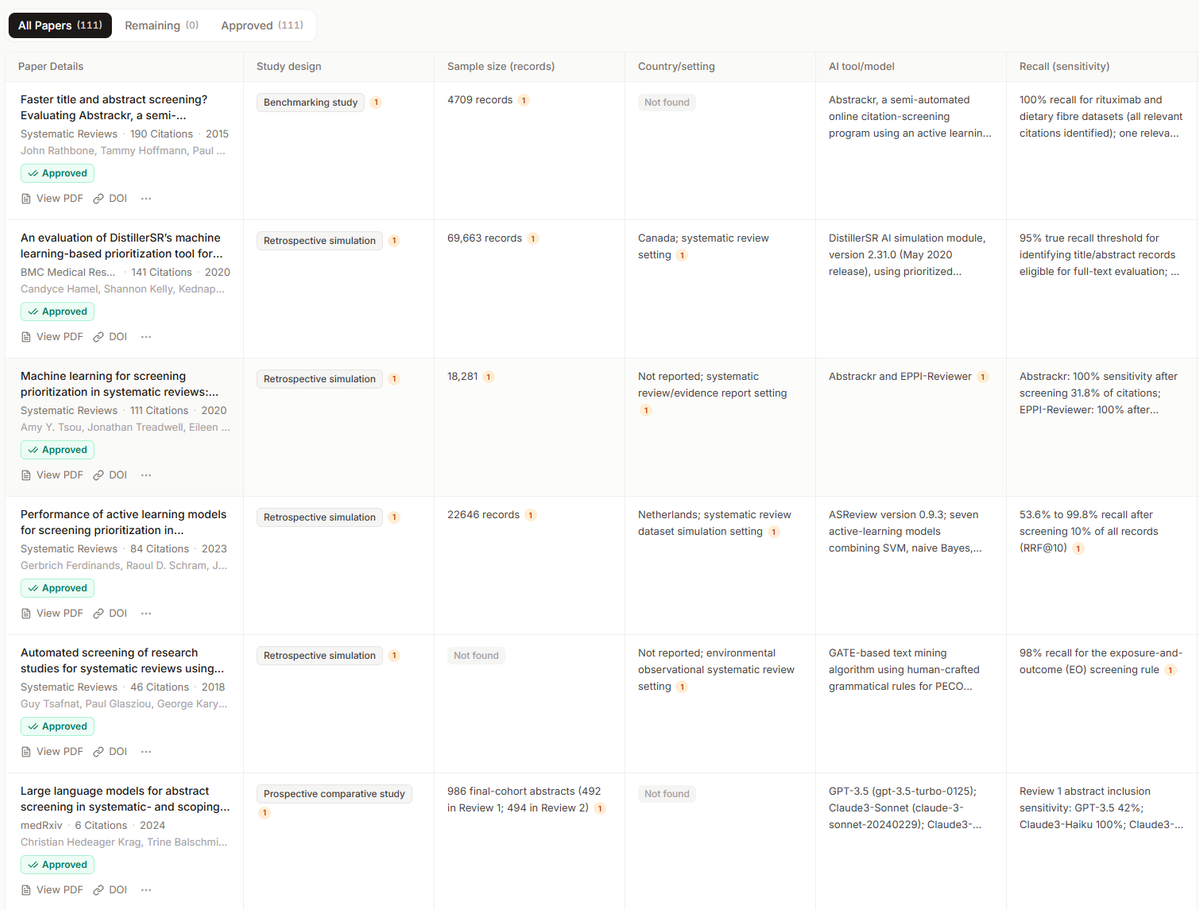
The extraction fields were settled back in the protocol at step 1, so here you just run it.
- Bibliographic information (authors, year, country, journal)
- Study design
- Characteristics of the population (sample size, age, sex, diagnostic criteria and so on)
- Intervention
- Comparator
- Outcomes (definition, how they were measured, when they were measured)
- Effect size (means and SDs, odds ratios, risk ratios and so on)
- Confidence intervals and dispersion measures (SD, SE, 95% CI and so on)
and more
Click the number attached to an extracted sentence and you jump to that spot in the full text.
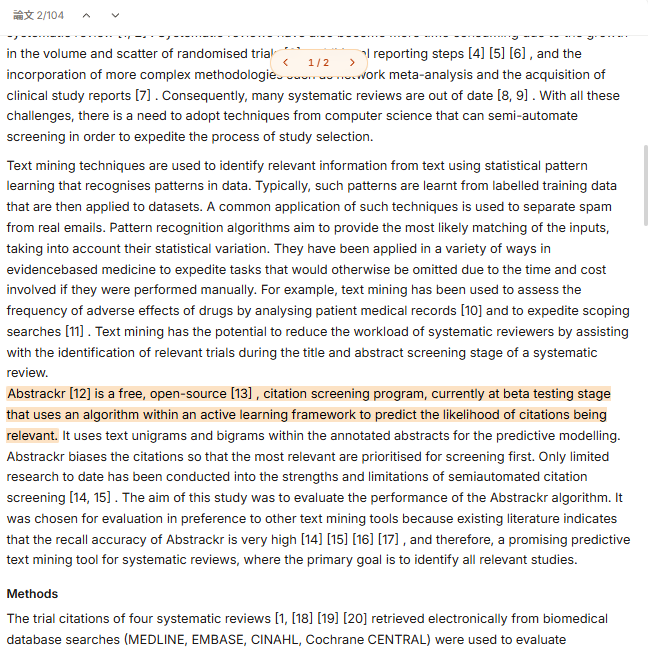
Once you have checked the extractions from every PDF, press the approve button.
A few minutes later, the report is finished
Dual independent reviewers (coming soon)
One more thing worth mentioning: a feature that is on the way
PRISMA 2020 recommends or requires that several stages be carried out by multiple independent reviewers (usually 2 or more) in order to reduce bias. Paperguide is planning to launch support for independent reviewers at the following steps.
Paper screening (title and abstract, and full text)
- 2 reviewers judge the same list of papers independently, blind to each other’s calls. Where they agree it is settled, where they disagree they discuss, and if that still does not resolve it a 3rd reviewer decides
Data extraction
- 2 reviewers extract data from the same papers independently. The results are compared, and any disagreement is settled by discussion or by a 3rd reviewer
The framework is already in place
Above the steps you will find Review Settings (managing roles) and Members (inviting collaborators).
Independent screening by multiple reviewers is expected to work by inviting people from here.
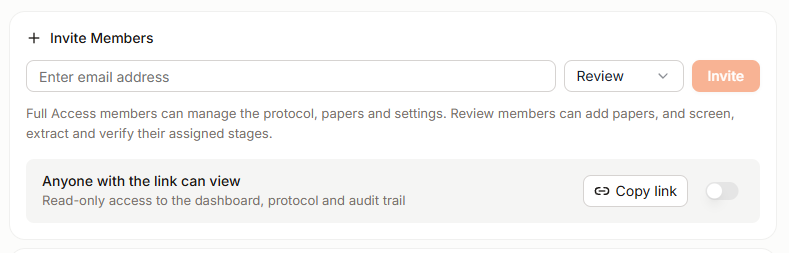
It looks like you will pick who handles each of the items below from a dropdown.
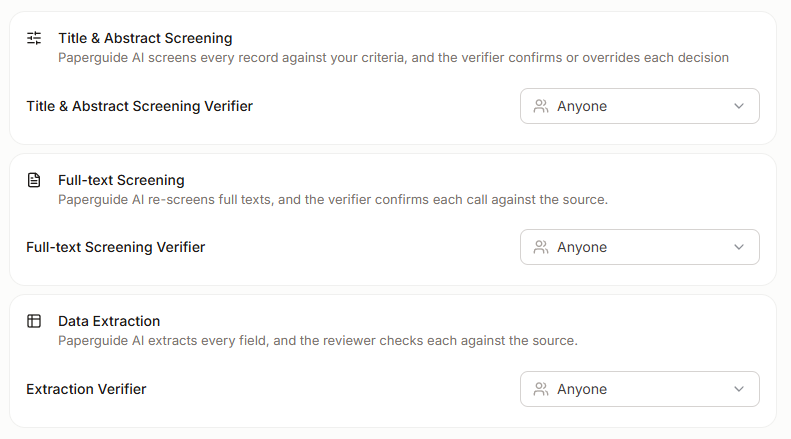
Note: this is expected to be available on the Evidence plan.
What Paperguide costs
Finally, let us go over what Paperguide costs.
Paperguide has 4 paid plans.
- Free
- Plus
- With a promo code, the monthly price is $7.20
- Pro
- With a promo code, the monthly price is $23.20
- Evidence
- With a promo code, the monthly price is $55.20
How Paperguide’s plans differ
If you want to use Systematic Review, a paid plan is the only option.
I would start with the Plus plan
If you find the AI credits or the number of papers you can screen running short, look at the Pro plan or above.
And if you are writing a systematic review in earnest, PRISMA-compliant screening by 2 reviewers (coming soon) is set to be available only on the Evidence plan.
| Free | Plus | Pro | Evidence | |
|---|---|---|---|---|
| Price | — | From $7.20/mo | From $23.20/mo | From $55.20/mo |
| AI credits | 2,000/mo | 12,500/mo | 50,000/mo | 150,000/mo |
| Systematic reviews | × | ○Up to 1,000 papers | ○Up to 5,000 papers | |
| AI paper search | △Usage limits | ○Unlimited | ||
| Reference manager | △Limited | ○Unlimited | ||
| Data extraction | △Up to 5 columns, 10 papers | ○Up to 50 columns, 100 papers | ||
| Collaboration and team admin | × | ○ | ||
| Image and table extraction | × | ○Coming soon | ||
| PRISMA dual reviewer screening | × | ○Coming soon | ||
Last updated: August 2026
What the paid plans cost
You can choose an annual or a monthly contract. Academic rates are listed alongside.
| Plan | Price | Monthly (before → after discount) | Promo code |
|---|---|---|---|
| Plus | Industry | $17/mo→$13.60/mo | ACADEMIA20 (20% OFF) |
| Academic | $9/mo→$7.20/mo | ||
| Pro | Industry | $39/mo→$31.20/mo | |
| Academic | $29/mo→$23.20/mo | ||
| Evidence | Industry | $119/mo→$95.20/mo | |
| Academic | $69/mo→$55.20/mo | ||
| Plus | Industry | $29/mo→$23.20/mo | ACADEMIA20 (20% OFF) |
| Academic | $15/mo→$12/mo | ||
| Pro | Industry | $69/mo→$55.20/mo | |
| Academic | $49/mo→$39.20/mo | ||
| Evidence | Industry | $199/mo→$159.20/mo | |
| Academic | $99/mo→$79.20/mo |
Show notes (5)
- Prices are in USD, per seat.
- "Regular price" is the published price; the discounted price includes the promo code.
- Annual plans are shown as a per-month figure (billed yearly).
- The Enterprise discount (10+ seats, 30–40%) is arranged through an introduction from this site.
- "Academic" prices are the ones shown when you select "Academic" on the official pricing page.
For full pricing, see the official site.
Last updated: August 2026
How to get started with Paperguide
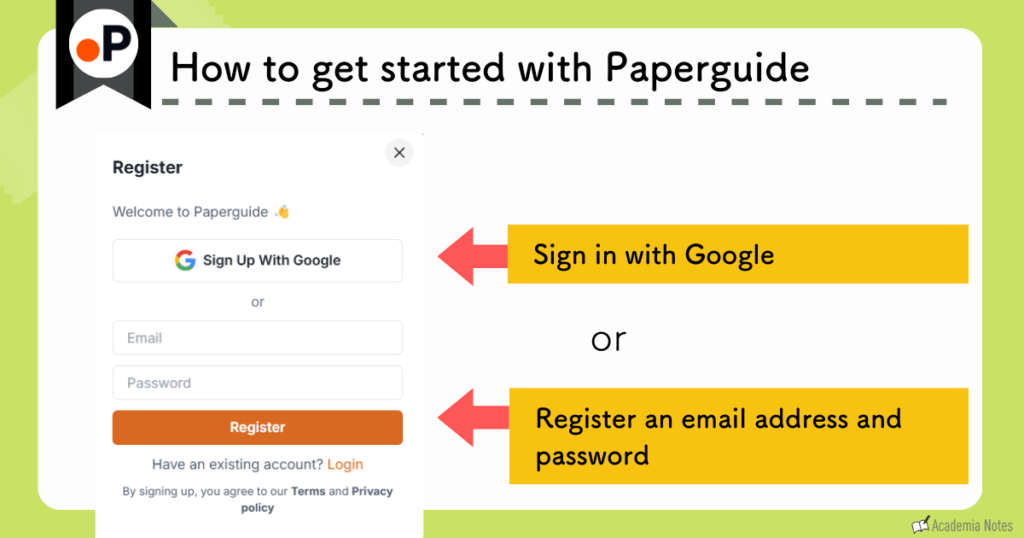
There are 2 ways to get started with Paperguide.
- Sign in with Google
- Create an account
Enter your email address and password to sign up
How to upgrade Paperguide
Official Website: Paperguide (https://paperguide.ai/)
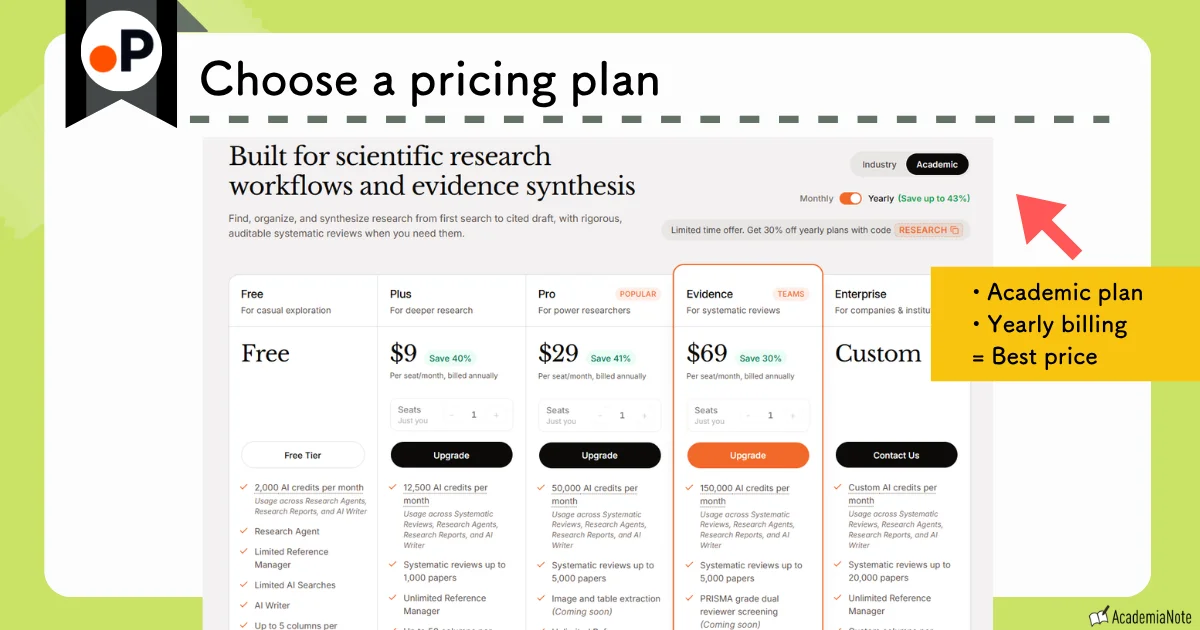
The annual plan works out cheaper.
You enter the coupon on the payment screen.
You can pay by credit card.
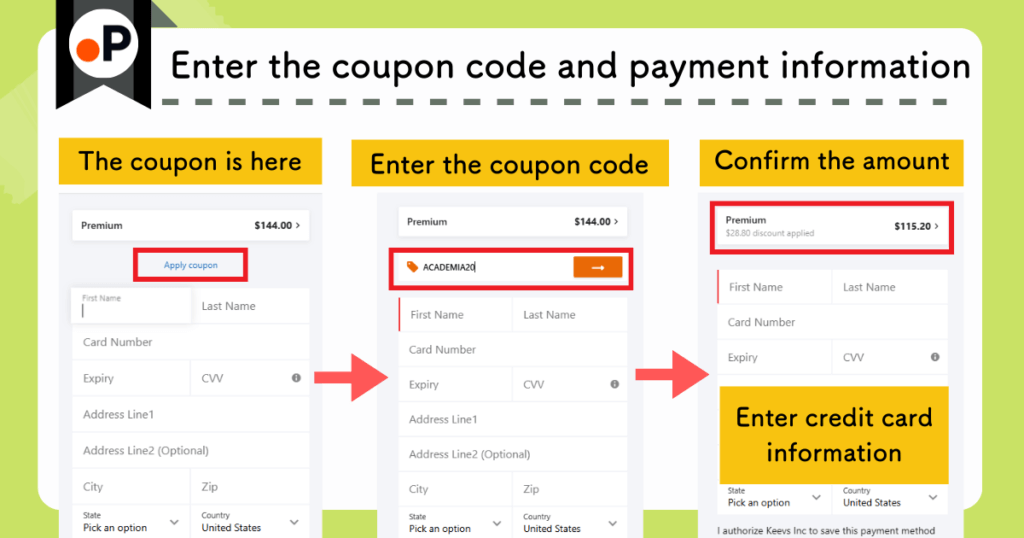
Once payment goes through, the paid features are available right away.
What Paperguide’s Systematic Review cannot do
The report generated here is a draft, not something you can submit as it stands.
Here are 3 things Paperguide’s Systematic Review cannot do at present.
• Risk-of-bias assessment (RoB 2 and the like) … this one is coming soon
• GRADE (rating the overall body of evidence) … not supported
• Statistical analysis for meta-analysis … export the evidence table as CSV and run it in R or RevMan
What Paperguide takes off your hands is the searching, selecting, extracting and document building. Everything past that point is your own work.
Paperguide Systematic Review: the wrap-up
Key points of this article
A feature that lets you build a systematic review through a PRISMA-compliant workflow
- Generated through a PRISMA-compliant workflow
- Protocol building
- Screening criteria setup
- Data extraction
- Finished just by following the screens
- Protocol — Set your research question, screening criteria, and extraction fields
- Paper search — Search research databases, or import your references
- Title and abstract screening — Screen titles and abstracts against your eligibility criteria
- Full-text screening — Screen full texts against your full-text criteria and finalize the included papers
- Data extraction — Extract structured data from the included papers into an evidence table
- Report generation — Generate a cited review draft from the synthesized findings
- Promo code for 20% off: ACADEMIA20
- From about $7.20 per month
Paperguide keeps making bigger leaps as an all-in-one research tool.
Give it a try.
You can start for free.
Details below
Official Website: Paperguide (https://paperguide.ai/)
Full guide: Streamline Your Research with Paperguide: Features and Pricing Explained by a Researcher in the Field